
AI meeting minutes
AI meeting minutes from any recording, in person, online or on your phone
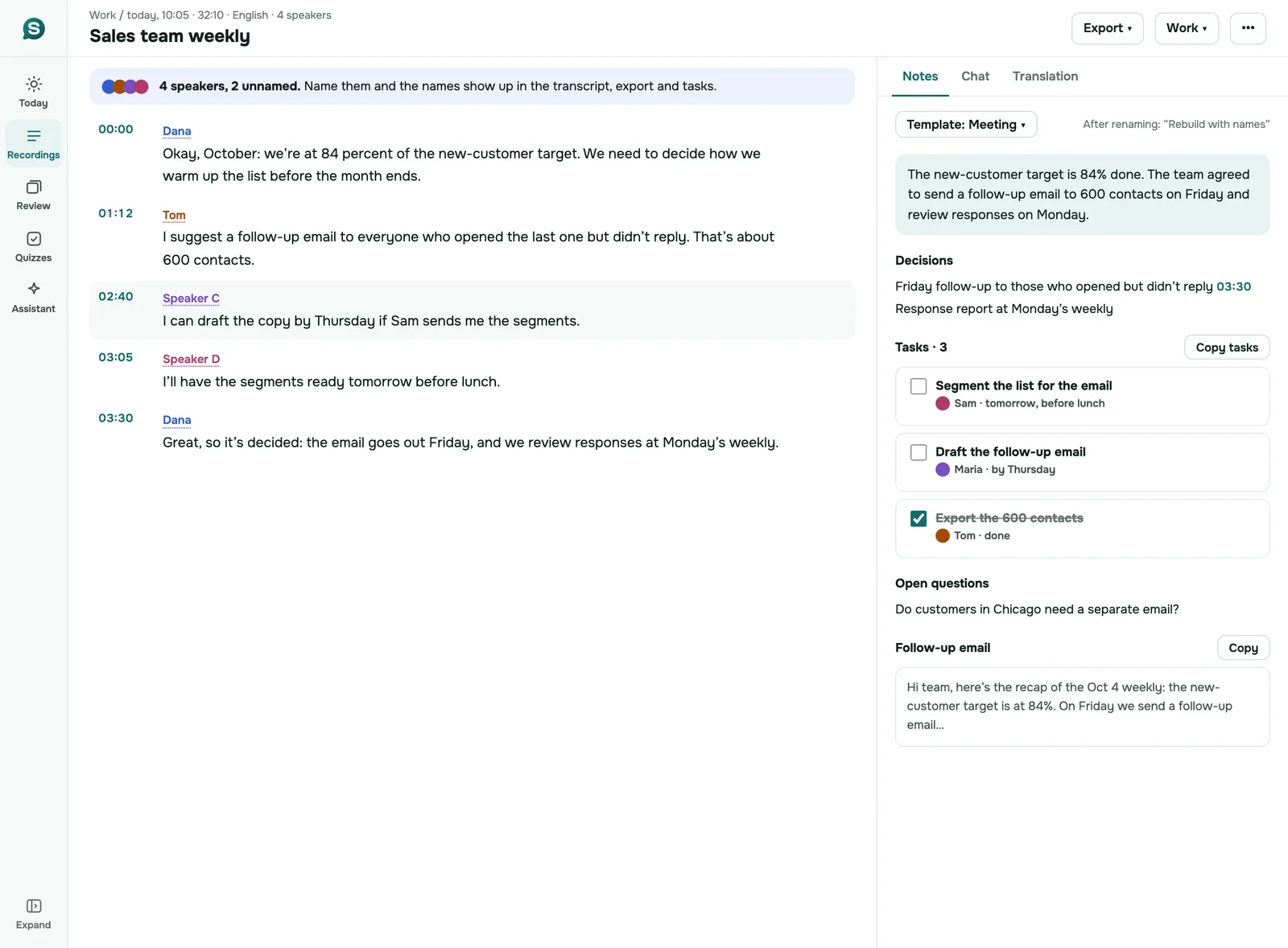
Record the meeting on your phone or in the browser, or upload the Zoom, Teams or Meet file. SozAI writes the transcript with speakers, then the minutes: decisions, tasks with owners, open questions, a draft follow-up email.
iOS and Android. 30 minutes free, no card.
Can AI write meeting minutes from a recording?
Yes. SozAI turns a meeting recording into minutes: a short summary, the decisions, tasks with an owner and a due date when someone said one, open questions, a draft follow-up email. You record the meeting on your phone or in the browser, or upload the file your meeting tool saved, and no bot joins the call. The first 30 minutes are free, once; after that Premium is from $4.99 a week. It writes from what was said, so it can't list the people who stayed silent, and it doesn't approve the minutes for you.
What the minutes look like
Below is unedited SozAI output for a public meeting recording: the recording went in, these minutes came out.
Summary. The NTSB board met to finalize findings, probable cause, and safety recommendations regarding the Southwest Airlines Flight 1380 accident. The board unanimously adopted 13 findings and an amended probable cause statement identifying a fan blade fatigue crack as the initiating event. Seven new safety recommendations were issued to the FAA, Southwest Airlines, and the EASA to improve nacelle structural integrity and passenger safety.
00:11Review and Adoption of Findings
- Staff presented 13 proposed findings regarding the accident.
- The board discussed and unanimously adopted the findings.
06:16Probable Cause Amendment and Adoption
- Staff presented the initial probable cause statement.
- The board chair proposed an amendment to explicitly include the fan blade fatigue crack as the initiating event.
- The board unanimously adopted the amended probable cause.
09:51Safety Recommendations and Final Report Adoption
- Staff presented seven new safety recommendations.
- The board unanimously adopted the recommendations.
- The board unanimously adopted the final report as revised.
- The meeting concluded with closing remarks.
Decisions
- The 13 proposed findings were adopted unanimously.
- The probable cause was amended to identify the fan blade fatigue crack as the initiating event and adopted unanimously.
- Seven new safety recommendations were adopted unanimously.
- The final report was adopted unanimously.
Bot or no bot
Most AI note takers for meetings join the call as an extra participant. Otter's pricing page, for example, says its assistant "joins Zoom, MS Teams, and Google Meet to automatically write and share notes" (checked 2026-10-25). For a calendar full of video calls that works well, because nobody has to remember to press record.
It does nothing for the meeting in the conference room, or for the call someone took on speakerphone. SozAI doesn't join calls. You record, in one of three ways:
- a phone on the table for an in-person meeting (where to put it is on the meeting recorder page);
- the SozAI web app in Chrome or Edge on a computer, which records the browser tab of a video call, with or without your microphone;
- the recording the meeting tool already saved, uploaded as a file of up to 500 MB (where the meeting tools keep them).
The trade-off is real. A bot starts by itself; with SozAI somebody presses record. In return there's no extra name in the participant list, one tool covers rooms and calls, and the people you meet don't have to be on a platform the bot supports. If every meeting you have is a video call and you never want to think about recording, a bot-based tool will suit you better.
Meetings in other languages
SozAI detects the spoken language by itself, across 99 languages, so a meeting held in Polish or Arabic needs no setting. The minutes are written in the language of the meeting. If the report has to be in English, translate the notes in the app or on the web; the transcript can be translated too.
How good the transcript is depends on the language. Our public accuracy test measured word error rates from 1.8% in Spanish to 8.0% in Portuguese, 19.6% in Arabic and 50% in Kazakh. Those were short sentences read in quiet rooms. A meeting with people talking over each other will do worse, and we haven't measured meetings yet.
One limit to plan around: each recording is transcribed in a single language. If a meeting switches from German to English halfway, the part in the second language can come out badly. When you know the switch is coming, start a new recording at that point.
A meeting minutes template you can copy
Minutes have the same shape whoever writes them. Copy this into your document and fill it from the SozAI notes, which map onto it section by section; the chapters (each with its timestamp) can stand in for agenda items. Attendance and approval are yours to add, because a recording can't tell who sat in the room and said nothing.
MEETING MINUTES
Meeting:
Date and time:
Place or link:
Chair:                 Minutes taken by:
Present:
Apologies:

1. Summary
   (two or three sentences)

2. Agenda items and decisions
   2.1 Item:
       Decision:
   2.2 Item:
       Decision:

3. Action items
   Task | Owner | Due

4. Open questions

5. Next meeting:

Approved by:           Date:
Try it now
Transcribe a recording in your browser, free
Drop a file and read the first 5 minutes as text. No signup. The app takes it from there.
From recording to minutes in three steps
What happens between pressing record and sending the minutes
Record or upload
Record on your phone or in the web app, or upload the recording your meeting tool saved. Audio and video files up to 500 MB.
Check the transcript
A one-hour file is usually transcribed in about 1 to 2 minutes. Each voice gets a label; rename the speakers in the phone app or on the web.
Use the meeting notes
A meeting gets notes with decisions and tasks at the top, plus open questions and a follow-up email. Copy them into the template above or straight into your email.
Meeting notes for your situation
- Online calls without a bot: record a Google Meet, Zoom or Teams call from your browser tab or your Mac; nobody joins the call.
- In-person meetings: a phone or laptop on the table, speakers marked, tasks pulled out.
- Meetings in another language: the transcript in the language spoken, notes translated into yours.
- One-on-ones and coaching: private notes and follow-ups from a 1:1.
- On a Mac: the Meeting mode hears desktop Zoom or Teams and transcribes on the Mac.
- On Windows: the web version in Chrome or Edge records the call tab and your microphone.
Recordings from Zoom, Teams or Google Meet
- Zoom: what Zoom transcribes on each plan, and how to get text from a local or cloud recording when it made none.
- Microsoft Teams: when the Teams transcript is missing or not yours to open, and what to do with the recording.
- Google Meet: which Workspace plans transcribe, and how to get a transcript of a Meet call on any plan.
Who it suits, and who it doesn't
A good fit if:
- you chair or sit in meetings held in a room, and somebody has to send minutes afterwards;
- your meetings run in a language other than English, or in a different language from one meeting to the next;
- you already have recordings, from Zoom or a dictaphone, and want minutes from them;
- you want the timestamped transcript kept as the backup for what the minutes say.
Look elsewhere if:
- you want a bot to join every call in your calendar without anyone pressing anything;
- your minutes are a formal record that a board or a court has to accept as is: SozAI gives you a draft, and a person still checks and signs it;
- the meeting is about patients. SozAI isn't built for clinical records; our sister app notavik keeps the audio on the device.
Using SozAI with a team
Today each person has their own SozAI account, and recordings stay in that account. Shared workspaces and admin roles don't exist yet. Team and Education seats are bought by card at web.sozai.app, $12.99 a month or $99.99 a year per seat, with an invoice in your organization's name: how buying for a team works. How teams use it now: SozAI for teams.
Where the recordings go
- Recordings travel to us over HTTPS and are stored on our servers.
- Speech recognition and the AI features are run by named partners. Every one is listed on our subprocessors page.
- We don't sell your recordings, and our code never uses them to train models.
- You can delete a recording or your whole account yourself. That deletes the audio file and everything made from it (transcript, notes, flashcards, quizzes) from our servers. Encrypted database backups are kept for up to 12 months.
Not offered yet: sign-in through your organization's identity provider, team admin roles, a security certification of our own. You sign in with Google or Apple, or with a one-time email code. Details are on the security page.
What it costs
The first 30 minutes of transcription are free, once, with no card. After that Premium is from $4.99 a week or $79.99 a year, billed through the App Store or Google Play, or Pro and team seats on web.sozai.app, with up to 700 hours of transcription. See pricing and buying for a team.
Answers
Frequently Asked Questions
What people ask before they trust AI with their minutes
Can AI write meeting minutes?
Yes, from a recording. The AI first transcribes who said what, then pulls out the decisions and tasks along with a summary. What it can't know is anything nobody said aloud: who attended without speaking, which item was formally approved, or what got agreed in the corridor afterwards. Treat the result as a draft for the chair or secretary to check and sign off, once they have added who attended.
Can ChatGPT do meeting minutes?
A general chat assistant can turn a transcript you paste into minutes, and does it well if you give it the format. The weak point is the transcript itself: before any assistant can say who agreed to what, you need an accurate one with the speakers separated. SozAI does both steps from the recording, and the transcript keeps timestamps, so you can check any decision against what was actually said.
Is there a free AI tool for meeting minutes?
Several have free tiers. SozAI gives you 30 free minutes once, enough for one short meeting with full minutes, and our meeting transcription preview turns the first 5 minutes of a recording into text without an account. Otter's free Basic plan lists 300 minutes of transcription a month, with a 30-minute cap per conversation (pricing page, checked 2026-10-25). Which suits you depends on whether a cap per meeting or a one-time allowance hurts more.
Which AI tool is best for meeting minutes?
It depends on where your meetings happen. If they're all video calls and you want notes without pressing anything, pick a tool whose bot joins the call. If they happen in rooms or in several languages, pick one that works from a recording, which is what SozAI is built for. Either way, read the language list before you pay, because some tools transcribe only a handful of languages.
Does SozAI join my Zoom, Teams or Google Meet calls?
No, it never joins as a participant. For an online call you have two options: record the call's browser tab in the SozAI web app (Chrome or Edge on a computer), or upload the recording the meeting tool saved. Our page on meeting recordings shows where each one keeps its recordings. In both cases, tell the other participants you're recording.
How does it know who said what?
Every recording is split by voice, and each voice gets a label such as Speaker A or Speaker B. Give the labels real names in the phone app or on the web, and the names appear in the transcript and in PDF, TXT, VTT and JSON exports (SRT subtitles carry no names). People talking over each other, or with similar voices, can get mixed up, so skim the labels before you send anything.
How soon after the meeting are the minutes ready?
The transcript of a one-hour file is usually ready about 1 to 2 minutes after the upload finishes. The notes with decisions and tasks are written from that transcript right after, and the app tells you when they're done. A long recording on a slow connection takes longer overall, because the file has to reach our servers first.
Which languages does it take minutes in?
Any of 99 languages, detected automatically, so you don't choose one before recording. The minutes come out in the language of the meeting, and you can translate the transcript and the notes afterwards. Accuracy differs a lot between languages; our published test lists the measured error rate for ten of them.
Turn your next meeting into minutes
Record it on your phone or upload the file. The first 30 minutes are free, once, no card needed.
Start with 30 free minutes. No credit card needed.

