
Free 5-minute preview
Interview Transcription
Drop an interview recording and read the first 5 minutes as text with each speaker labelled, free and with no signup; the SozAI app transcribes the whole interview.
- Free preview: first 5 minutes
- Deleted after processing
- No signup
Drop your file here
or
Supports MP3, M4A, WAV, OGG/OPUS, AAC, FLAC and WEBM
Transcript
How do I transcribe an interview with SozAI?
Upload the recording of an interview, or record it in the SozAI app, and you get a transcript split by speaker, with a timecode on every passage. Tap a timecode and the audio plays from that line, so you can check a quote before you use it. To see the result on your own audio first, drop the file in the box above: the first five minutes come back as text, free, with no account.
It is built for journalists and researchers, and for anyone who interviews candidates or customers: 99 languages, detected automatically, files up to 500 MB, on iPhone, Android, Mac and the web. The first 30 minutes are free, once; after that Premium is $4.99 a week or $79.99 a year.
What it does not do: it is not a human-verified transcript, it does not join your video calls, and it has no Word export.
What an interview transcript looks like
Below is the unedited output for a public interview recording: speaker labels and timecodes exactly as SozAI returned them, before anyone corrected a word.
Kevin Murphy
00:00Really interesting work. My primary job right now is I'm the Chief Science Data Officer for the Science Mission Directorate. And that job allows me to look across all of the wonderful scientific information that we have and try to use advanced techniques to understand that goldmine of scientific information. […]Nilufar Ramji
00:42So if you could break it down for us in your own words, can you explain artificial intelligence to us and then take it a step further by explaining why it's important for us to understand this as an agency?Kevin Murphy
00:55Sure. Artificial intelligence is typically used as a pretty broad term. It means a lot of different things depending on who you're talking, talking to. But at its basis, artificial intelligence is software that learns patterns from examples instead of following rules written by hand. Like you don't have expert logic. Right, Right. […]Nilufar Ramji
02:59This is very helpful for me as well. Artificial intelligence is like the buzzword that you hear everywhere, but you also hear some other terminology as well. So in addition to AI, we hear machine learning, we hear deep learning. So educate me a little bit. How are these different? And then how do they kind of come together and make what we know as AI?
Try it on your own recording first
The box at the top of this page transcribes the first five minutes of an interview file, free and without an account. Your browser cuts a longer recording on your device, so only those five minutes are uploaded. The transcript comes back split into speaker turns, and once you have seen it, it is deleted at the speech recognition service; we keep neither the audio nor the text.
It takes MP3, M4A, WAV, OGG/OPUS, AAC, FLAC, WEBM and MP4, in files up to about 30 MB on a computer and 12 MB on a phone. Five minutes is enough to see whether the speaker labels hold on your audio. A call recorded on speakerphone works, and so does a conversation across a café table, with more mistakes on the quieter voice.
Name the speakers once
Every file and every recording made in the app comes back with speaker labels: Speaker A, Speaker B and so on. Rename them in the iPhone or Android app or on web.sozai.app and the new names replace the letters in that transcript on both, and in your exports.
Two habits save time later. Use roles rather than real names when the person should not be identifiable ("Interviewer", "Participant 3", "Source"), because the names you type are stored with the transcript. And check the first two minutes: when two voices sound alike, or one person only says "yes" and "right", the labels can swap at short interjections.
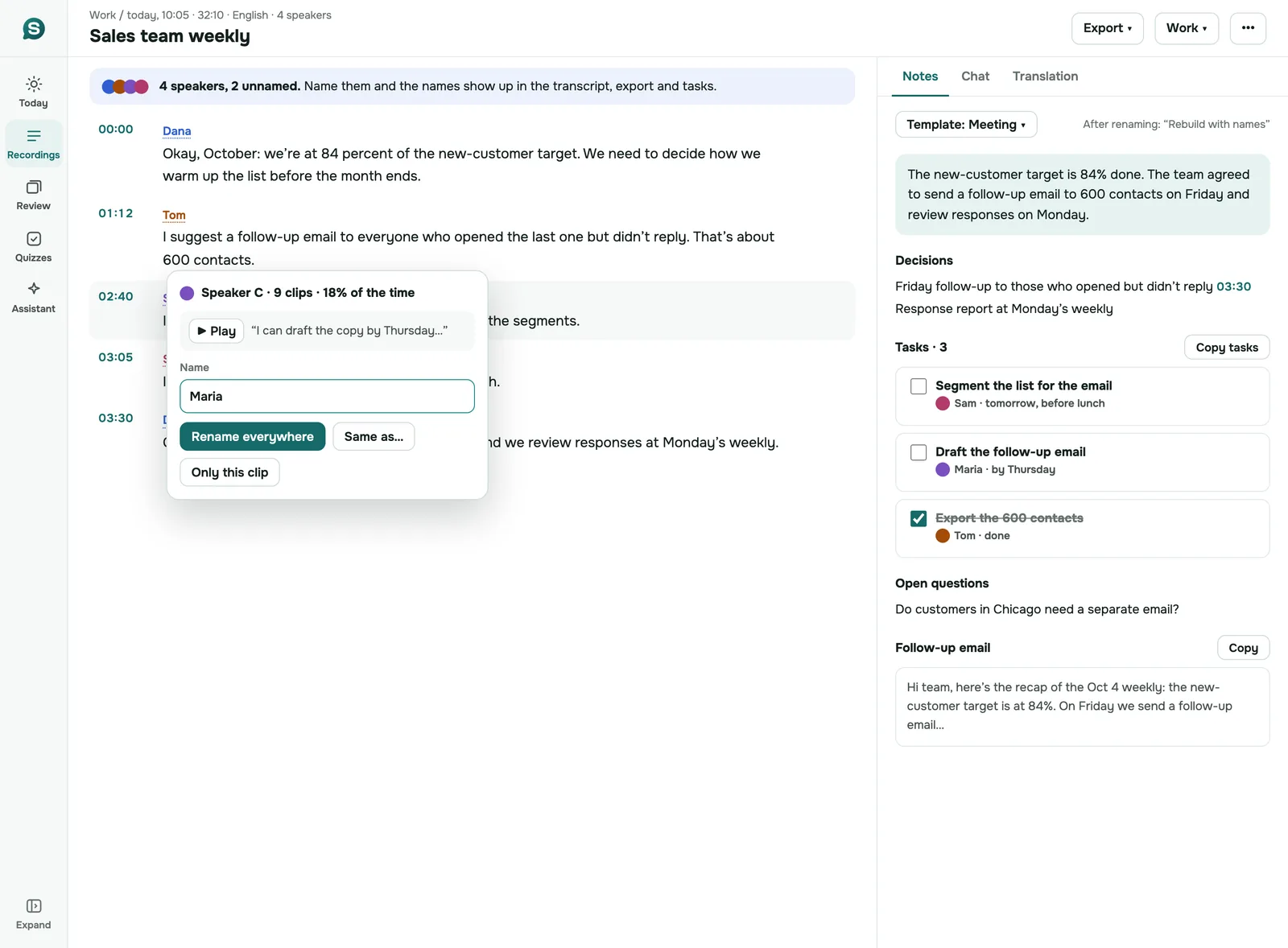
Speaker renaming is not in the Mac and iPad app yet. Rename on the phone or the web.
Checking a quote against the audio
A transcript is a draft of what was said. The recording is the record. Before a sentence goes into print or into your findings, play it.
In SozAI every passage carries the time it starts. Tap or click the timecode and playback starts at that line, in the phone app and on the web. Listen to the sentence before and after it as well: a quote that is word-perfect can still change meaning when you cut the question that came before it.
If the transcript got a word wrong, fix it in the iPhone or Android app, line by line or the whole text at once. The web and Mac versions show the text but do not edit it yet. Your correction is saved to the transcript itself, so the corrected version is what you export and share.
Names and numbers are where automatic transcripts slip most often. Look for each of them in the transcript and play it back.
Interviews in other languages, or in two
SozAI detects the language from the audio, so you never pick it. That covers 99 languages, and it means a German interview and a Turkish one can sit in the same folder without any setting changed.
Quality is not the same in every language. We measured it on 200 clips in 10 languages and published the method and the result for every clip in our accuracy test. Those were short read sentences in quiet rooms. A real interview, with crosstalk and a café behind it, will do worse.
Detection happens once per recording. An interview that runs in one language and drops into another for a few sentences is transcribed in the main language, and those sentences can come out wrong; check them against the audio. If the conversation switches for good halfway through (an interpreter takes over, say), splitting the file at that point gives each half its own detection.
Need colleagues to read it in their language? Translate the transcript in the app or on the web and keep the original next to it. Quote from the original.
For journalists
On deadline you need two things from a transcript: a quote you can prove, and a source you have not exposed.
The proof part is mostly speed. The transcript is text, so you look for the word you remember (Ctrl+F works on the web) instead of scrubbing through an hour of audio. The timecode takes you to the second it was said, and the audio stays in your account for as long as your audio setting keeps it. Field audio works if the phone is close to the person talking. A phone on the table between you is fine; a phone in your pocket in a loud street is not.
Keeping the source safe is about where the recording goes. When you upload it, the audio and the transcript are stored on our servers, and the speech recognition runs at a partner company in the US. Every company that touches the file is named on our sub-processor list. You can delete a recording, or your whole account, yourself; that removes the audio, transcript and notes from our servers.
Our advice: when the identity of a source is itself the secret, do not upload that recording anywhere, to us or to anyone else. Transcribe it on a device you control.
For researchers
Research interviews come with conditions a newsroom does not have: consent forms that say where audio may go, a transcription convention you have to keep, and software you will import into. We wrote those up separately in qualitative research transcription, including how a SozAI transcript gets into NVivo, ATLAS.ti or MAXQDA and what to tell an ethics board.
Hiring and customer interviews
If you interview customers for product research, rename the labels to "Customer" and "Interviewer" and the transcript reads like a script. Then ask the recording a question in the app ("what did she say about pricing?") instead of scrolling for it. The same works across a hiring loop: ask every candidate the same questions and the transcripts can be compared side by side.
The first 30 free minutes cover about one interview. That is enough to see whether the speaker labels hold up on your own audio before you pay anything.
Tell the person you are recording, at the start and on the recording. For job candidates, check your company's policy on keeping interview recordings and how long you may hold them.
Export formats, by platform
| Where | Formats | Speaker names | Timecodes |
|---|---|---|---|
| iPhone and Android app | PDF, TXT, SRT, VTT, JSON | PDF, VTT, JSON and TXT (TXT once the speakers have names) | PDF, SRT, VTT, JSON |
| Mac and iPad app | PDF, TXT, SRT, VTT, JSON | Renaming is not available on Mac and iPad yet | PDF, SRT, VTT, JSON |
| web.sozai.app | TXT, SRT, VTT, or copy the text | TXT (optional) and VTT | TXT (optional), SRT, VTT |
SRT files never carry speaker names; use VTT when you need both names and timing. There is no Word export: open the TXT in Word, or send the PDF.
Students and researchers use SozAI at





Lectures, seminars and interviews turned into searchable text — by the people who sit through them.
How Interview Transcription Works
From a recording to quotes you have checked, in three steps
Record or Upload the Interview
Record in the SozAI app on iPhone, Android or Mac, or upload an existing file of up to 500 MB. Common audio and video formats work.
Get the Transcript by Speaker
The language is detected from the audio and the text comes back split into speakers, with a timecode on every passage. A one-hour file usually takes one to two minutes.
Check Quotes and Export
Rename the speakers, play back each passage you plan to quote, correct words in the phone app, then export PDF, TXT, SRT, VTT or JSON.
SozAI, Otter, TurboScribe, Notta and Rev for interviews
Prices and limits as each company publishes them, checked 25 October 2026. Click a name for its pricing page; cells marked otherwise link to the page they come from.
| SozAI | Otter | TurboScribe | Notta | Rev | |
|---|---|---|---|---|---|
| Free | 30 minutes, once | 300 min a month, 30 min per conversation, 3 file imports in total | 3 files a day, up to 30 min each | 120 min a month, up to 3 min per conversation | 45 AI min a month, English only |
| Paid, from | $4.99 a week or $79.99 a year | Pro $8.33 per user a month billed yearly, $16.99 monthly | $10 a month billed yearly, $20 monthly | Pro $8.17 a month billed yearly | Essentials $25.49 per seat a month billed yearly; human transcripts $1.99 a minute |
| Languages | 99, detected automatically | 6 (English, Spanish, French, German, Japanese, Chinese) | 98+ (its home page) | 58 (its interview page) | English on Free, English and Spanish on Essentials, 37+ on Pro |
| Longest file | 500 MB | 30 min (Free), 90 min (Pro), 4 h (Business) per conversation | 10 h or 5 GB (paid) | 1 GB (its interview page) | not stated on the pricing page |
| Exports | PDF, TXT, SRT, VTT, JSON (web: TXT, SRT, VTT) | Free: TXT and MP3; Pro adds PDF, Word, SRT | Word, PDF, TXT, SRT, VTT (its home page) | TXT, Word, SRT, XLSX, PDF (its interview page) | not stated on the pricing page |
Our pick, honestly: if your interviews are English video calls, Otter is built for that and joins the call for you. If you have a backlog of long files and want one flat price, TurboScribe's paid plan is hard to beat. If a quote will be printed and you cannot afford a single wrong word, pay Rev for a human-verified transcript. SozAI is the better fit when you record in the room or on the phone, when the interviews are not all in English, and when you want to move between phone, laptop and browser on one account.
Who SozAI suits for interviews, and who it does not
A good fit if you:
- record interviews in person or on the phone and want the transcript on your laptop by the time you sit down
- interview in more than one language, or in a language the big English-first tools leave out
- need timecodes to go back to the audio and check every quote
- want a summary of the interview, and answers to questions about it, without pasting it into another tool
Look elsewhere if you:
- need a certified or human-verified transcript (a human service such as Rev does that)
- want a bot that joins Zoom or Teams and records the call for you
- need a Word file with the speaker names already formatted
- work under a contract that requires an independent security audit report before any file is uploaded
Interviewing as a team
Today each person on a team has their own SozAI account. There is no shared workspace or admin role yet, and no sign-in through a company identity provider. Sign-in is with Google, Apple or a one-time email code. Team and Education seats are bought by card at web.sozai.app, $12.99 a month or $99.99 a year per seat, with an invoice in your organization's name: how buying for a team works. More on how teams use it on SozAI for teams.
Where your interviews go
- Recordings travel to us over HTTPS and are stored on our servers.
- Speech recognition is done by a partner company in the US. Summaries, notes and answers to your questions are written by AI models from other providers. Every company that processes your data, and what it receives, is named on our sub-processor page.
- We do not sell your recordings, and our own code never uses them to train models.
- Deleting a recording, or your whole account, removes the audio, the transcript, notes, cards and quizzes from our servers. Encrypted database backups are kept for up to 12 months. Deleting in SozAI does not delete the copy held by the speech recognition partner.
- What we do not have yet: an independent security audit report, sign-in through your company's identity provider, and team admin roles. Details on security at SozAI.
Price
The first 30 minutes are free, once, with no card. After that, Premium is $4.99 a week or $79.99 a year, billed by the App Store or Google Play, with up to 700 hours of transcription. See pricing.
Answers
Frequently Asked Questions
What people ask before they upload an interview
How do I transcribe an interview?
Record it in the SozAI app, or upload the file you already have from a recorder or a video call (files up to 500 MB). The language is detected for you. A one-hour interview is usually ready in one to two minutes, split by speaker with timecodes. Rename the speakers, check the quotes you plan to use against the audio, and export TXT, PDF, SRT, VTT or JSON.
Is it acceptable to record an interview?
Yes, if the person knows. Ask at the start and keep that question and their answer on the recording. The law differs by place: US federal law and many states accept the consent of one party, while some states, California and Florida among them, require everyone's consent, and in the EU a recording of a person is personal data. Research interviews also need whatever your consent form and ethics approval allow.
Can ChatGPT transcribe an interview?
A chat assistant can tidy up or summarise a transcript you paste into it. What you usually do not get from a chat window is a long recording split by speaker, with timecodes you can click to hear the line again, which is what you need to check a quote. Use a transcription tool for that step. In SozAI you can then ask questions about the interview inside the app.
What is the best app for interview transcription?
It depends on how you interview. Otter fits English video calls, because it joins the call. TurboScribe suits a large backlog of long files at one flat price. Rev sells human-verified transcripts for quotes that cannot be wrong. SozAI fits interviews recorded in person or on the phone, in any of 99 languages, when you want the same account on iPhone, Android, Mac and the web.
How accurate is an AI interview transcript?
It depends on the audio more than on the software. We tested our transcription on 200 short clips in 10 languages and published the method and the result for every clip in our accuracy test. Those were read sentences in quiet rooms. Interviews are harder, because people talk over each other and sit far from the phone. Treat the transcript as a draft and play back every passage you will quote; the timecodes take you straight to it.
How long does it take to transcribe a one-hour interview?
For an uploaded file or a recording made in the app, usually one to two minutes once the upload has finished. A YouTube link can take a few minutes more. You can close the app while it works; the transcript appears in your library on every device signed in to the same account, including web.sozai.app.
Is there a free way to transcribe customer interviews with speaker labels?
Yes, two of them. The box at the top of this page transcribes the first five minutes of a recording with speaker turns, free and without an account. New accounts in the app get 30 free minutes, once, and every file comes back with speaker labels, so one customer interview of up to half an hour costs nothing. For regular interviews you need Premium, from $4.99 a week or $79.99 a year.
What happens to the recording when I delete it?
Deleting a recording in the app or on the web removes the audio, the transcript, notes, cards and quizzes from our servers. Encrypted database backups are kept for up to 12 months before they expire, and the speech recognition partner keeps its own copy under its own retention rules. If a recording must never leave your hands, do not upload it.
Is the transcript verbatim?
No, it is a clean read. Punctuation is added, and filler sounds such as “um” and “uh” are usually left out, so the text reads like the conversation rather than a phonetic record. False starts and repeated words often stay. If your research method needs every hesitation, say so in your protocol and restore them by ear against the timecodes; the audio is one tap away in the app and on the web.
Can I transcribe a recorded phone or Zoom call?
Yes, once you have the file. Zoom's local recording can save an audio-only .m4a next to the video, Teams and Meet recordings are video files, and call recorders produce MP3 or M4A; the app and the box above take all of these. Two voices on one channel are still split by speaker. SozAI does not join calls and cannot record a call inside another phone app. For a call open in Chrome or Edge on a computer, the web version can record the tab's audio.
How long a recording can I try free on this page?
Any length, but you get the first five minutes as text. Your browser cuts the recording before it is uploaded, so the rest of an hour-long interview never leaves your computer or phone. Files up to about 30 MB work on a computer and up to 12 MB on a phone, and each device gets a limited number of free previews a day. The SozAI app transcribes the whole interview, in files up to 500 MB.
Transcribe your next interview
Upload one interview and check the speaker labels and timecodes on your own audio. The first 30 minutes are free, once, with no card.
Start with 30 free minutes. No credit card needed.


