
Turn lectures and lessons into transcripts, notes, flashcards and quizzes
Record a class or paste a YouTube link. Get a transcript in 99 languages, then a quiz you can print with an answer key or import into Moodle.
The short answer
SozAI turns a recorded lesson or a YouTube video into a transcript with timestamps in 99 languages. From the transcript it makes notes, flashcards and a quiz. Teachers can build a test from that transcript with our free quiz generator and export it to Moodle GIFT or CSV, or print it with the answer key on a separate page. Students and tutors use the app: 30 free minutes once, then $3.99 a week or $44.99 a year. SozAI is not a school-managed platform, and it isn't meant for children under 13.
One public lecture, run through SozAI
This is what SozAI produced from a public lecture, unedited: a transcript excerpt, then the quiz and flashcards made from it.
Mike Poland
00:08Hi everybody. I'm Mike Poland, the scientist in charge at the Yellowstone Volcano Observatory. Thanks for joining us today. I'd like to talk a little bit about what the volcano observatory is. What is the Yellowstone Volcano Observatory, what makes it up, what do we do, what's our mission? And also some of the neat results that we've come upMike Poland
00:24with over the last few years. Some of the things that really make Yellowstone an impressive place to work and geologically and volcanologically. Well, first I can tell you what the Yellowstone Volcano Observatory is not. We are not a facility. We are not a place. I think a lot of people, when they hear the term volcano observatory,Mike Poland
00:40they think of a place like the Hawaiian Volcano Observatory where there's a wonderful facility that used to overlook the active eruption site at the summit of Kilauea Volcano. Well, the Yellowstone Volcano Observatory is a virtual observatory. There is no physical facility for the observatory. So we don't have that building like the
1. What is the primary reason the Yellowstone Volcano Observatory is considered a virtual observatory?
- It relies entirely on satellite data to monitor activity.
- It does not have a single physical facility or building. (correct)
- It is a digital simulation used for educational purposes.
- It is managed remotely by scientists located in other states.
The speaker clarifies that unlike other observatories, YVO does not have a physical building or facility, existing instead as a virtual entity.
2. How does the organizational structure of the Yellowstone Volcano Observatory differ from most other U.S. volcano observatories?
- It is operated exclusively by the National Park Service to ensure local control.
- It is a private non-profit research group that operates independently of government agencies.
- It is a consortium of nine different organizations rather than being run primarily by the USGS. (correct)
- It is managed by a rotating committee of university researchers rather than a federal agency.
The speaker explains that while the USGS is the main player in most observatories, YVO is a consortium of nine different organizations.
3. Why does the observatory use buried seismometers for earthquake detection?
- To protect the equipment from extreme weather conditions in the park.
- To measure vibrations deep within the Earth's crust more accurately.
- To achieve the best signal-to-noise ratio by reducing surface noise. (correct)
- To prevent visitors from tampering with the sensitive monitoring devices.
The speaker notes that burying the seismometers helps minimize noise, allowing for the detection of very small earthquakes.
3 of 10 questions shown.
| Front | Back |
|---|---|
| Why is the Yellowstone Volcano Observatory described as a 'virtual observatory'? | It has no physical facility or building. It exists as a collaborative network across institutions rather than in one place. |
| How does YVO differ from most other U.S. volcano observatories in its structure? | YVO is a consortium of nine organizations, whereas most other observatories are run mainly by the USGS. No single institution runs YVO, though the USGS is responsible for issuing hazard messages. |
| Name the three main goals of the Yellowstone Volcano Observatory. | Research into volcanic, tectonic, earthquake, and hydrothermal processes; monitoring earthquake and volcanic activity; and education and outreach about Yellowstone's geologic past, present, and possibly future. |
| Why can the seismic network detect such small earthquakes in Yellowstone? | About 46 stations, many with multiple seismometers, some buried beneath the ground, reduce noise and maximize signal quality. As a result, earthquakes as small as magnitude 1.5, and in some areas below zero, can be detected. |
| How do continuous GPS stations detect ground deformation? | Each GPS antenna sits on a permanent monument, so when the ground moves, the antenna moves with it. Tracking the antenna's position over time reveals ground motion. |
5 of 27 cards shown.
For teachers: from a lesson to a printed test
The fastest route depends on where the lesson lives.
If it's a YouTube video with captions, paste the link straight into the quiz generator. It reads the video's transcript and writes the questions. No account needed.
If you recorded the lesson yourself, put it in the SozAI app first. The quiz generator's own upload only transcribes the first five minutes of a file, which is enough for a short clip and not for a 45-minute class. In the app you get the full transcript; export it as TXT and paste it into the quiz generator. It accepts up to 60,000 characters, which is roughly an hour of steady talk.
Then choose 5, 10 or 20 questions: multiple choice with four options, true/false, short answer or a mix. Pick the difficulty too. Each question comes with a short explanation taken from the material. From there:
- Print the test on A4 or US Letter with lines for the name and score. The answer key goes on a separate page, with the explanations if you want them.
- Download a Moodle GIFT file and import it into your question bank. Special characters are already escaped, true/false and short-answer questions keep their type, and each explanation arrives as the question's general feedback.
- Download a CSV with one question per row, which opens in Excel or Google Sheets.
The questions come from free AI models and can be wrong: a bad key, two defensible answers, a question about something the lesson only hinted at. Read the test before you hand it out. The quiz and flashcard tools together allow 10 generations a day on one device.
For students: lecture, notes, cards, quiz
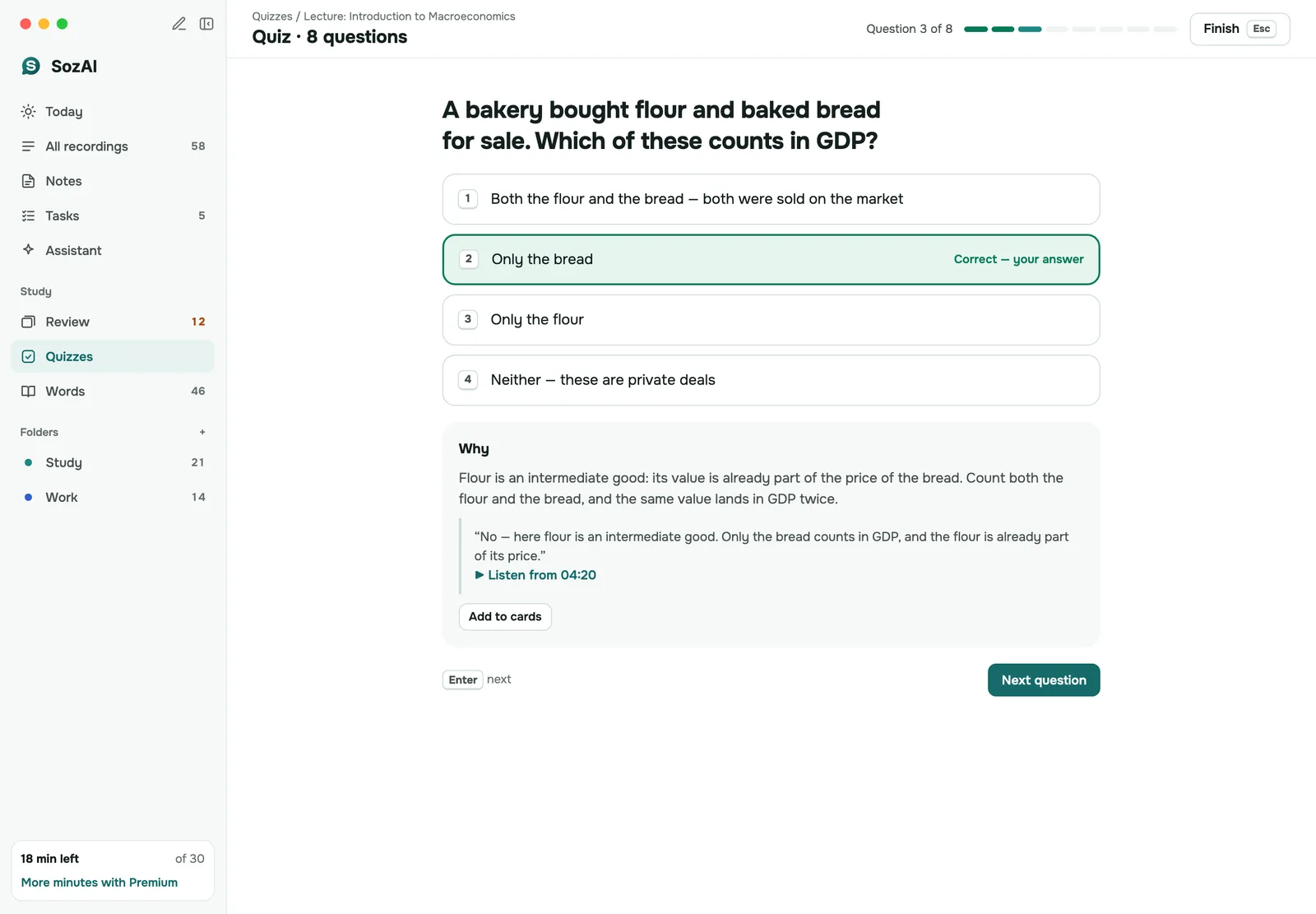
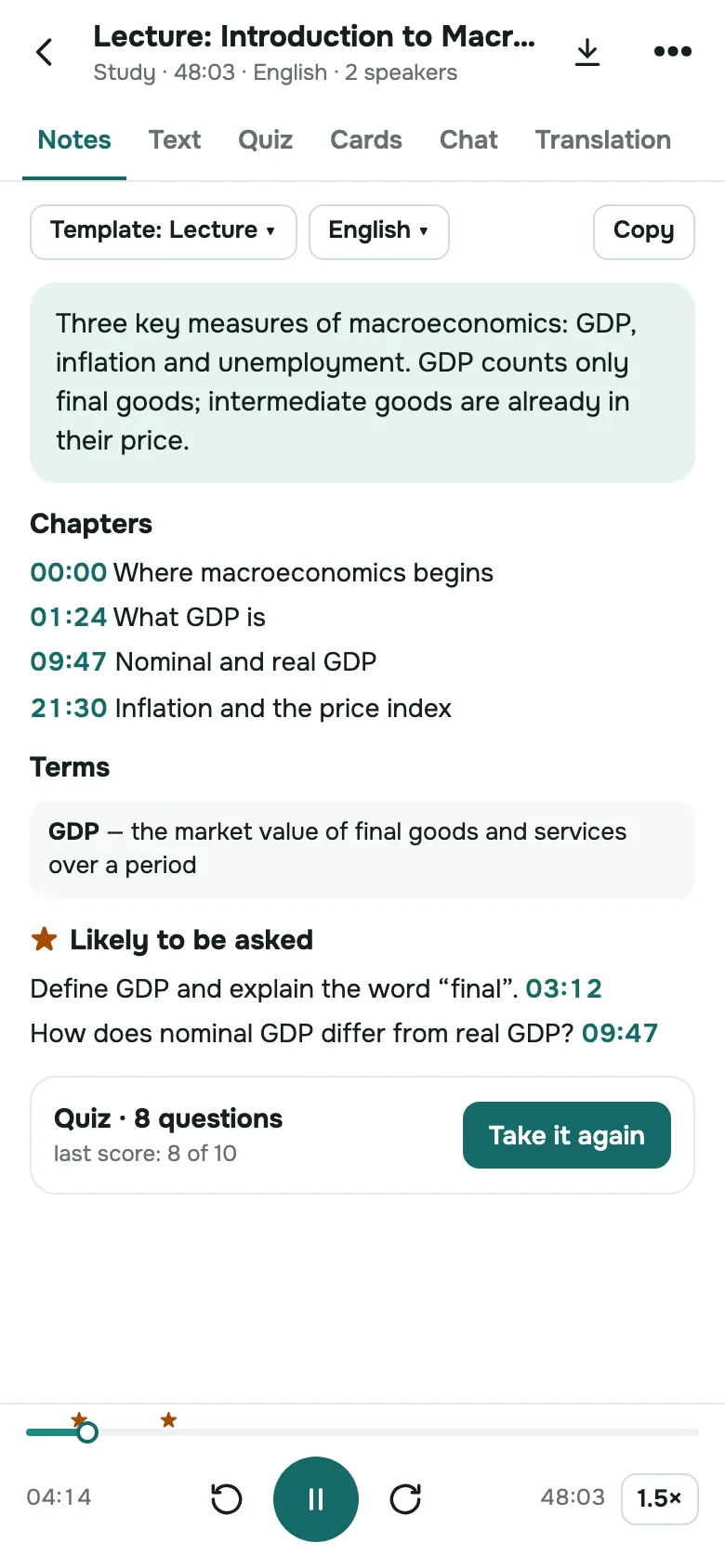
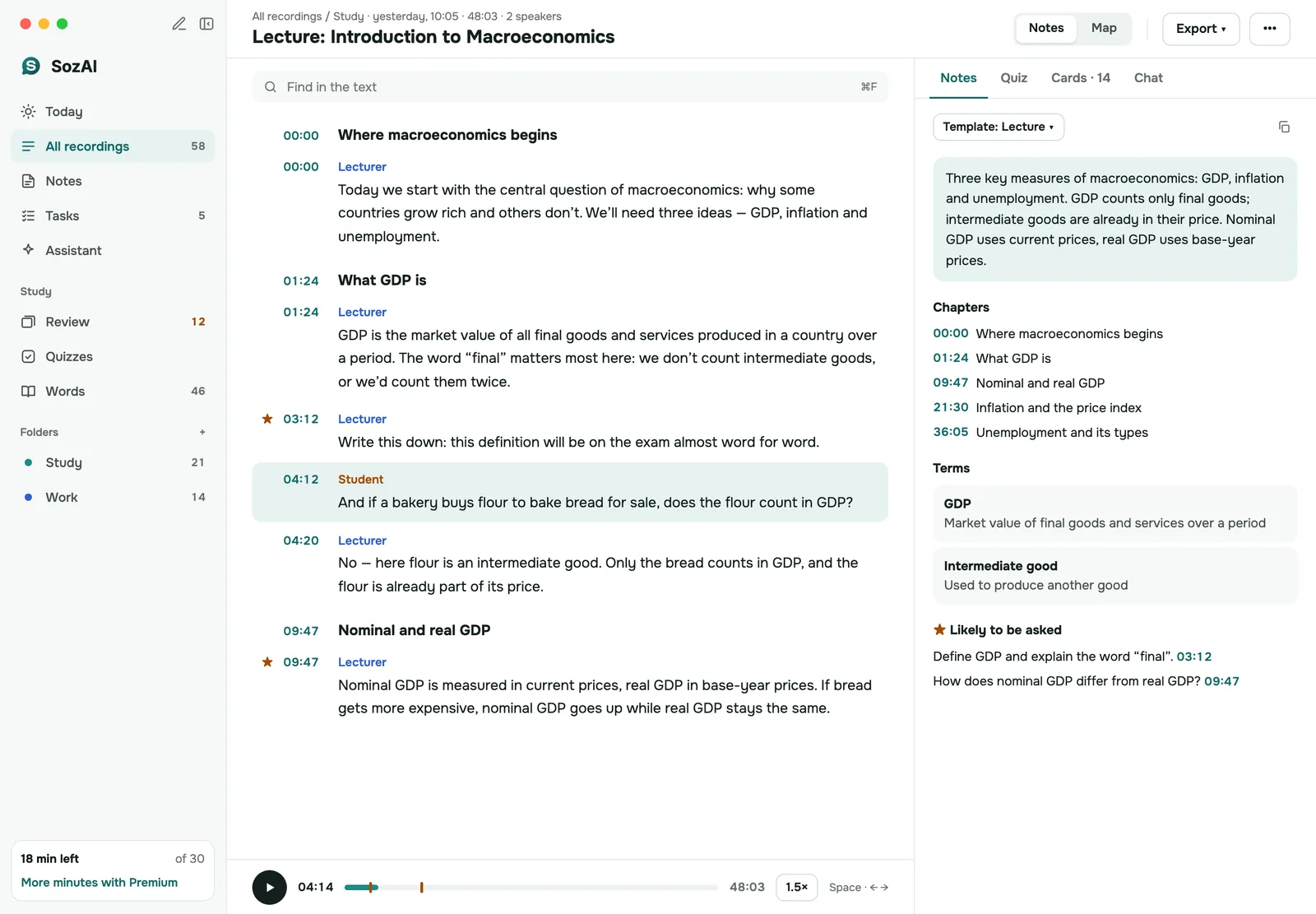
Record the lecture on your phone, or upload the recording the university posted. The transcript marks who is speaking and when, so a question from the audience doesn't get mixed into the professor's argument. From the transcript the app makes a summary and structured notes, flashcards you review with spaced repetition, and a quiz with explanations.
The flashcards and quizzes stay inside the app for now. If you study in Anki or Quizlet, use the free flashcard generator on the transcript instead: it exports CSV for Anki and a tab-separated TXT that Quizlet imports. More on the student workflow: lecture notes and quizzes and flashcards.
For tutors
If you tutor online and record the session, with the student's and the parent's agreement, the transcript gives you a recap to send home and the raw material for practice. Paste the part where you worked through a topic into the quiz generator, and the student gets ten questions on exactly what you covered. The 30 free minutes cover a session or two, so you can see whether it fits before paying.
For universities and departments
Lecture recordings that already exist can be uploaded from the Mac app or the web app, and exported as SRT or VTT subtitles for the course video, or as text for students who read faster than they listen. Research groups use the same transcripts for interviews and focus groups; see transcripts for research.
What an institution should know before a rollout: there is no LMS integration or single sign-on, and no central admin. Subscriptions are bought by each person through the App Store or Google Play. If a department wants to pay once for a group of staff or students, write to [email protected] and we'll invoice it.
Lectures that aren't in English
The quiz tools at the top of Google's results start from a PDF or pasted text. SozAI starts from the recording, recognizes 99 languages, detects the language of each recording on its own, and writes the quiz and flashcards in the language of the source: a Polish lecture gives a Polish test.
How well it hears each language is measured, not promised. In our accuracy test of 200 public recordings, the word error rate was 1.8% for Spanish, 3.6% for English, 5.5% for Russian and 8.0% for Portuguese, with Arabic at 19.6%. Kazakh came out at 50%, and 5 of the 20 Kazakh files were detected as Azerbaijani, so for Kazakh lectures, check the transcript before you build a test on it. The test used short read sentences in quiet rooms; a lecture hall with an echo will do worse.
Students under 18 and classroom privacy
We'll be plain about this, because a school has to be. SozAI is a tool for individuals. It is not a school-contracted platform, and we have no student data privacy agreements with schools or districts. There are no student accounts managed by a school: each person signs in with their own Google or Apple account or an email code. Our privacy policy says the service is not intended for children under 13.
Recordings are stored on our servers in Germany, speech recognition runs in the US, and every partner that processes them is listed on our sub-processors page. The free tools on sozai.app need no account, but the text you paste is sent to free AI models whose providers may keep it, so leave out students' names and grades. Before you record a class, get the agreement your school requires from the students and, for minors, their parents. The rest is on the security page.
What it costs a class or a school
The quiz generator and the flashcard tools on sozai.app are free, with no account. In the app, every new account gets 30 minutes of transcription free, once; that's the way to test it on a real lecture. After that, Premium is $3.99 a week or $44.99 a year per person, with up to 700 hours of transcription. Prices vary by country and are billed by the App Store or Google Play. See pricing.
Education plans for a department or a tutoring center: write to [email protected] with the number of people, and we'll invoice you.
Answers
Frequently asked questions
Is SozAI free for teachers?
The quiz generator and the flashcard tools on sozai.app are free and need no account, with up to 10 generations a day on one device. Taking and exporting the quizzes is unlimited. The app gives every new account 30 minutes of transcription once; after that a Premium subscription is needed. For a group of teachers, ask us about an Education plan.
How do I get a SozAI quiz into Moodle?
In the quiz generator, open Export to download the GIFT file. In Moodle, go to the question bank, choose Import, pick the GIFT format and upload the file. Special characters are escaped, true/false and short-answer questions keep their type, and each explanation becomes the question's general feedback. Quizzes made inside the app can't be exported yet, so build the test in the web tool.
Can I make a quiz from a full recorded lesson?
Yes, in two steps. Transcribe the recording in the SozAI app, export the transcript as TXT, and paste it into the quiz generator, which accepts up to 60,000 characters. The tool's own audio upload only transcribes the first five minutes, so it suits short clips. A YouTube video with captions can go into the quiz generator directly as a link.
Can students under 13 use SozAI?
No. Our privacy policy says the service is not intended for children under 13. SozAI is also not a school-managed platform: there are no student accounts run by a school and no agreements with districts. Teachers can use the free web tools for their own preparation, as long as they keep students' names and grades out of the text they paste.
Which languages can lectures be in?
SozAI recognizes 99 languages and detects the language of each recording itself. Quizzes and flashcards are written in the language of the source. Our published test measured 1.8% word errors in Spanish and 3.6% in English, but 50% in Kazakh, so the quality varies a lot by language. Check a transcript in a less common language before you build a test on it.
Can I export flashcards to Anki or Quizlet?
From the free flashcard generator on sozai.app, yes: it downloads a CSV that Anki imports and a tab-separated TXT that Quizlet imports, and it can print the deck. Flashcards made inside the SozAI app stay in the app for now, where you review them with spaced repetition. To get both, run the transcript through the web tool.
Does SozAI join Zoom or Google Meet classes?
No, there is no bot that joins a class. Record the session on a phone or laptop, or download the class recording from Zoom or Meet and upload it to the app or to web.sozai.app, up to 500 MB per file. A one-hour recording is usually transcribed a minute or two after it finishes uploading.
Turn your next recording into text
Record, upload a file or paste a link. You get the transcript, speakers and a summary back.
Free on iOS and Android. No account required for YouTube transcripts.