Skip to content
Get App

SozAI

SozAI for macOS

Upload a lecture or a long interview and read it with speakers and notes on a big screen, then test yourself with a quiz. 99 languages, 30 minutes free.

Download

Free to download. 30 minutes included.

  • macOS 14+

System Requirements

  • Internet connection to transcribe
  • A microphone, only if you record
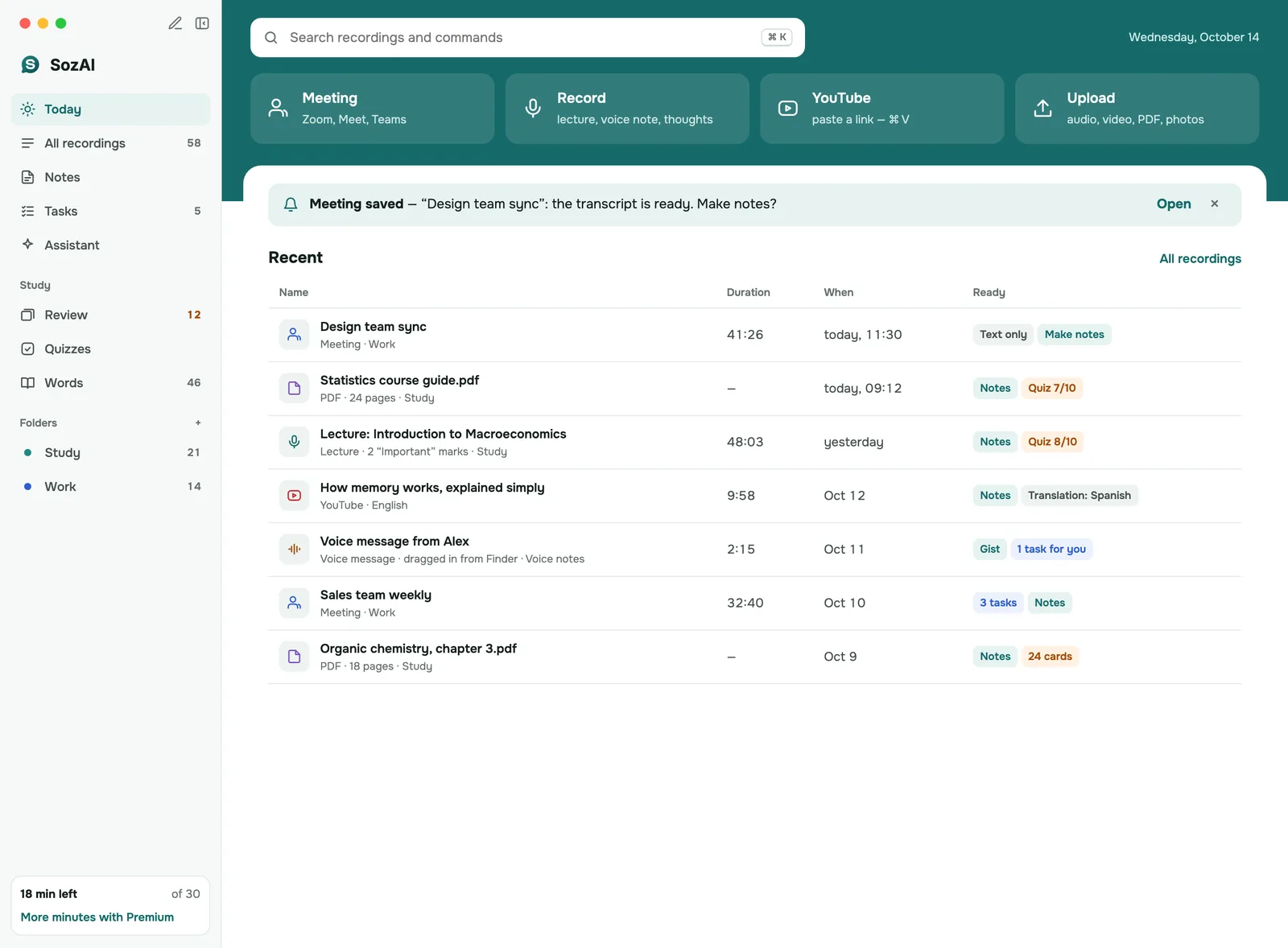
SozAI app: the Today screen with Upload, Record and YouTube link, and recent recordings

What is SozAI for Mac?

SozAI for Mac is a transcription app for macOS 14 and later: upload an audio or video file, record with the Mac's microphone or paste a YouTube link, and you get the text with speaker labels and timestamps in any of 99 languages. A one-hour file is usually done 1–2 minutes after it uploads. Notes and flashcards come from that same transcript.

It's for students and researchers who study from long recordings, and for anyone who would rather read than replay. It's free on the Mac App Store with 30 minutes of transcription, once; Premium is from $3.99 a week or $44.99 a year through the App Store.

Know before you install: the Mac app doesn't record the other side of a video call, and you can't edit transcript text or rename speakers on the Mac yet.

What you can do on a Mac

The Today screen starts with the ways in: Record with the microphone, paste a YouTube link, or Upload. Uploads take audio and video files up to 500 MB. Photos and PDFs go in too, and their pages become text you can make notes from. Anything you recorded on your phone is already in the library, in the same folders.

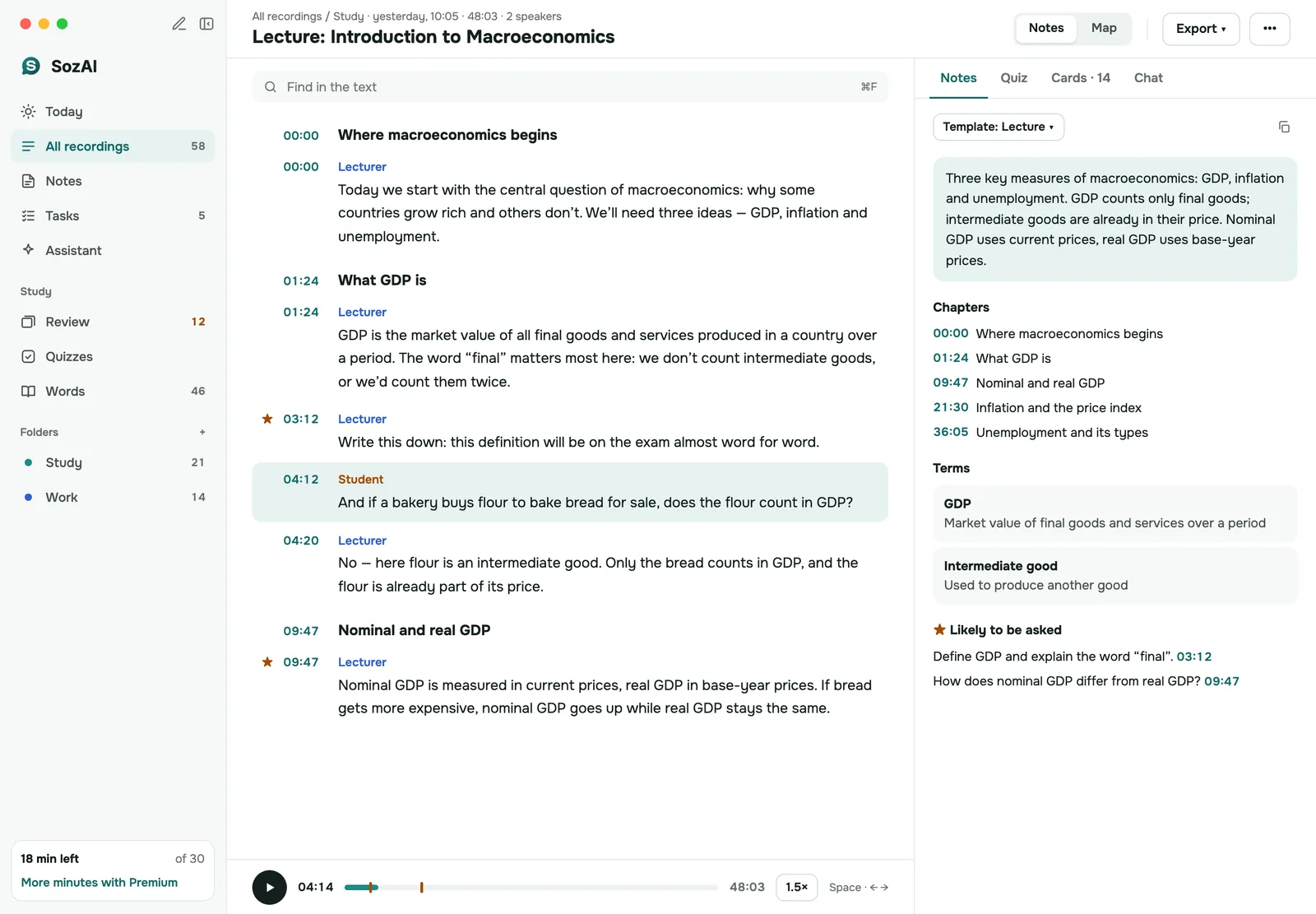
Open a recording and the transcript fills the left side. Each passage has a speaker label and a timestamp; click the timestamp and playback starts there. The right side holds the notes, written from a template such as Lecture, and tabs for the quiz and the flashcards. A chat tab answers questions about the recording. The Export menu saves PDF, TXT, SRT, VTT or JSON.

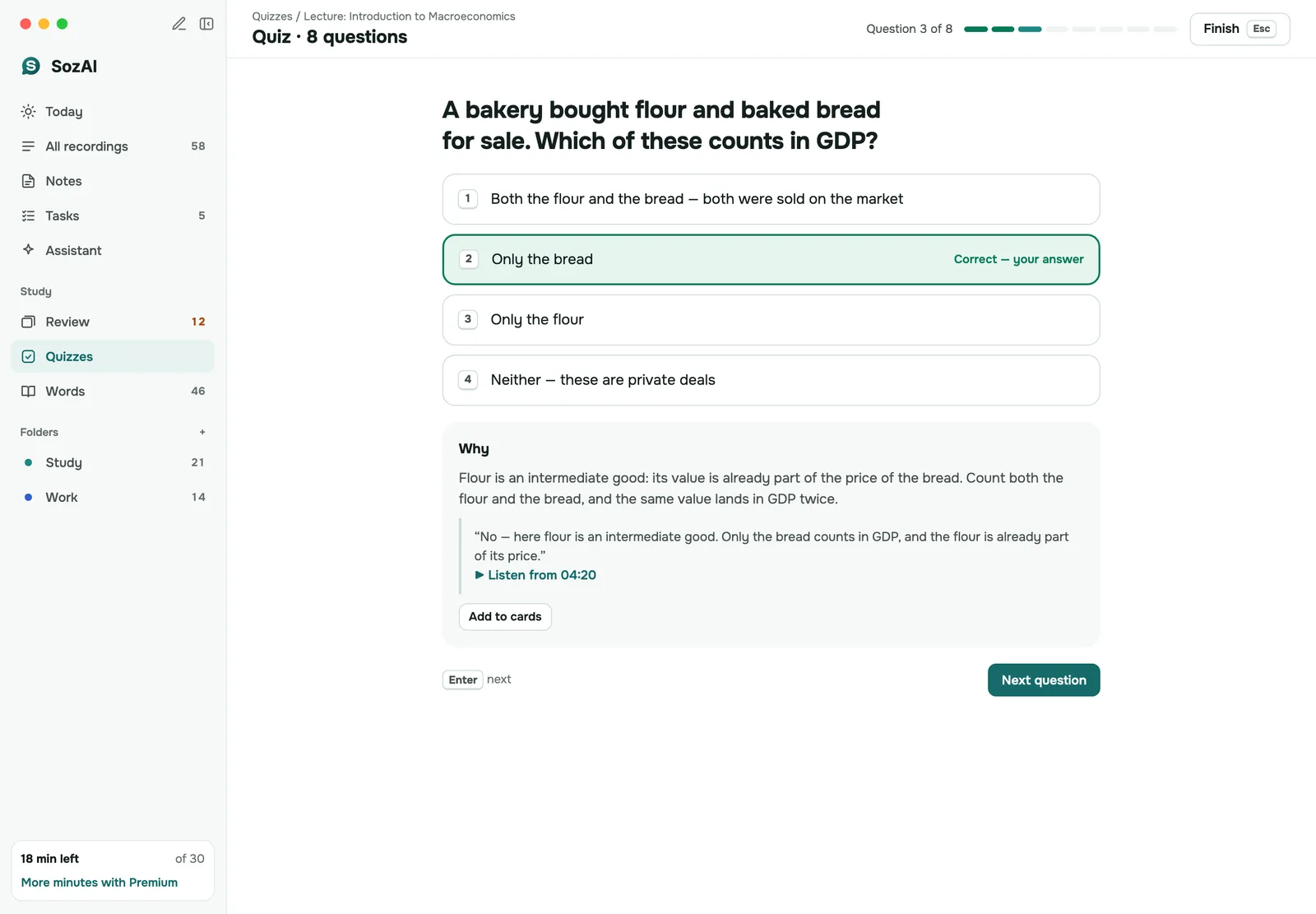
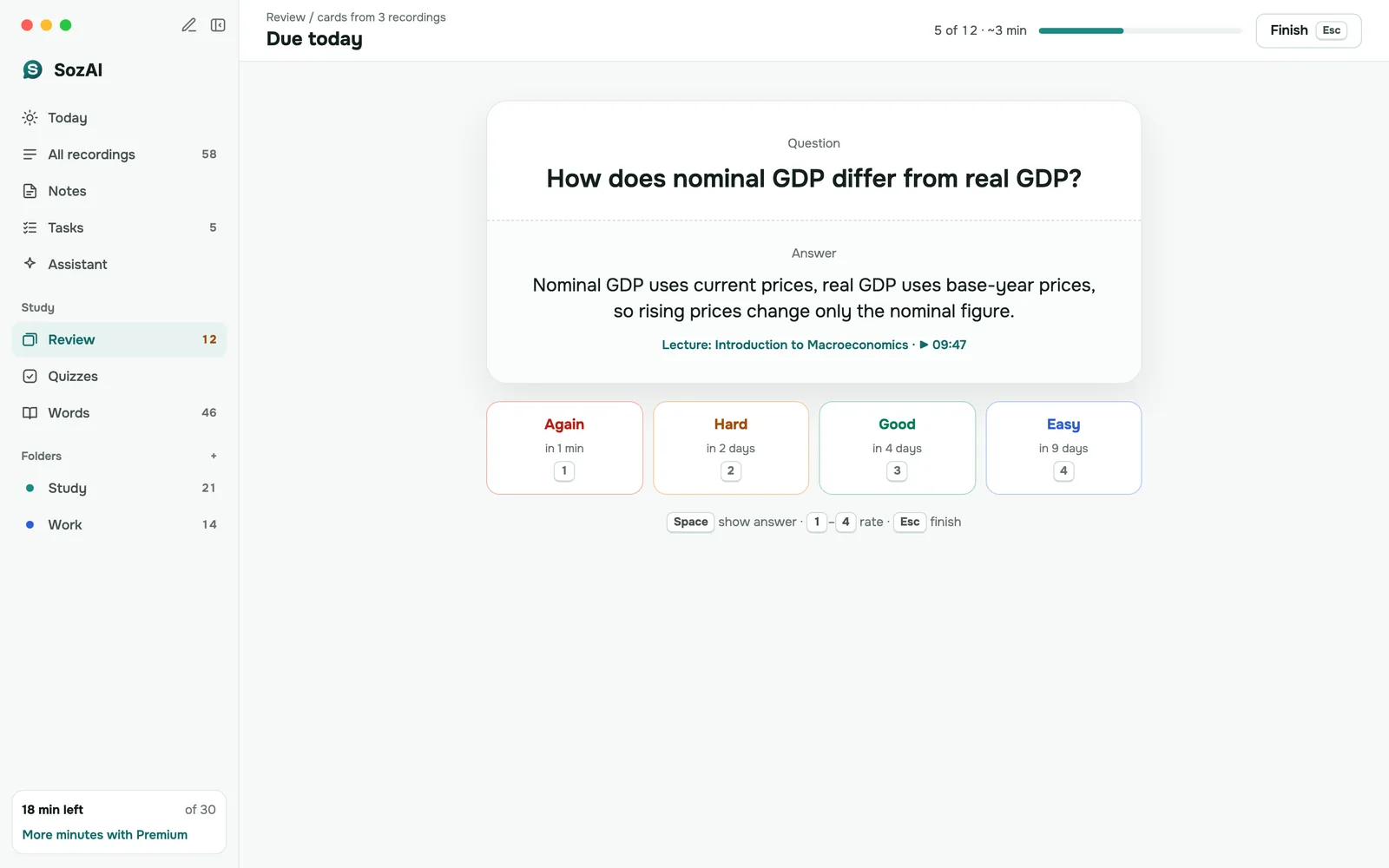
Studying is where the bigger screen pays off. A quiz shows why each answer is right or wrong once you've picked one. Flashcard review takes one card at a time, and you rate it with the keys 1 to 4, from Again to Easy.

What the Mac app doesn't do yet

It records what the Mac's microphone hears. It doesn't capture the other participants' audio in a video call, and it doesn't join calls as a bot. For a call, save the recording in your meeting app and upload the file; here is where Zoom puts its recordings.

You also can't edit the transcript text or rename speakers on the Mac. Both work in the iPhone and Android app, and renaming speakers works at web.sozai.app too.

Transcription runs on our servers, not on the Mac, so it needs an internet connection.

How fast, and how accurate

An hour of audio usually takes 1–2 minutes once the upload has finished; YouTube links take a few minutes more. In our published test on short read sentences, the word error rate ranged from 1.8% in Spanish to 8.0% in Portuguese, 3.6% in English, and rose to 19.6% in Arabic and 50% in Kazakh. Lecture halls and long meetings weren't part of that test. How we measured it.

SozAI on Mac: a lecture transcript with speaker labels and timestamps, and notes on the right

Speaker Labels and Timestamps

Every transcript includes automatic speaker diarization. See exactly who said what, jump to any moment with precision timestamps.

  • AI identifies different speakers automatically
  • Click any timestamp to jump to that moment
  • Export with or without speaker labels
SozAI on Mac: a quiz question answered, with the explanation shown

Quizzes that explain the answer

Turn a lecture into a quiz. After each answer you see why it is right or wrong, with the explanation written from the recording itself.

  • Four answer options per question
  • An explanation after every answer
  • Retake any quiz from the quizzes list
SozAI on Mac: a flashcard with the answer shown and the Again, Hard, Good and Easy buttons

Flashcard review that points back to the lecture

Cards from your recordings come back when you are due to see them. Reveal the answer, then rate how well you knew it.

  • Rate each card Again, Hard, Good or Easy
  • Jump from an answer to the moment in the lecture
  • Decks per recording, with the number due today

What SozAI does on macOS

Record with the microphone

Record a lecture or your own spoken notes with the Mac's microphone or an external one.

File import

Upload audio and video files up to 500 MB. Photos and PDFs turn into text and notes.

99 languages

The language is detected for you. Measured word error rate: 1.8% in Spanish to 8.0% in Portuguese.

Speaker labels

Every file and recording comes back split by speaker, with a timestamp on each passage.

Five export formats

PDF, TXT, SRT, VTT and JSON, from the Export menu of any recording.

One account everywhere

Recordings made on your phone or on the web are in the Mac library. Sync runs through your SozAI account.

System requirements

ItemWhat you need
macOSmacOS 14 Sonoma or later
Where to get itThe Mac App Store
ConnectionInternet access for transcription and the AI features
MicrophoneBuilt in or external, only to record
AccountThe same account as on your phone

What you pay for

The app is free to download, and every account gets 30 minutes of transcription once. Those minutes don't renew each month.

SozAI Premium is an auto-renewing subscription billed by the App Store: from $3.99 a week, or from $44.99 a year, which comes to about $0.87 a week. It gives you up to 700 hours of transcription. Every AI feature works the same on both plans; only the minutes differ. The app shows the price for your country before you buy, and one subscription covers your account on every device. Premium bought on your iPhone works on the Mac when you sign in with the same account. Both plans side by side: pricing.

Buying for a team or a class? Team and Education plans aren't sold in the app. They are priced per member on the pricing page; until web checkout opens, write to [email protected]. See also SozAI for teams and SozAI for schools.

Your recordings

Recordings travel over HTTPS and are stored on our servers in Germany (Hetzner). Speech recognition and the AI features are run by outside partners; every company that processes your files is on our sub-processors list, with what it receives and when. We don't sell recordings, and our code doesn't use them to train models.

You can delete one recording or your whole account on the Mac or in the phone app, without writing to us. That removes the audio and everything made from it from our servers; our encrypted database backups keep a copy for up to 12 months. How we store and delete data is on the security page.

SozAI on your other devices

Version and what's new

Version 1.8.0 reached the Mac App Store on 19 October 2026. It brought the new Mac design with a sidebar for every section. Photos and PDFs became sources, and any recording can now have flashcards and a quiz. Every release, with its date, is on the changelog.

By

Answers

Frequently Asked Questions

Is SozAI for Mac free?

Downloading is free, and every account gets 30 minutes of transcription once, with no card; the minutes don't reset monthly. After that, Premium costs from $3.99 a week or $44.99 a year, billed by the App Store, and covers up to 700 hours. Every AI feature is on both plans. If you already pay on your iPhone, sign in with the same account and the Mac has Premium too.

Can it record my Zoom or Teams calls?

Not directly. The Mac app records the microphone, so in a call it hears you and whatever your speakers play into the room, not a clean feed of the other participants. It doesn't join calls as a bot either. The reliable way is to record the call in the meeting app itself, then upload that file to SozAI, which labels the speakers.

Does it work offline?

No. Transcription and the AI features run on our servers, so the Mac needs an internet connection to make a transcript or notes. Nothing is transcribed on the Mac itself, which is why an older Mac on macOS 14 gets the same speed as a new one: about 1–2 minutes for an hour of audio after the upload.

Which languages and files does it handle?

99 languages, detected automatically; you can't set the language by hand. Files can be up to 500 MB, in the usual audio and video formats such as MP3, M4A, WAV, MP4 and MOV. You can also add photos and PDFs, whose pages become text. Short clips in less common languages are sometimes detected wrong: our test took 5 of 20 Kazakh clips for Azerbaijani.

Can I edit the transcript on the Mac?

Not yet. On the Mac you can read and study a transcript and export it, but the text can't be corrected and speaker labels can't be renamed there. Correct the text in the iPhone or Android app; rename speakers in the phone app or at web.sozai.app. Corrections you save on the phone are in the same transcript when you open it on the Mac.

Is it the same account and subscription as on my iPhone?

Yes. Sign in with the same account and your whole library is on the Mac, notes and flashcards included. Premium belongs to the account, so one subscription covers every device you sign in on, and the web. You manage it in the store you bought it from.

How do I cancel Premium on a Mac?

Open the App Store app, click your name in the bottom-left corner, then Account Settings. Under Subscriptions click Manage. Choose SozAI and click Cancel Subscription. Deleting the app doesn't cancel it. Premium stays on until the end of the paid period, and your recordings stay in your account. Refund requests go to Apple at reportaproblem.apple.com.

Who can see my recordings?

They're stored on our servers in Germany (Hetzner) and sent over HTTPS. To transcribe and summarize them we pass audio and text to processing partners, every one named on our sub-processors page. We don't sell recordings, and our code doesn't train models on them. Deleting a recording removes it and everything made from it from our servers; encrypted backups keep a copy for up to 12 months.

Get SozAI for Mac with 30 free minutes

On the Mac App Store, for macOS 14 or later.

Download

Free to download. 30 minutes included.