Podcast transcription
Podcast transcription with speakers, timestamps and caption files
Upload an episode or paste its YouTube link. SozAI writes the transcript with a label for every voice and a time for every passage, in 99 languages, then pulls out takeaways and quotes you can check against the audio.
- Free preview: first 5 minutes
- Deleted after processing
- No signup
Drop your file here
or
Supports MP3, M4A, WAV, OGG/OPUS, AAC, FLAC and WEBM
Transcript
How do I transcribe a podcast?
For your own show, upload the episode file (up to 500 MB) to the SozAI app or to web.sozai.app, or paste the episode's YouTube link. You get a transcript with speaker labels and timestamps, TXT, SRT and VTT downloads, and notes with takeaways and quotes. The first 30 minutes are free, once; Premium starts at $4.99 a week or $79.99 a year.
For someone else's show, first look at the episode in Apple Podcasts or Spotify, which show their own transcripts for many episodes, or search our public library of YouTube transcripts. SozAI does not read RSS feeds and does not publish a transcript to your podcast host for you.
Transcribe your own episode
There are two ways in. Upload the finished file (MP3, M4A, WAV or a video file, up to 500 MB) in the iPhone, Android, Mac or iPad app or on web.sozai.app, which takes several files at once. Or, if the episode is on YouTube, paste the link: the app transcribes the video itself, so it works whether or not the video has captions.
A one-hour file is usually done a minute or two after the upload finishes. YouTube links take a few minutes longer. Speaker labels come from the voices in an uploaded file; on a YouTube link they are guessed by an AI model from what is said, so check them on a panel show before you publish.
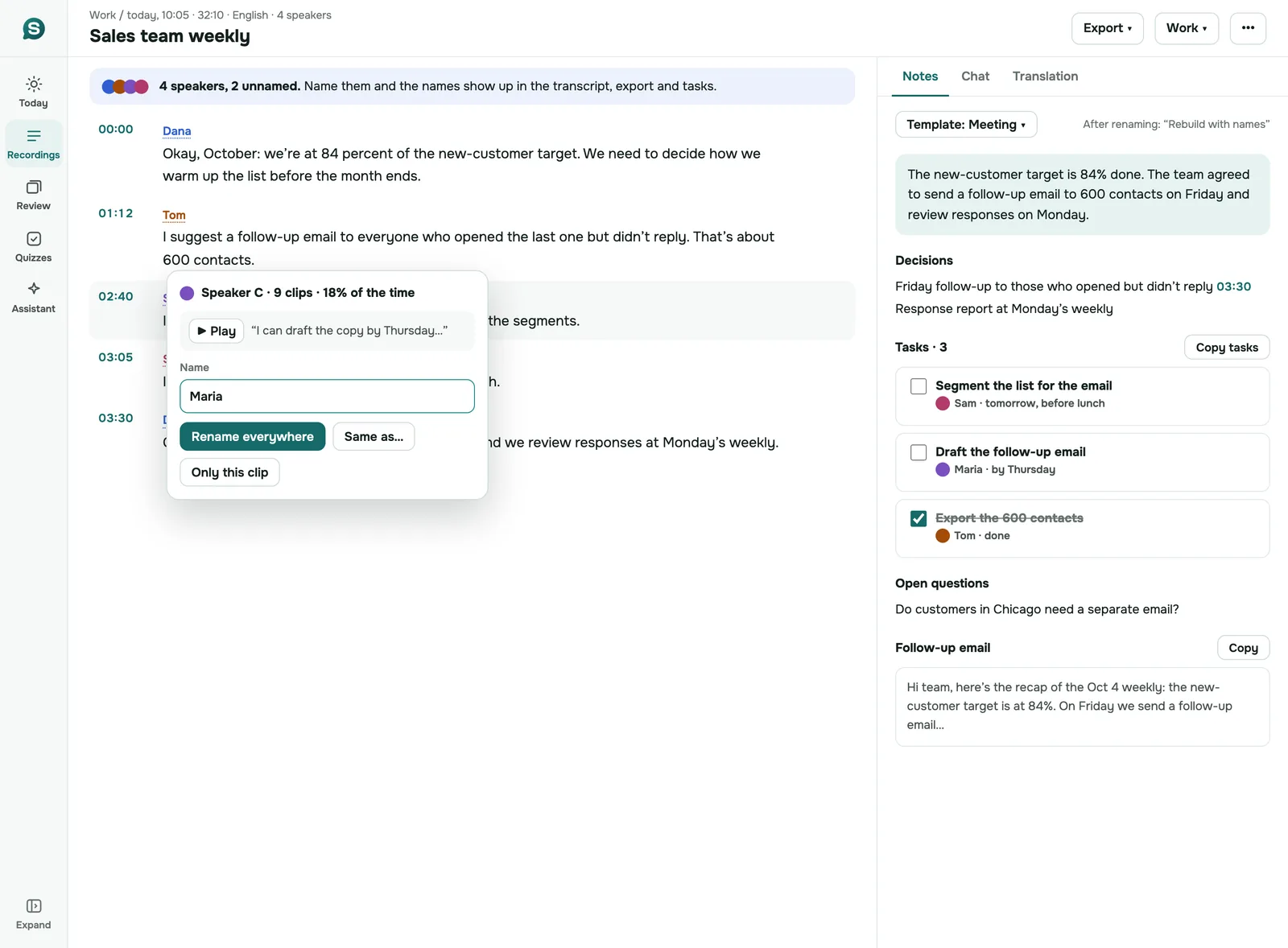
Naming the speakers takes one click per voice on the web or in the phone app. Fixing a misheard word is a phone app job for now: the web and the Mac and iPad apps let you read, rename speakers (web) and export, but not edit the text.
Get the transcript of a published podcast
Many shows publish on YouTube too, and every YouTube transcript someone requests on sozai.app goes into our public transcript library: more than 27,000 of them on 24 October 2026, in 84 languages. Shows have their own pages, for example Easy German, Learn German with Falk, Japanese with Shun and Go English.
Episode not there yet? Paste its link into the free YouTube transcript tool. It reads the video's captions, so it is free and fast, but a video without captions gets no transcript there, and you can run 10 an hour. Remember whose words they are: quote a few lines and link the show, don't republish a whole episode as your own page.
Subtitles for video podcasts
For a video episode, download SRT or VTT. Both carry the timing of every line. SRT never carries speaker names; VTT from the app does, which matters because Apple Podcasts shows a speaker's name in its transcript view when the VTT file identifies the speaker. Apple Podcasts Connect accepts VTT or SRT uploads for subscriber episodes, and Spotify for Creators accepts VTT or SRT up to 5 MB with timestamps. We have not run our files through either platform's checks, so open the file once and look before you upload it.
Apple Podcasts and Spotify transcripts: what they do and don't
Both apps now make transcripts themselves, so start there if all you need is to read along. They are built for listening inside the player, not for taking the text elsewhere.
| Apple Podcasts | Spotify | SozAI | |
|---|---|---|---|
| Which episodes | Apple's own transcripts appear for many episodes on iOS 17.4 or later, usually some time after publishing; Apple asks creators to wait at least 24 hours | "Some shows" get auto-generated transcripts; not every creator has the feature | Any file you upload or YouTube link you paste |
| Languages | Apple lists 11: English, Danish, Dutch, Finnish, French, German, Italian, Norwegian, Portuguese, Spanish and Swedish | Not listed on the creator help page | 99, detected for you |
| Taking the text out | Listeners can select and copy up to 200 words | Listeners read it in the mobile app; the help page says nothing about copying | Copy all, or download TXT, SRT, VTT (PDF and JSON in the apps) |
| Your own file | VTT or SRT upload in Podcasts Connect for subscriber episodes; the RSS transcript tag for the rest | VTT or SRT, max 5 MB, with timestamps; replaced if you switch on auto-generated ones | Exports the SRT or VTT you then upload there |
| Editing | Fix it in your own file and upload it again | Not in Spotify for Creators: download the VTT, edit, re-upload | Line by line in the phone app |
| Limits | No music lyrics; episodes over 10 hours may not be transcribed; private-feed episodes get none | Not in the Spotify for Creators mobile app | 500 MB per file; 30 free minutes, once |
Apple and Spotify columns checked on 2026-10-25 against Transcripts on Apple Podcasts and Managing episode transcripts on Spotify. Neither page carries an update date, so check them again before you rely on a detail.
SozAI is the better fit when the transcript has to leave the player: show notes, a blog post, a newsletter quote, captions for the YouTube version, or an episode in a language neither app lists.
Typing an episode by hand, or checking a draft
SozAI gives you a draft to check, not a finished publication transcript. You will correct it where people talk at once, and on names and jargon.
Typing it yourself
Transcribing a conversation by hand takes far longer than the episode runs.
Replaying every passage where people talk over each other Typing speaker names in front of every line Timing caption lines one by one Writing show notes from memory Starting again for every language
With SozAI
Upload the episode, then spend your time where a human is needed: the names and the quotes.
Transcript a minute or two after a one-hour file uploads Speaker labels on every uploaded file and recording SRT and VTT caption files with the timing kept Takeaways and timecoded quotes from the transcript Line-by-line corrections in the phone app
What you get from one episode
The transcript first, then the pieces you would otherwise write by hand after recording.
Speakers you can name
Each voice in an uploaded file gets its own label. Rename Speaker A to your guest once, and the name follows through the transcript and into PDF, VTT, JSON and TXT exports. SRT is the exception, it never carries names.
Renaming works in the phone app and on web.sozai.app, not yet in the Mac and iPad apps. On a YouTube link the labels are an AI model’s guess from the content, so a four-person panel needs a careful look.
Speakers you can name
Show notes material
Pick the Video / podcast notes template and SozAI writes key takeaways, quotes with timecodes and a list of what to watch or read next. Recordings longer than five minutes are split into chapters with timestamps. It usually takes under a minute.
Treat it as raw material. Check every quote against the audio before it goes into your show notes, because a quote you publish is your responsibility, not the model’s.
Show notes material
Languages, measured
SozAI detects the spoken language itself, across 99 languages. We measured it on 10 of them with a public test set: word error rate from 1.8% in Spanish to 8.0% in Portuguese, 19.6% in Arabic and 50% in Kazakh.
Those were short sentences read in quiet rooms, not two hosts laughing over each other, so expect more corrections on a lively episode. The method and every file are on our accuracy test page. You can also translate a transcript into another language in the app.
Languages, measured
Finding the line you need
Every passage has its timestamp, so the moment someone said the thing you want to clip is one search away. Use Find in the text on the web, then jump to that time in the player.
When the wording is wrong, fix it line by line in the phone app before you export. The web and desktop apps don’t edit text yet, so export from the phone if you correct a lot.
Finding the line you need
Shows where a transcript earns its keep
Some formats get more out of a transcript than others. Here is where it pays off.
Interview shows
Speaker labels separate host and guest, and timecoded quotes make it quick to pull the line you want for social posts or the episode page.
Panels and co-hosted shows
Three or four voices are where labels help most and where they need the most checking. Name each speaker once and re-read the crosstalk.
Language-learning podcasts
Learners read along. Our language learning transcripts show how that looks for shows already on YouTube.
Video podcasts
Export SRT or VTT for the YouTube upload, and keep the TXT for the episode page.
How it works
Three steps from the finished episode to files you can publish.
Add the episode
Upload the audio or video file (up to 500 MB), record in the app, or paste the YouTube link.
Get the transcript
Speaker labels and timestamps arrive a minute or two after a one-hour file uploads. YouTube links take a few minutes longer.
Check, name, export
Name the speakers, correct lines in the phone app, then download TXT, SRT or VTT, or PDF and JSON from the apps.
Solo, remote or on video
The way you record changes what to check in the transcript.
Solo episodes
One voice, so the labels are simple. Check product names and anything you spelled out loud.
Remote interviews
Upload the file your recording tool exports. Separate tracks per person? Upload the mixed file; SozAI labels voices within one file.
Video podcasts
Upload the video file or paste the YouTube link, then export SRT or VTT for captions.
A back catalog, season by season
There is no RSS import, so a back catalog goes in as files. This is the quickest way.
Upload several episodes at once
On web.sozai.app you can pick several files in one go. Each counts against your minutes; Premium covers up to 700 hours.
One folder per season
Folders work the same in the app and on the web, so a season stays together wherever you open it.
Download the text in bulk
The web library downloads the transcripts you select as TXT files in one step.
What you can do with the transcript
Everything below runs on the transcript you already have, with no new upload.
Timestamps on every passage
Each passage carries its time. SRT and VTT keep the timing, so the captions line up with the audio.
Quotes with timecodes
The Video / podcast notes pick out quotes with the time they were said, so you can check each one against the audio before posting it.
Translation
Translate the transcript into another language in the app or on the web, for a second-language episode page or for your own reading.
Ask about the episode
Ask a question in the chat and get an answer drawn from that episode’s transcript, for example which guest mentioned a book.
Export formats
Phone, Mac and iPad apps: PDF, TXT, SRT, VTT and JSON. Web: TXT (with or without timecodes and speakers), SRT and VTT. There is no Word export.
Folders for shows and seasons
Sort episodes into folders in the app and on the web. Each folder is yours alone; there are no shared team folders yet.
Where your episodes go
Short and checkable. The full list of partners is on our sub-processors page.
Encrypted in transit
Uploads and downloads travel over HTTPS.
Stored on our servers
Recordings and transcripts are stored on our servers.
Delete it yourself
Delete an episode, or your whole account, yourself. That removes the audio and everything made from it from our servers; encrypted database backups are kept up to 12 months.
No training on your audio
We don't sell your recordings, and our code never uses them to train models.
Who processes the audio
Speech recognition and the AI features are run by named partners, each listed with its country on our sub-processors page. Storage, backups and deletion are explained on the security page.
For podcast networks and agencies
Today each person on your team has their own SozAI account, with their own folders. There are no shared workspaces or admin roles yet. Team and Education seats are bought by card at web.sozai.app, $12.99 a month or $99.99 a year per seat, with an invoice in your organization's name: how buying for a team works. More on how teams use it is on SozAI for teams.
What it costs
The first 30 minutes are free, once, with no card. After that, Premium is $4.99 a week or $79.99 a year, billed by the App Store or Google Play, and covers up to 700 hours of transcription. Files can be up to 500 MB each. Details are on the pricing page.
Answers
Podcast transcription questions
Short answers, including the limits.
How can I transcribe a podcast?
Upload the episode file to the SozAI app or web.sozai.app, or paste its YouTube link. A one-hour file is usually transcribed a minute or two after it uploads, with speaker labels and timestamps. Rename the speakers, correct lines in the phone app if needed, then download TXT, SRT or VTT. The first 30 minutes are free, once.
Can ChatGPT transcribe podcasts?
A chatbot is strongest on text you already have. The reliable route is to get the transcript first, then ask for a summary or a blog draft. If you want to stay in one place, SozAI writes takeaways and timecoded quotes from the transcript, and its chat answers questions about that episode.
Where can I get a free podcast transcript?
Check the episode in Apple Podcasts or Spotify first; both show their own transcripts for many episodes. If the show is on YouTube, search our public transcript library, or paste the video link into our free YouTube transcript tool, which reads the captions, up to 10 videos an hour. For your own file, the first 30 minutes in SozAI are free.
How long does a one-hour episode take?
Usually a minute or two after the upload finishes. A YouTube link takes a few minutes longer because the video is processed from the link. Notes with takeaways and quotes take under a minute more. Large files take longer to upload on a slow connection, and that wait comes before processing starts.
Can SozAI tell the host from the guest?
In an uploaded file or a recording, yes: each voice gets its own label, and you rename them on the web or in the phone app. People talking over each other, or two similar voices, can be mixed up, so re-read those passages. On a YouTube link, labels are guessed by an AI model from the content, not from the voices.
Can I edit the transcript before I publish it?
Yes, in the iPhone and Android app, line by line or the whole text at once. The web and the Mac and iPad apps don't edit the text yet; they let you read, copy and export it, and the web lets you rename speakers. If you edit in another tool, export TXT or VTT and edit there.
Which export formats can I use for a podcast?
The phone, Mac and iPad apps export PDF, TXT, SRT, VTT and JSON. The web exports TXT, with or without timecodes and speakers, plus SRT and VTT. SRT never includes speaker names; VTT from the app does. There is no Word export, so paste the text into your editor if you need a document.
Can I transcribe my whole back catalog?
Yes, as files. There is no RSS import, so download the episodes from your host and upload them; web.sozai.app takes several files at once, up to 500 MB each. Every episode counts against your minutes. Premium covers up to 700 hours, which is roughly 700 one-hour episodes.
Do transcripts help my podcast show up in search?
A page with the transcript gives search engines words to read, where an audio player alone gives them almost none. Whether that brings listeners depends on the page and the topic, and we can't promise traffic. A practical start is an episode page with a short summary and the key quotes on top, the full transcript below.
What happens to my audio after transcription?
It stays in your account with the transcript until you delete it. Deleting a recording, or your account, removes the audio and everything made from it from our servers; encrypted database backups are kept up to 12 months. We don't sell recordings or use them to train our models. The partners who process audio are listed on our sub-processors page.
Transcribe your next episode
Upload the file or paste the YouTube link, and check the speaker names before you publish. The first 30 minutes are free, once.
Start with 30 free minutes. No credit card needed.