Skip to content
Get App

SozAI

SozAI for Android

Record a lecture or a meeting, or share a voice message in from WhatsApp, and get the text with speakers and timestamps in 99 languages. The first 30 minutes are free.

Download

Free to download. 30 minutes included.

  • Android 7.0+

System Requirements

  • Internet connection to transcribe
  • Microphone access only if you record
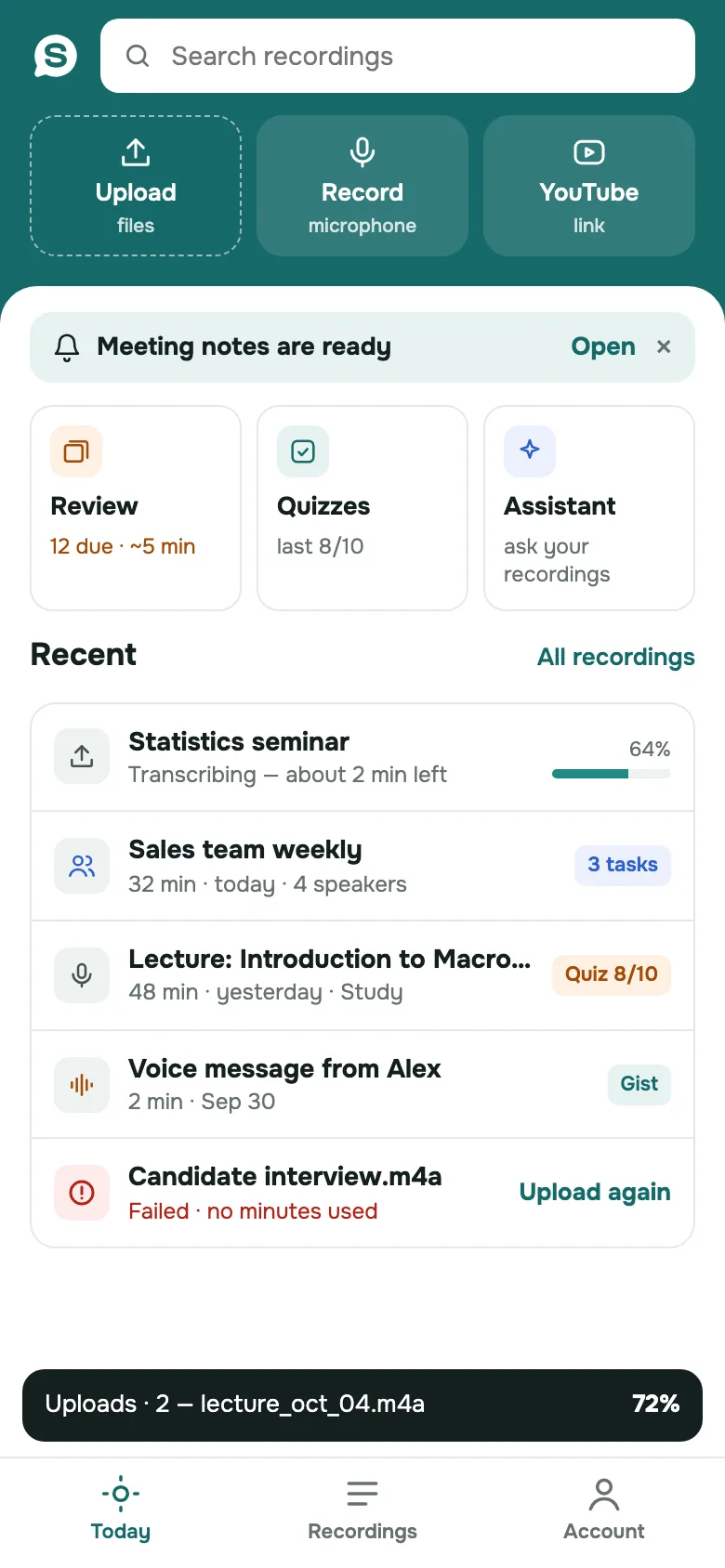
SozAI app home screen with Upload, Record and YouTube link, and recent recordings

What is SozAI for Android?

SozAI for Android is a transcription app: record or import audio on your phone and you get the text with speaker labels and timestamps in any of 99 languages, detected automatically. A one-hour file is usually done 1–2 minutes after it uploads. The app then writes notes and builds a quiz and flashcards, and you can ask the recording questions.

It's for students and interviewers, and for anyone whose voice notes pile up. It's free on Google Play with 30 minutes of transcription, once; Premium is from $4.99 a week or $79.99 a year, billed by Google Play, with up to 700 hours.

One limit up front: transcription runs on our servers, so it needs an internet connection.

What you can do on Android

The app opens with a Record button, with Upload and YouTube link beside it. For audio that's already on the phone, Share is quicker. Send a WhatsApp or Telegram voice message, a file from your recorder app or one from your file manager to SozAI, and it starts uploading. Most audio and video formats open as they are, including the AMR and 3GP files that older recorder apps make, up to 500 MB per file.

Lose signal halfway through a recording and the app keeps it on the phone, then uploads it when the connection comes back.

With the transcript in front of you, you can:

Phones and tablets

SozAI installs on Android 7.0 and later. The layout with a sidebar exists on iPad and Mac only; on an Android tablet you get the phone layout on a bigger screen.

Recording needs the microphone permission, which Android asks for the first time you tap Record. Uploading or sharing a file doesn't.

Speed and accuracy

Files and recordings: about 1–2 minutes for an hour of audio, counted from the end of the upload. YouTube links take a few minutes more.

We published our own accuracy test: 200 short read clips in 10 languages. Word error rate went from 1.8% in Spanish to 8.0% in Portuguese (English 3.6%), and was much higher in Arabic (19.6%) and Kazakh (50%). Expect more mistakes than that in a noisy room. How we measured it.

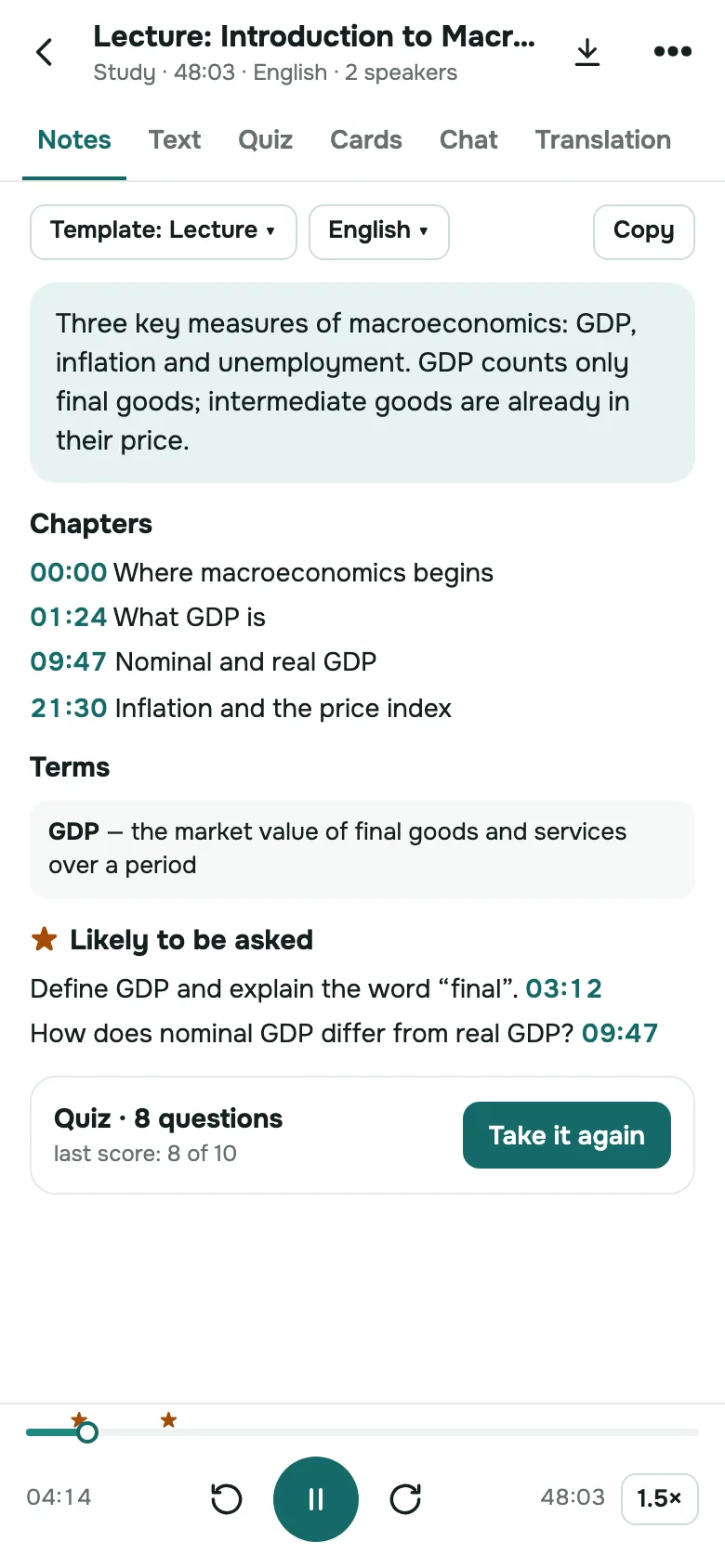
SozAI app: lecture notes with a summary, chapters, key terms and likely exam questions

Notes, chapters and key terms from every recording

Each recording becomes notes you can read in a minute: a short summary, timestamped chapters, key terms and the questions a lecture is likely to ask.

  • Pick a note template, such as Lecture
  • Tap a chapter to jump to that moment in the recording
  • Ask the recording a question in the Chat tab

What SozAI does on Android

Record

Record a lecture or a voice note with the phone's microphone, or paste a YouTube link.

Share in from any app

Share WhatsApp voice messages and audio or video files to SozAI, up to 500 MB each.

99 languages

The language is detected for you. Measured word error rate: 1.8% in Spanish to 8.0% in Portuguese.

Speaker labels

Every file and recording comes back split by speaker, and you can give each one a name.

Five export formats

PDF, TXT, SRT, VTT and JSON. SRT keeps the timings; speaker names go into the others.

One account everywhere

Sign in on any of your devices or on the web and your recordings are there.

System requirements

ItemWhat you need
AndroidAndroid 7.0 or later on a phone or tablet
ConnectionInternet access for transcription and the AI features
MicrophoneOnly to record; uploads and shared files work without it
AccountOptional at first; sign in to keep your recordings on every device

What you pay for

The app is free to download, and every account gets 30 minutes of transcription once. Those minutes don't renew each month.

SozAI Premium is an auto-renewing subscription billed by Google Play: from $4.99 a week, or from $79.99 a year, which comes to about $1.54 a week. It gives you up to 700 hours of transcription. Every AI feature works the same on both plans; only the minutes differ. The app shows the price for your country before you buy, and one subscription covers your account on every device. Both plans side by side: pricing.

Buying for a team or a class? Team and Education plans aren't sold in the app. Seats are bought by card at web.sozai.app, $12.99 a month or $99.99 a year per seat: how buying for a team works. See also SozAI for teams and SozAI for schools.

Your recordings

Recordings travel over HTTPS and are stored on our servers. Speech recognition and the AI features are run by outside partners; every company that processes your files is on our sub-processors list, with what it receives and when. We don't sell recordings, and our code doesn't use them to train models.

You can delete one recording or your whole account in the app, without writing to us. That removes the audio and everything made from it from our servers; our encrypted database backups keep a copy for up to 12 months. How we store and delete data is on the security page.

SozAI on your other devices

Version and what's new

Version 1.8.0 was released for Android on 17 October 2026. The release before it, 1.7.0, added photos and PDFs as sources and put quizzes and flashcards in the library. Every release, with its date, is on the changelog.

By

Answers

Frequently Asked Questions

Is SozAI free on Android?

Installing is free, and every account gets 30 minutes of transcription once, with no card. The minutes don't reset monthly. To keep transcribing after that you need Premium, from $4.99 a week or $79.99 a year, billed by Google Play. Every AI feature is on both plans; Premium only raises the transcription limit, to up to 700 hours.

Does it work offline?

You can record without a connection. The app keeps the recording on the phone and uploads it once you're online again. Everything after that runs on our servers: the transcript, the notes, the quiz, the chat. So nothing gets transcribed until the phone is back online, and the app doesn't use your phone's processor or battery for the transcription itself.

Which languages does it understand?

99. You don't choose the language; SozAI detects it from the audio. For widely spoken languages that is reliable. On short clips in rarer languages it can be wrong: in our accuracy test, 5 of 20 Kazakh clips were detected as Azerbaijani. You can translate any finished transcript into another language in the app.

Which files can I import, and how big?

Up to 500 MB per file. Most audio and video formats work, including AMR and 3GP from older recorder apps. The easy way is Share: in WhatsApp or in your file manager, share the audio to SozAI. Large files go up in small parts, which copes better with mobile data. A one-hour file usually takes 1–2 minutes after the upload.

Can I use SozAI on a computer too?

Yes, with the same account. On any computer, web.sozai.app lets you upload or record and read your transcripts; you can rename speakers there and download text or subtitle files. On a Mac there is also a desktop app from the Mac App Store. In Chrome, our extensions transcribe YouTube videos, WhatsApp Web voice messages and audio files.

Who can see my recordings?

They're stored on our servers and sent over HTTPS. To transcribe and summarize them we pass audio and text to processing partners, every one named on our sub-processors page. We don't sell recordings and our code doesn't train models on them. Deleting a recording in the app removes it from our servers; encrypted backups keep a copy for up to 12 months.

How do I cancel Premium?

Open the Google Play Store app, tap your profile picture, then Payments & subscriptions, then Subscriptions. Choose SozAI and tap Cancel subscription. Uninstalling the app doesn't cancel it. Premium stays on until the end of the period you've paid for, and your recordings stay in your account afterwards. Google handles Play billing, including refund requests.

I'm switching between Android and iPhone. Do I lose anything?

No, as long as you sign in with the same account on both, be it your Google or Apple account or a one-time email code. Your recordings and everything made from them live in the account, not on the phone. Premium follows the account too, whichever store you bought it in, but you cancel it in that store: a subscription bought on Google Play is managed in Google Play.

Transcribe your first recording free

On Google Play. 30 minutes of transcription come with the app, once.

Download

Free to download. 30 minutes included.