
Medical transcription for study and research
Medical transcription for lectures, research and dictation
Record a pharmacology lecture or upload a focus-group recording. SozAI writes the transcript with speakers and timestamps, then notes with likely exam questions and a deck of flashcards. It is built for study and research, not for patient visits.
- Free preview: first 5 minutes
- Deleted after processing
- No signup
Drop your file here
or
Supports MP3, M4A, WAV, OGG/OPUS, AAC, FLAC and WEBM
Transcript
Is SozAI a medical transcription tool?
For medical students and researchers, yes. SozAI transcribes lectures, tutorials, research interviews and focus groups with speaker labels and timestamps in 99 languages, and turns a lecture into study notes and flashcards. The first 30 minutes are free, once; Premium is $4.99 a week or $79.99 a year.
It is not a clinical scribe. SozAI does not write SOAP notes, does not connect to an EHR, and sends recordings to partners for processing. Do not use it for patient visits or anything with identifiable patient data.
Clinicians: SozAI is not HIPAA-compliant. For patient notes use notavik — it runs on your device.
notavik is an iPhone, iPad and Mac app from the same studio. According to notavik.com, it records the visit and drafts a SOAP or narrative note on the device, in English or German, without uploading the audio.
From a lecture to something you can revise from
Record in the lecture hall with the app, or upload the lecture capture file afterwards (up to 500 MB). A one-hour lecture is usually transcribed a minute or two after it uploads. Choose the Lecture notes template and you get a short summary and chapters with timestamps, then key terms with facts and figures. Last comes a list of questions likely to be asked, each linked to the moment in the recording.
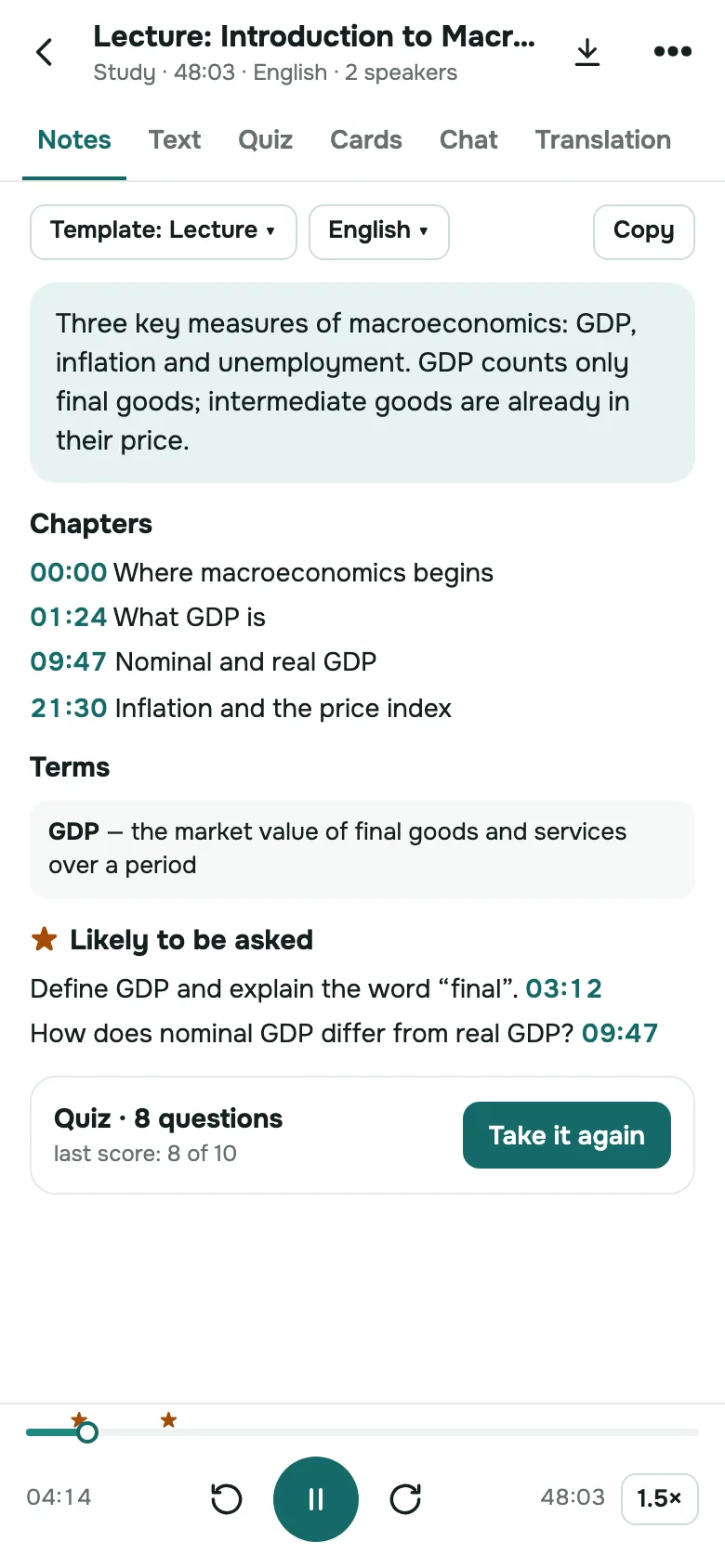
From the same recording SozAI makes flashcards you review on a schedule, and a quiz of 5 to 15 questions whose explanations quote the lecture. Questions you get wrong go into your cards. Making notes, cards and quizzes doesn't use your transcription minutes.
The full student workflow, with recording tips for medical lectures and an honest look at terminology errors, is in our guide on transcribing medical lectures and dictation. To try a few minutes of your own recording without an account, use the free medical audio transcription tool.
Medical lectures already in our library
Our public library of YouTube transcripts includes medical teaching channels in other languages, for example Anatomie 3D Lyon and Structure Fonction in French, and Medyczne Korepetycje and Brodata Medycyna in Polish. They are free to read; the words belong to the channels' authors.
Students and researchers use SozAI at





Lectures, seminars and interviews turned into searchable text — by the people who sit through them.
Handwritten lecture notes, or a transcript you can study from
A transcript doesn't learn for you. It gives you the exact words to check a dose or a definition, and the raw material for active recall.
Notes by hand
Writing while a lecturer speeds through a pharmacology slide means choosing what to miss.
Drug names and doses lost while you write the previous point Gaps when the slide changes before you finish Flashcards typed by hand the night before No way to check what was actually said Notes you can't read a month later
With SozAI
You listen in the lecture. The transcript and the cards are waiting when you sit down to revise.
Every word with a timestamp, so you can check a dose against the audio Notes with key terms and likely exam questions Flashcards and a quiz from the same lecture Find in the text instead of replaying an hour Lectures in 99 languages, detected for you
Four jobs SozAI does in medicine, and where they stop
All of it without patient data. Each section says what to check.
Lectures to flashcards
Tap Important during the lecture when the lecturer says something will be on the exam. Those moments go into the lecture notes. The flashcards that follow link back to the second they came from.
Review the cards on a schedule (Again, Hard, Good, Easy), and take the quiz when you think you know the topic. Each quiz explanation quotes the lecture, so a wrong answer sends you back to the exact explanation instead of a textbook chapter.
Lectures to flashcards
Research interviews and focus groups
Each voice gets a label. Rename the labels to participant codes on the web or in the phone app, and the codes carry into the PDF, VTT, JSON and TXT exports. Correct misheard words in the phone app before you code the data.
Check your ethics approval before you upload anything: the audio is processed by our partners, listed on our sub-processors page, and stored on our servers. For the interview side of qualitative work, see our guide to research interview transcripts.
Research interviews and focus groups
Drug names and terminology
SozAI has no special medical vocabulary model. Our published test measured short sentences read aloud in 10 languages, from 1.8% word error rate in Spanish to 8.0% in Portuguese, and it did not test medical terms.
Expect errors on sound-alike drugs and on numbers. Check every dose, every left and right, and every negation against the audio before it goes into your notes. The method is on the accuracy test page.
Drug names and terminology
Non-clinical dictation
Dictating a literature summary or a case presentation with every identifier removed works well: speak, and the text is ready a minute or two later. Copy it out or export it.
Anything about a real, identifiable patient does not belong in SozAI. That is a job for an on-device tool such as notavik, or for the system your hospital has approved.
Non-clinical dictation
Where it fits in a medical degree or a research project
Six situations where a transcript is useful, all of them without patient data.
Preclinical lectures
Anatomy and pharmacology lectures turn into notes with key terms and a list of likely exam questions. Then into cards you review until the exam.
Tutorials and case discussions
Small-group teaching with several voices. Speaker labels keep the tutor’s explanation apart from the students’ guesses. Leave out any real patient details.
Qualitative health research
Interviews with patients or staff as research participants, under your ethics approval and consent forms. Use participant codes as speaker names.
Focus groups
Six or eight voices in one room is hard for any speaker detection. Expect to fix labels where people interrupt each other, and keep your own seating notes.
Journal clubs and conference talks
Record a talk you are allowed to record, or paste a YouTube link to a published lecture, and keep a searchable transcript next to the paper.
Studying abroad
A lecture in German or French becomes a transcript in that language, and you can translate it into your own.
How it works
From the lecture hall to your first review session.
Record or upload
Record in the app with the Lecture mode on and tap Important at the key moments, or upload the file afterwards, up to 500 MB.
Transcript and notes
A one-hour lecture is usually transcribed a minute or two after it uploads. The lecture notes follow in about a minute.
Revise
Review the flashcards, take the quiz, ask the chat about the lecture, or export the transcript as PDF.
Study tools that come with every recording
All of them work on the transcript you already have.
Find in the text
Search one lecture for “beta blocker” and jump straight to the moment it was explained, instead of scrubbing through an hour of audio.
Likely to be asked
The lecture notes list the questions the lecturer hinted at, each with its timestamp, so you can hear how it was put.
Timestamps throughout
Each passage and each card points back to a time in the recording. One tap plays it.
Translation
Translate the transcript when you study in a language that is not your first. On web.sozai.app you can also rebuild the notes in another language.
Exports
The phone, Mac and iPad apps export PDF, TXT, SRT, VTT and JSON; the web exports TXT, SRT and VTT. Flashcards and quizzes stay in the app: to take them to Anki or Moodle, paste the transcript text into our free flashcard generator or quiz generator.
For medical schools and research groups
Each student or researcher has their own SozAI account and folders; there are no shared workspaces or admin roles yet. Education seats are bought by card at web.sozai.app, $12.99 a month or $99.99 a year per seat, with an invoice in your institution's name: how buying for a team works. More for universities is on SozAI for education.
Where recordings go
- Recordings travel over HTTPS and are stored on our servers.
- Speech recognition and the AI features are run by named partners; every one is listed on our sub-processors page.
- We don't sell your recordings, and our code never uses them to train models.
- Delete a recording or your whole account yourself; that removes the audio and everything made from it from our servers. Encrypted database backups are kept up to 12 months.
What we don't offer: no agreement for handling protected health information, no independent security audit report, and no team admin roles yet. Sign-in is with Google, Apple or a one-time email code. The details are on the security page.
Answers
Medical transcription questions
Including the ones with a "no" for an answer.
Is SozAI HIPAA compliant?
No. SozAI is not HIPAA-compliant and does not sign agreements for handling protected health information. Recordings are processed by partners on servers, not on your phone. Use SozAI for study and research without patient data. For patient notes, notavik, an app from the same studio, records the visit and drafts the note on your own device.
Can I record patient consultations with SozAI?
No. A consultation contains identifiable health information, and SozAI is not built or contracted for that. Even with the patient's consent, the recording would leave your device and pass through our processing partners. For clinical documentation, use an on-device tool such as notavik or the system your hospital has approved.
What is the best AI transcription for medical students' lecture notes?
Look for three things: a transcript you can check against the audio, notes built from it, and a way to revise. SozAI does all three from one recording, in 99 languages: lecture notes with terms and likely exam questions, flashcards on a review schedule, and a quiz. Our guide on transcribing medical lectures covers the workflow step by step.
How accurate is it on drug names and anatomy?
We have not measured medical vocabulary. Our published test of read speech in 10 languages ranges from 1.8% word error rate in Spanish to 8.0% in Portuguese, but specialist terms are harder than everyday words. Check doses, sound-alike drugs, sides and negations against the audio, and correct them in the phone app.
Can I use SozAI for qualitative health research?
Yes, if your ethics approval and consent forms allow a cloud transcription service. Audio is stored on our servers and processed by the partners listed on our sub-processors page. Use participant codes as speaker names, remove identifiers in the phone app's editor, and delete the recording when your protocol says so.
Can I transcribe a lecture in German or Polish?
Yes. SozAI detects the spoken language across 99 languages, so you don't set it. You can then translate the transcript, or on the web rebuild the notes in another language, which helps when you study abroad. Accuracy differs by language: our test page lists the measured error rate for each of the 10 languages we checked.
Can I export the flashcards to Anki?
Not from the app yet: flashcards and quizzes stay inside SozAI, where you review them. To get cards into Anki, copy the transcript or one chapter, paste it into our free flashcard generator and download the CSV for Anki. The free quiz generator exports Moodle GIFT and CSV, and prints the test with a separate answer key.
What happens to my recordings?
They stay in your account until you delete them. Deleting a recording, or your whole account, removes the audio and everything made from it from our servers; encrypted database backups are kept up to 12 months. We don't sell recordings, and our code never uses them to train models.
Turn your next lecture into flashcards
Record it, or upload the file afterwards. Notes, cards and a quiz all come from the same recording. The first 30 minutes are free, once.
Start with 30 free minutes. No credit card needed.


