What is SozAI for iPhone and iPad?
SozAI is a transcription app for iPhone and iPad. Record or upload audio and you get the text with speaker labels and timestamps in any of 99 languages, detected automatically; a one-hour file is usually done 1–2 minutes after it uploads. From that transcript it writes notes and builds a quiz and flashcards, and you can ask the recording questions.
It suits students who record lectures, people who run interviews, and anyone with a backlog of voice memos. The download is free and includes 30 minutes of transcription, once. Premium, from $4.99 a week or $79.99 a year through the App Store, raises that to up to 700 hours.
The limit to know first: transcription happens on our servers, so you need an internet connection, and on iPad you can't edit the transcript text yet.
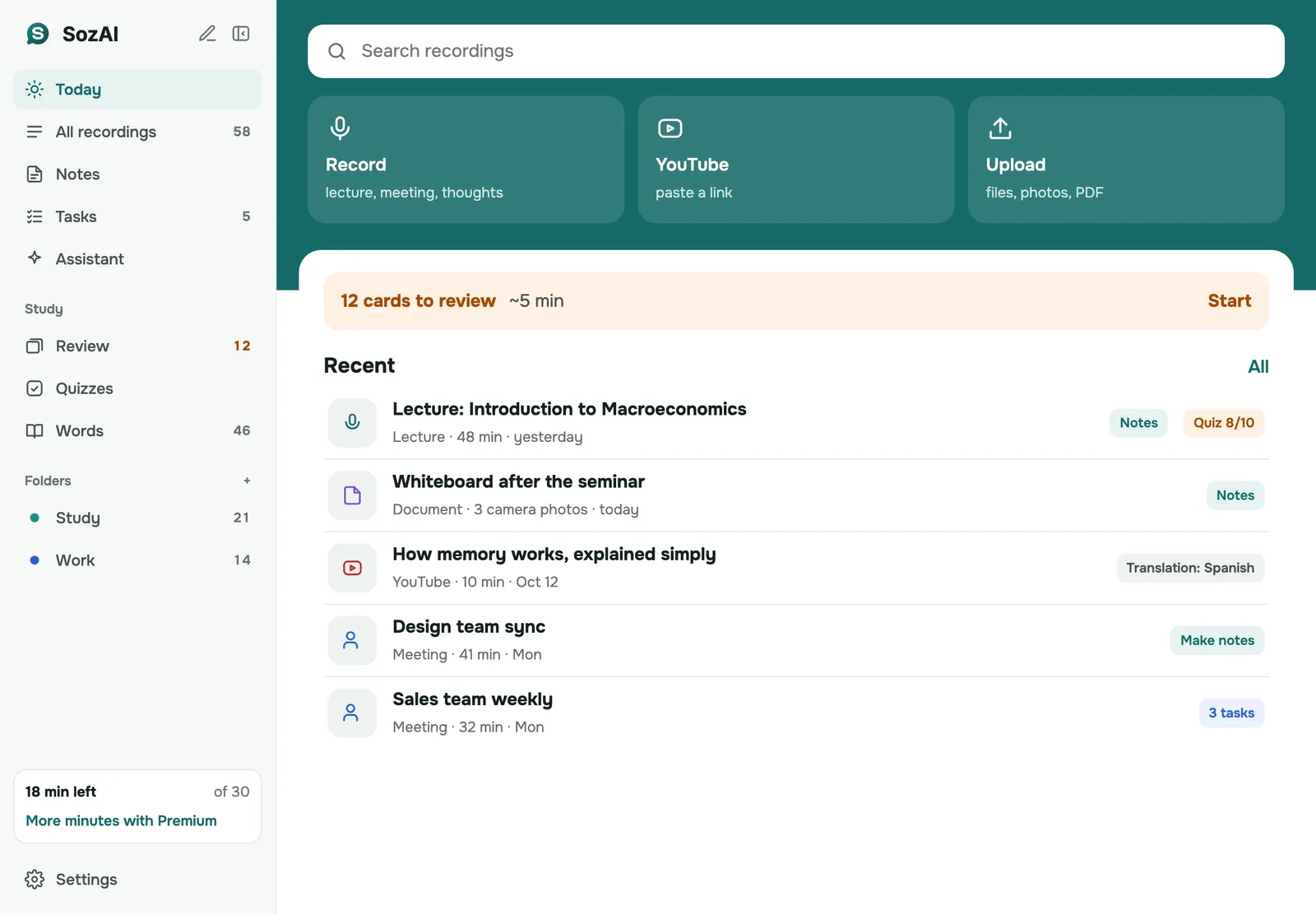
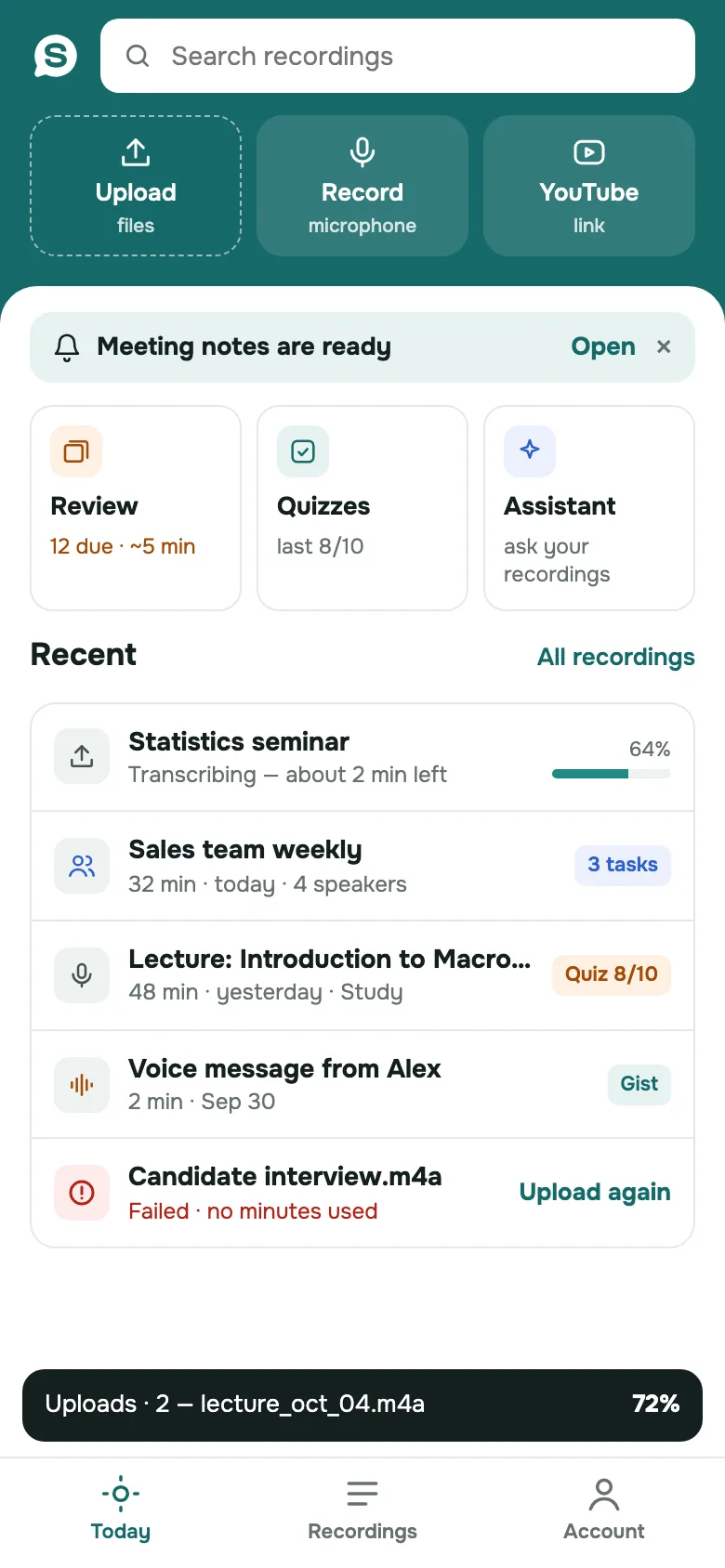
The home screen has three ways in: Record with the microphone, Upload a file, or paste a YouTube link. You can also share audio into SozAI from another app, such as a voice memo, a WhatsApp voice message or a file in Files. Most audio and video formats open as they are, from MP3 and M4A to iPhone video and the Opus voice notes WhatsApp sends, up to 500 MB per file.
If the connection drops while you record, the app keeps the recording on the phone and uploads it once you're back online.
Once the transcript is ready, the iPhone app lets you:
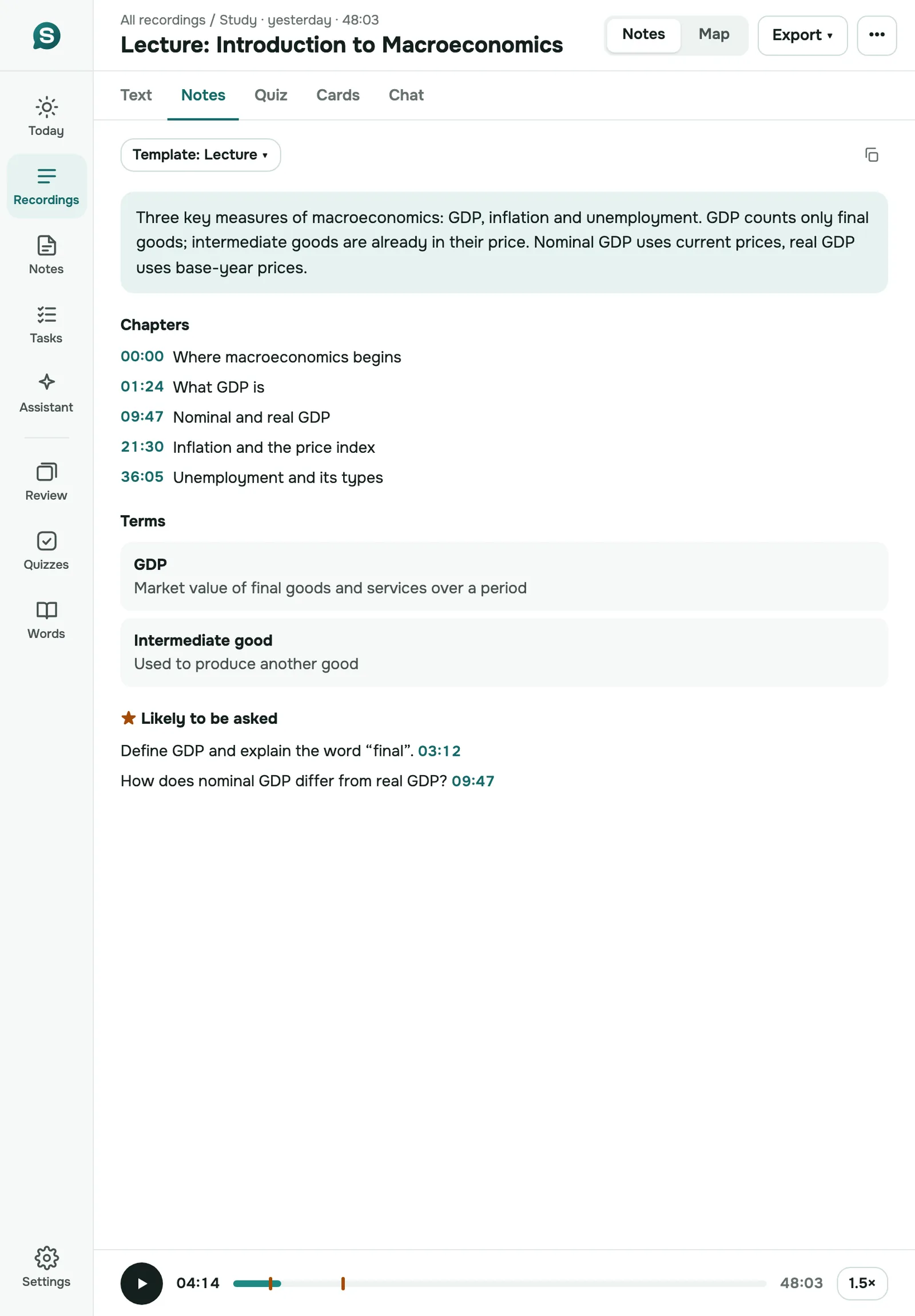
The same app gets its own layout on iPad, with a sidebar for every section and room to read the notes while the player runs, in either orientation. Most of the iPhone app works there too, from recording to the five export formats.
Two things are iPhone-only for now: editing the transcript text and renaming speakers. If you need either, do it on the iPhone, or rename speakers at web.sozai.app.
A one-hour file or recording is usually transcribed 1–2 minutes after the upload finishes. YouTube links take a few minutes longer.
On our published test of short read sentences, the word error rate ran from 1.8% in Spanish to 8.0% in Portuguese, with English at 3.6%. Arabic came in at 19.6% and Kazakh at 50%, so in those two languages plan on correcting the text. The test didn't cover noisy rooms or long meetings. How we measured it.

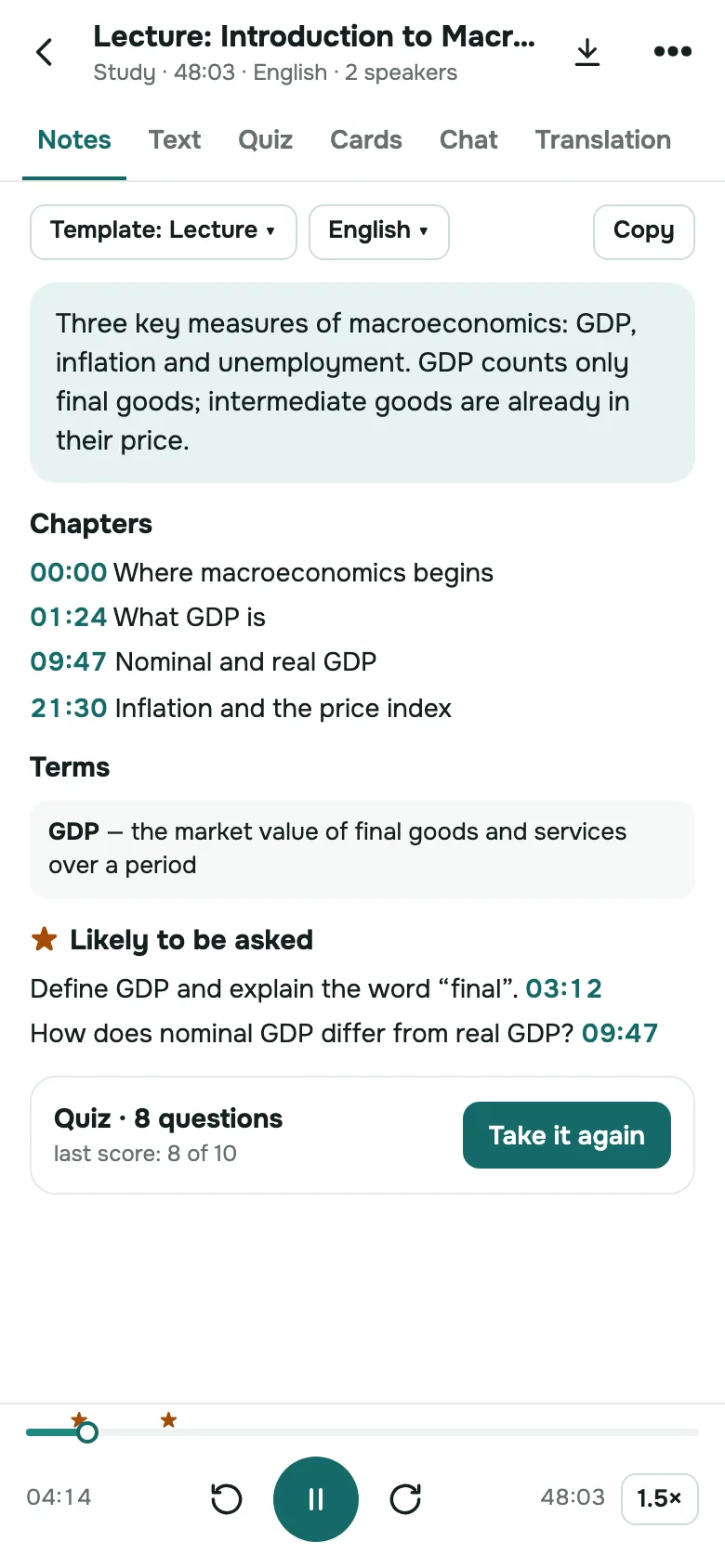
Each recording becomes notes you can read in a minute: a short summary, timestamped chapters, key terms and the questions a lecture is likely to ask.

Lecture notes, chapters and the player fit the iPad screen in portrait and landscape, and every recording is on all the devices you sign in on.
Record a lecture or a voice memo with the built-in microphone, or paste a YouTube link.
Open audio and video files up to 500 MB from Files, or share them in from Voice Memos and WhatsApp.
The language is detected for you. Measured word error rate: 1.8% in Spanish to 8.0% in Portuguese.
Every file and recording comes back split by speaker. On iPhone you can give each one a name.
PDF, TXT, SRT, VTT and JSON. SRT keeps the timings; speaker names go into the others.
Sign in on any of your devices or on the web and your recordings are there. Sync runs through your SozAI account.
| Device | What you need |
|---|---|
| iPhone | iOS 15.6 or later |
| iPad | iPadOS 15.6 or later |
| Connection | Internet access for transcription and the AI features |
| Account | Optional at first; sign in to keep your recordings on every device |
| Mac | A separate download from the Mac App Store, macOS 14 or later: SozAI for Mac |
The app is free to download, and every account gets 30 minutes of transcription once. Those minutes don't renew each month.
SozAI Premium is an auto-renewing subscription billed by the App Store: from $4.99 a week, or from $79.99 a year, which comes to about $1.54 a week. It gives you up to 700 hours of transcription. Every AI feature works the same on both plans; only the minutes differ. The app shows the price for your country before you buy, and one subscription covers your account on every device. Both plans side by side: pricing.
Buying for a team or a class? Team and Education plans aren't sold in the app. Seats are bought by card at web.sozai.app, $12.99 a month or $99.99 a year per seat: how buying for a team works. See also SozAI for teams and SozAI for schools.
Recordings travel over HTTPS and are stored on our servers. Speech recognition and the AI features are run by outside partners; every company that processes your files is on our sub-processors list, with what it receives and when. We don't sell recordings, and our code doesn't use them to train models.
You can delete one recording or your whole account in the app, without writing to us. That removes the audio and everything made from it from our servers; our encrypted database backups keep a copy for up to 12 months. How we store and delete data is on the security page.
Version 1.8.0 reached the App Store on 17 October 2026 and brought the iPad layout described above. The release before it, 1.7.0, added photos and PDFs as sources and put quizzes and flashcards in the library. Every release, with its date, is on the changelog.
Answers
The download is free, and each account gets 30 minutes of transcription once, with no card. Those minutes don't come back each month. After that you need Premium, from $4.99 a week or $79.99 a year, billed by the App Store. Every AI feature comes with both plans; Premium only adds transcription time, up to 700 hours.
Partly. You can record without a connection: the app keeps the recording on your iPhone and uploads it when you're online again. Transcription and the AI features run on our servers, so they need the internet. Nothing is transcribed on the device itself, which is also why the app works the same on an older iPhone as on a new one.
99, and you don't pick one: the app detects the language of each file. That works well for widely spoken languages. On short clips in less common ones it can guess wrong; in our accuracy test, 5 of 20 Kazakh clips were taken for Azerbaijani. Once a transcript is done, you can translate it into another language from the Translation tab.
A single file can be up to 500 MB. Most audio and video formats work, MP3 and M4A as well as iPhone video and the Opus voice notes WhatsApp sends, and you can share a file in from another app, Voice Memos for example. Files over 50 MB go up in small parts, which copes better with a weak connection. A one-hour file is usually transcribed 1–2 minutes after the upload finishes.
On iPad it's the same App Store app, with a layout made for the larger screen. The Mac app is a separate download from the Mac App Store and needs macOS 14 or later. Sign in with the same account and your recordings and Premium are on all of them. Editing transcript text and renaming speakers are iPhone features today; on iPad and Mac you read and study the transcript and export it.
They're stored on our servers and sent over HTTPS. To transcribe and summarize them we pass audio and text to processing partners, all named on our sub-processors page. We don't sell recordings, and our code doesn't train models on them. Deleting a recording in the app removes it and everything made from it from our servers; encrypted backups keep a copy for up to 12 months.
Open the Settings app on your iPhone or iPad, tap your name and then Subscriptions. Choose SozAI and tap Cancel Subscription. Deleting the app doesn't cancel it. You keep Premium until the end of the period you've paid for, and your recordings stay in your account afterwards. Apple handles App Store billing, so refund requests go to Apple at reportaproblem.apple.com.
PDF, TXT, SRT, VTT and JSON, or you can copy the text. Speaker names you've set appear in every format except SRT, whose subtitles carry only the timings. A transcript made from photos or a PDF has no timings, so it offers no SRT or VTT. There's no Word format: open the TXT or the PDF in Word if you need one.