

YouTube Transcript
Full transcript and AI summary in a panel beside any YouTube video. Search it, jump by timestamp, export TXT, SRT or Markdown.
One account for the phone app, the Mac app and the Chrome extensions. Record on the go, read it on the desktop, transcribe without leaving the page you are on.
iOS and Android. 30 minutes free, no card.
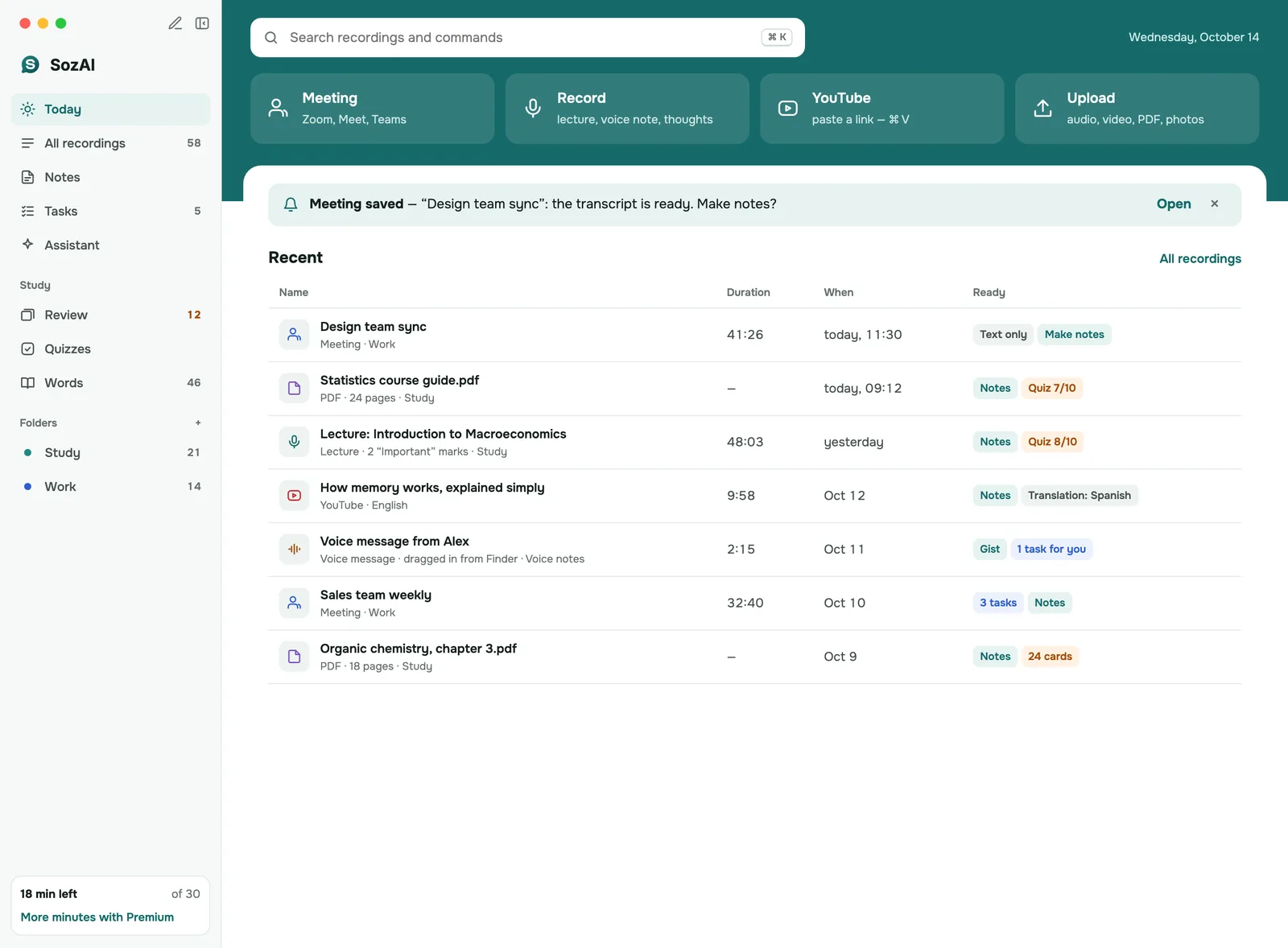
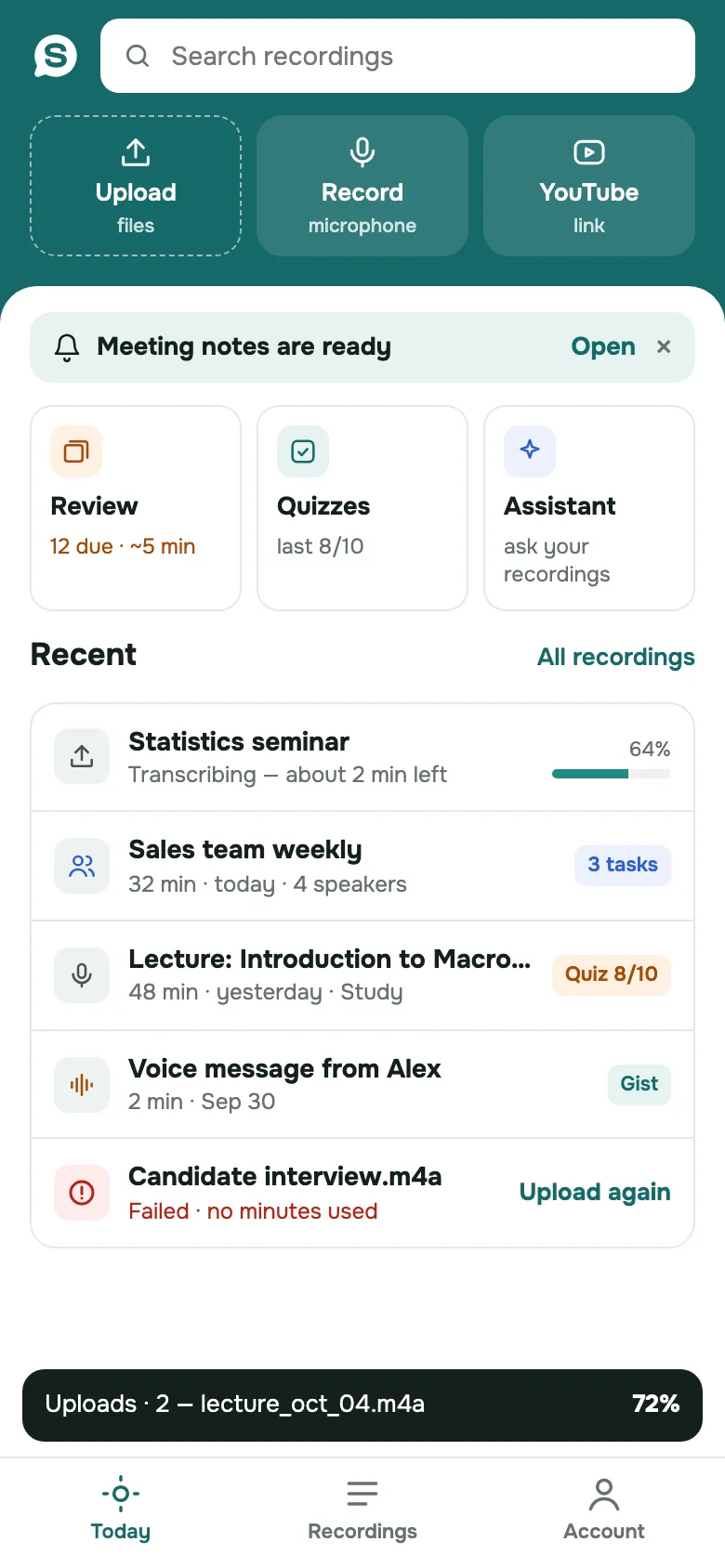
iOS · Android · macOS
Record, upload a file or paste a link. You get the transcript with speakers and timestamps, a summary, and translation into 99 languages. Everything syncs between your phone and your Mac.
Record, upload and transcribe on the go. Summaries, translation, a searchable library.
Learn moreThe same app on Android: record, import from any app, transcribe with speakers and a summary.
Learn moreYour library on the desktop: upload files or record, then read each transcript next to its notes and study from it.
Learn moreChrome Web Store
Small, single-purpose tools. Two work inside the page you are already on; the third opens a workspace for your own recordings. Install from the Chrome Web Store in one click; none of them needs a signup to start.
Free to install. Each one does one job inside the page you are already on.
Full transcript and AI summary in a panel beside any YouTube video. Search it, jump by timestamp, export TXT, SRT or Markdown.

A Transcribe button under every voice message in WhatsApp Web. The text appears in the chat, and a short AI summary too once you allow it.

Drop an audio or video file, or record from the microphone, and get a transcript with speakers and timestamps in a workspace tab, plus an AI summary if you allow it.
One account
Each client does what its screen is good at, and the account ties them together.
A lecture, a meeting or a voice memo goes into the phone app. It is transcribed in minutes and lands in your library.
Open the same library on macOS: search across every transcript, edit, export to PDF or SRT, ask the transcript questions.
YouTube transcripts need no upload: the extension reads the video's captions on the spot, free. A WhatsApp voice note goes to SozAI straight from the chat, with no file to save, and uses minutes like any other recording. A recording you already have as a file can go into the Transcribe Audio to Text extension without leaving Chrome.
Which one
Pick by where the audio is. If it is already on a web page, YouTube or WhatsApp, it is an extension. A file or a recording goes to the app on your phone or Mac, or, on any computer with Chrome, to the Transcribe Audio to Text extension.
| Product | Best for | Free tier | Account | Get it |
|---|---|---|---|---|
| iPhone & iPadApp | Recording lectures, meetings and voice memos on the go | 30 minutes | Optional | Details |
| AndroidApp | Recording and importing audio on Android phones and tablets | 30 minutes | Optional | Details |
| MacApp | Studying and exporting long recordings on a big screen | 30 minutes | Optional | Details |
| YouTube TranscriptChrome extension | Reading and searching YouTube videos instead of watching them | 100 videos a month | None | Details |
| Voice to Text for WhatsAppChrome extension | Reading WhatsApp voice notes at your desk | 30 free minutes, once | Optional | Details |
| Transcribe Audio to TextChrome extension | Meetings, interviews and voice notes you have as a file, on any computer with Chrome | 30 free minutes, once | Optional | Details |
Pricing
The app comes with 30 minutes of transcription free, once, no card required. When you need more, SozAI Premium is a subscription you start inside the app on iPhone, Android or Mac, and it works on every device signed into the same account. The YouTube extension is free. The WhatsApp and Audio to Text extensions use minutes: 30 free once, then Premium from the app.
See plans and pricesGet transcriptions in minutes, not hours
Transcribe in any major language
Your data is encrypted and protected
Answers
Yes. Sign in with the same Google or Apple ID in the apps on your phone and Mac, and your library and Premium follow you, along with whatever is left of the free minutes. In Chrome, the WhatsApp and Audio to Text extensions start with a guest account and take a Google sign-in or an email code when you want your own. The YouTube extension needs no account at all.
Thirty minutes of transcription in the app — recordings, uploaded files or YouTube links — with speakers, timestamps and a summary. They are per account, not per device.
Installing them costs nothing. The YouTube extension reads up to 100 videos a month per device for free. The WhatsApp and Audio to Text extensions transcribe audio, so they use minutes: each starts with the same 30 free minutes as the app, once, counted per message or file and rounded up to a whole minute. After that they use SozAI Premium, which is bought in the app. None of them asks you to sign up to start.
Inside the app, through the App Store or Google Play. There is no separate web checkout. Once you subscribe, Premium is active on every device signed into the account.
No. Each app works on its own. Using both simply means one library: record on the phone, read and edit on the Mac.
Not as a desktop app. On Windows, use the Chrome extensions: YouTube and WhatsApp for what is already on the page, Transcribe Audio to Text for your own files and microphone recordings. The free online tools on this site cover files up to five minutes without installing anything.
Start with 30 free minutes
Record, upload a file or paste a link. The transcript, the speakers and a summary come back in minutes.
Free on iOS and Android. No card required.
Point your camera
Scan the code to open the download page on iOS or Android. 30 minutes of transcription free, no card.

