
Lecture notes
AI lecture notes: record the lecture, get the transcript, notes, flashcards and a quiz
Record in the lecture hall on your phone, or upload the file afterwards. SozAI writes the whole transcript, then notes with chapters and the questions likely to be asked, and builds your revision cards from the same recording.
- Free preview: first 5 minutes
- Deleted after processing
- No signup
Drop your file here
or
Supports MP3, M4A, WAV, OGG/OPUS, AAC, FLAC and WEBM
Transcript
Can AI take lecture notes for me?
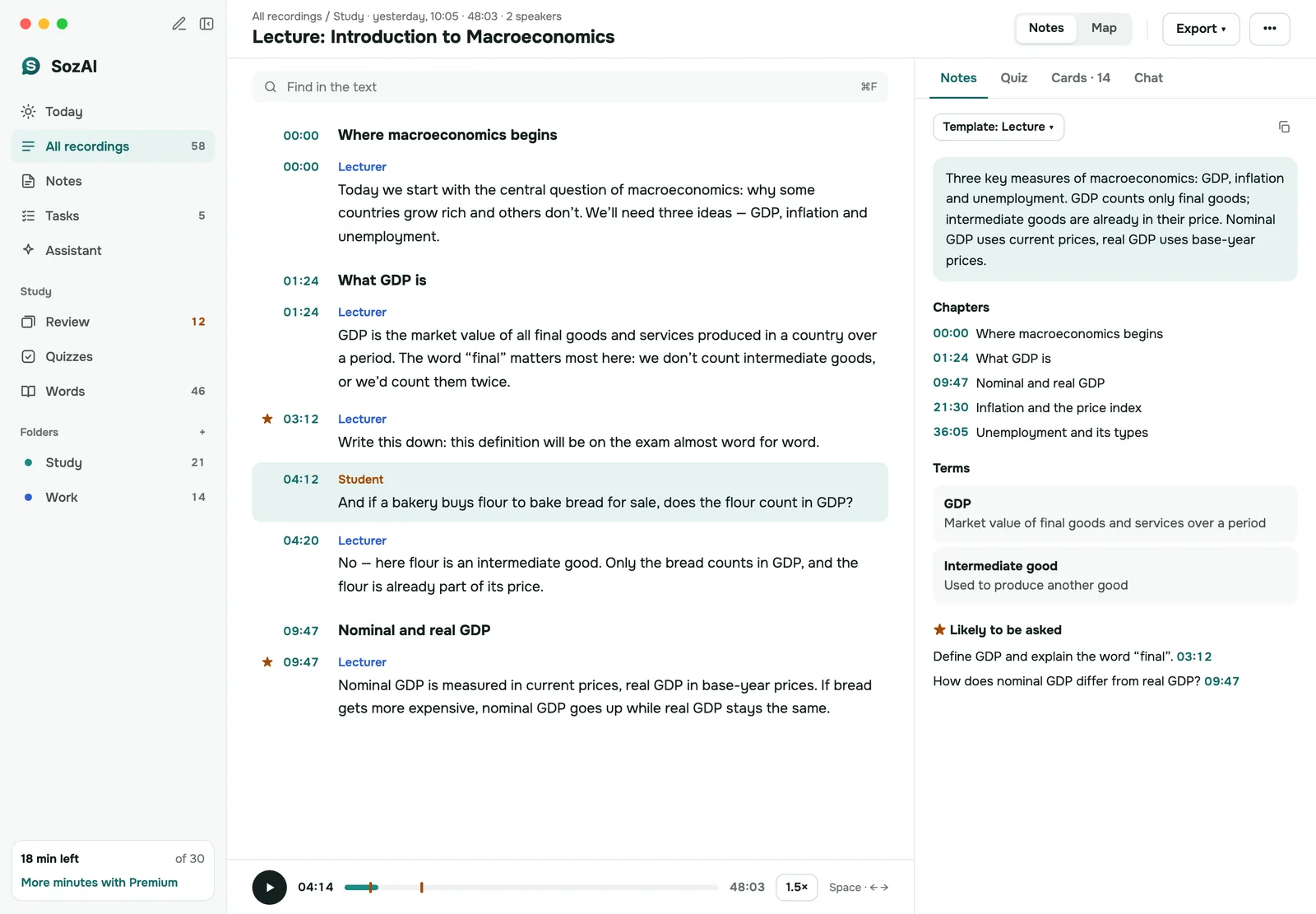
It can draft them from a recording. Record the lecture in the SozAI app on iPhone, Android, Mac or iPad, or upload the file afterwards (up to 500 MB). A one-hour lecture usually comes back as a transcript a minute or two after it uploads, and the notes take about a minute more: chapters with timestamps, key terms, facts and the questions likely to be asked. Flashcards and a quiz are made from the same recording.
The first 30 minutes are free, once; Premium is $4.99 a week or $79.99 a year. It won't rescue a recording made from the back row behind a noisy projector, and some universities restrict recording, so check the rules below first.
Try it with a real lecture
Below is what SozAI made from a public lecture recording, unedited: the transcript and notes first, then the cards and quiz built from them.
Mike Poland
00:08Hi everybody. I'm Mike Poland, the scientist in charge at the Yellowstone Volcano Observatory. Thanks for joining us today. I'd like to talk a little bit about what the volcano observatory is. What is the Yellowstone Volcano Observatory, what makes it up, what do we do, what's our mission? And also some of the neat results that we've come upMike Poland
00:24with over the last few years. Some of the things that really make Yellowstone an impressive place to work and geologically and volcanologically. Well, first I can tell you what the Yellowstone Volcano Observatory is not. We are not a facility. We are not a place. I think a lot of people, when they hear the term volcano observatory,Mike Poland
00:40they think of a place like the Hawaiian Volcano Observatory where there's a wonderful facility that used to overlook the active eruption site at the summit of Kilauea Volcano. Well, the Yellowstone Volcano Observatory is a virtual observatory. There is no physical facility for the observatory. So we don't have that building like the
Summary. The Yellowstone Volcano Observatory is a virtual consortium of nine institutions dedicated to monitoring volcanic, seismic, and hydrothermal activity in Yellowstone. The observatory tracks hazards like earthquakes, lava flows, and hydrothermal explosions while conducting research on the region's complex magma system. Through various monitoring networks, scientists have made significant discoveries, such as the birth of new thermal areas and the ability to track geyser activity using seismic and thermal data.
00:08Introduction to the Yellowstone Volcano Observatory
- YVO is a virtual observatory and a consortium of nine institutions.
- The USGS leads hazard messaging, but all partners collaborate on goals.
- Primary goals include research, monitoring, and education.
Terms
- Yellowstone Volcano Observatory (YVO): A virtual consortium of nine organizations that monitors and researches the Yellowstone volcanic system.
- Mantle plume: An area of thermal upwelling and enhanced melting originating deep within the Earth.
- Basalt: A low viscosity magma that flows easily.
- Rhyolite: A sticky magma prone to being more explosive.
Facts and figures
- 1500-2500 earthquakes occur in the Yellowstone region per year on average.
- The Yellowstone system has two main magma chambers: one at 15 miles deep and one at 3 miles deep.
- The upper magma reservoir is 5-15% molten; the lower is 2-5% molten.
- Three major caldera-forming explosions occurred 2.1 million, 1.3 million, and 631,000 years ago.
- The 1959 Hebgen Lake earthquake was a magnitude 7.3.
- Total geothermal power output of Yellowstone is 1.3 gigawatts.
Likely to be asked
- The distinction that YVO is a virtual observatory and a consortium, not a single physical facility.
- The three primary goals: research, monitoring, and education/outreach.
- The hierarchy of hazards: caldera-forming explosions are the most destructive but least frequent, while hydrothermal explosions and earthquakes are more frequent.
| Front | Back |
|---|---|
| Why is the Yellowstone Volcano Observatory described as a 'virtual observatory'? | It has no physical facility or building. It exists as a collaborative network across institutions rather than in one place. |
| How does YVO differ from most other U.S. volcano observatories in its structure? | YVO is a consortium of nine organizations, whereas most other observatories are run mainly by the USGS. No single institution runs YVO, though the USGS is responsible for issuing hazard messages. |
| Name the three main goals of the Yellowstone Volcano Observatory. | Research into volcanic, tectonic, earthquake, and hydrothermal processes; monitoring earthquake and volcanic activity; and education and outreach about Yellowstone's geologic past, present, and possibly future. |
| Why can the seismic network detect such small earthquakes in Yellowstone? | About 46 stations, many with multiple seismometers, some buried beneath the ground, reduce noise and maximize signal quality. As a result, earthquakes as small as magnitude 1.5, and in some areas below zero, can be detected. |
| How do continuous GPS stations detect ground deformation? | Each GPS antenna sits on a permanent monument, so when the ground moves, the antenna moves with it. Tracking the antenna's position over time reveals ground motion. |
5 of 27 cards shown.
1. What is the primary reason the Yellowstone Volcano Observatory is considered a virtual observatory?
- It relies entirely on satellite data to monitor activity.
- It does not have a single physical facility or building. (correct)
- It is a digital simulation used for educational purposes.
- It is managed remotely by scientists located in other states.
The speaker clarifies that unlike other observatories, YVO does not have a physical building or facility, existing instead as a virtual entity.
2. How does the organizational structure of the Yellowstone Volcano Observatory differ from most other U.S. volcano observatories?
- It is operated exclusively by the National Park Service to ensure local control.
- It is a private non-profit research group that operates independently of government agencies.
- It is a consortium of nine different organizations rather than being run primarily by the USGS. (correct)
- It is managed by a rotating committee of university researchers rather than a federal agency.
The speaker explains that while the USGS is the main player in most observatories, YVO is a consortium of nine different organizations.
3. Why does the observatory use buried seismometers for earthquake detection?
- To protect the equipment from extreme weather conditions in the park.
- To measure vibrations deep within the Earth's crust more accurately.
- To achieve the best signal-to-noise ratio by reducing surface noise. (correct)
- To prevent visitors from tampering with the sensitive monitoring devices.
The speaker notes that burying the seismometers helps minimize noise, allowing for the detection of very small earthquakes.
3 of 10 questions shown.
Recording a lecture in a hall
Most of transcript quality is decided before you press record. We haven't run our own lecture-hall test, so the advice below comes from university guides, mainly the University of Oregon's Accessible Education Center and a KIT guide to recording with a smartphone.
- Sit near the front, close to the lecturer, and away from projectors and people typing.
- Prop the phone up, or put it on something soft rather than straight on the desk, and keep moving things away from the microphone.
- Make a short test recording first to find out how far from the lecturer you can be.
- Turn on airplane mode, so calls don't interrupt the recording and the battery lasts.
In the SozAI app, choose the Lecture mode before you start and tap Important whenever the lecturer says "this will be on the exam". Those moments go into the notes.
Lectures in other languages
SozAI detects the spoken language itself across 99 languages, so a lecture in German or Spanish needs no setting. You can translate the transcript, and on web.sozai.app rebuild the notes in another language, which helps on an exchange semester. Accuracy is not the same everywhere. On our public test of read sentences, word error rate ran from 1.8% in Spanish and 3.0% in German to 19.6% in Arabic and 50% in Kazakh, so a Kazakh lecture needs much more checking than a Spanish one. For listening to a lecture you don't fully follow, see how to understand a lecture in another language.
From notes to revision
A transcript you never revisit doesn't help much. SozAI turns the same lecture into flashcards and a quiz of 5 to 15 questions. Cards come back for review on a schedule (Again, Hard, Good, Easy), each linked to the second of the lecture it came from. Quiz explanations quote the lecture, and the questions you get wrong are added to your cards.
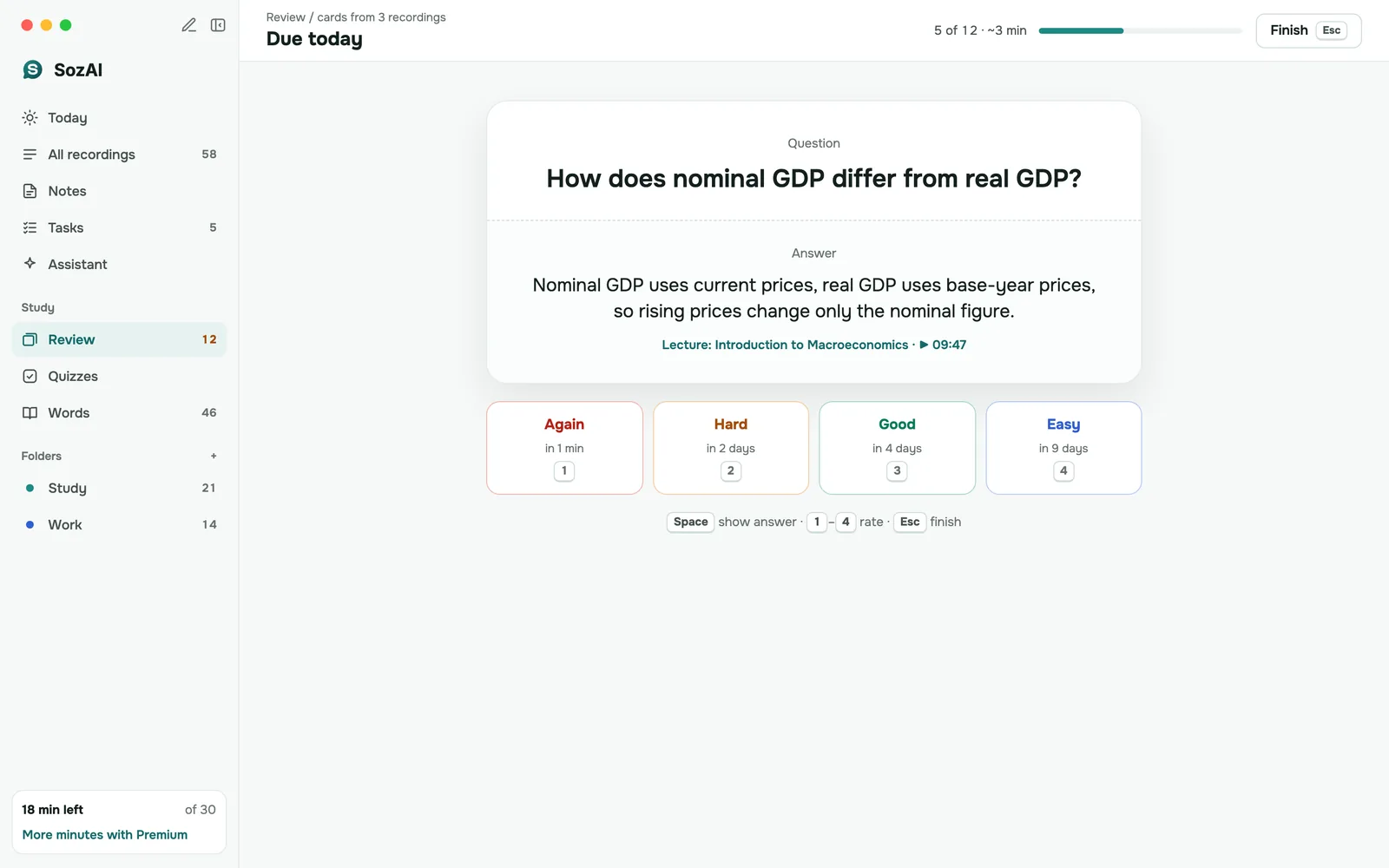
The cards and quizzes stay inside SozAI. To take them elsewhere, copy the transcript or one chapter and paste it into our free tools: the quiz generator exports Moodle GIFT and CSV and prints a test with a separate answer key, and the flashcard generator downloads CSV for Anki and a TXT file Quizlet imports. Both tools can also take a recording directly, but only its first minutes, so paste the transcript for a full lecture.
Is it OK to record a lecture?
It depends on your university, and often on the lecturer. Policies we checked on 2026-10-25 agree on the basics:
- Ask first. Cal State LA requires the instructor's permission before recording, and the instructor may say no.
- A disability accommodation changes the answer. At Cal State LA an instructor cannot refuse a student who meets the disability office's criteria, and at Dublin City University recording is arranged through its disability service.
- Keep it to yourself. Both policies, and the University of Oregon's, limit recordings to your own study and ban posting or sharing them.
- The lecture is not yours. DCU states that the content stays the university's property.
This is not legal advice. Your course handbook or disability office has the rule that applies to you.
Students and researchers use SozAI at




Lectures, seminars and interviews turned into searchable text — by the people who sit through them.
Writing while listening, or listening first
Handwritten notes force you to choose between hearing the next point and finishing the last one. A recording moves the writing to later, when you can pause.
Notes by hand
You write one point while the lecturer is already explaining the next.
Explanations missed while you finish the previous point Gaps where a slide changed too soon No time to ask a question in the moment Notes you can't check against what was said Revision cards typed from scratch the night before
With SozAI
You listen in the room. The text and the cards are waiting when you sit down to study.
The full lecture as text, with a timestamp on every passage Notes with chapters and likely exam questions Flashcards and a quiz from the same recording Find in the text instead of replaying an hour Lectures in 99 languages, detected for you
What a recording changes about studying
Four honest effects, and where each one stops.
Listening instead of copying
With the lecture recorded, you can follow the argument and ask a question instead of racing to write. Write down only what you would want to find again. The transcript fills the rest.
A recording is not understanding, though. If you never go back to it, you have only moved the work to a folder. Plan the review the same day.
Listening instead of copying
When reading works better than listening
Some students take in a lecture better as text: people studying in a second language, and students with a recording accommodation from their disability office. Text lets you slow down and look up a word.
SozAI gives you that text after the lecture, not live captions in the room. The accommodation itself, and the permission to record, come from your university.
When reading works better than listening
Finding one explanation again
Find in the text takes you to the moment a term was explained, and the timestamp plays the lecturer’s own words. Chapters split anything over five minutes into named sections.
Keep a folder per course, in the app and on the web, so a semester of lectures stays in one place.
Finding one explanation again
Lectures you could not attend
If your university posts lecture capture videos, download the file where that is allowed and upload it. For open courses on YouTube, paste the link instead: the app transcribes the video from the link.
Don’t ask a classmate for their recording unless your university allows sharing; most recording policies say a recording is for the person who made it.
Lectures you could not attend
Where students use lecture transcripts
Six settings, each with what to watch out for.
University lectures
One lecturer, one microphone, a big room. Sit near the front and the transcript needs few corrections; the notes and cards follow from it.
Seminars and tutorials
Several voices, each with its own label. Expect to fix labels where people interrupt each other, and check that the tutor’s points stay separate from the discussion.
Online courses and recorded lectures
Upload a video file, or paste a YouTube link to an open course. Our free YouTube transcript tool also gives you the captions as text.
Recording accommodations
If your disability office has approved recording, the transcript gives you the lecture as text you can read at your own pace. The approval, and its conditions, come from your university.
Language classes
Choose the Language lesson notes template: it lists new words with translations and examples, plus the grammar and phrases from the lesson.
Research talks and seminars
Guest lectures and research seminars you are allowed to record. Keep the transcript next to the paper the speaker discussed, and quote with care.
How it works
From the lecture hall to your first review, in three steps.
Record or upload
Record in the app with the Lecture mode on, or upload the file later, up to 500 MB. Tap Important at the moments that matter.
Transcript and notes
A one-hour lecture is usually transcribed a minute or two after it uploads. The notes follow in about a minute.
Revise
Review the cards, take the quiz, ask the chat about the lecture, or export the transcript as PDF or TXT.
Study tools in every lecture
All of these work on the transcript you already have, with no second upload.
Find in the text
Search inside a lecture for a term and jump to the passage. Each lecture is searched on its own; keep courses in folders to find the right one.
Timestamps to the audio
Each passage and each card carries a time. Tap it to hear the lecturer’s explanation again, at your own speed.
Notes templates
The Lecture template writes terms, facts and likely exam questions; switch to Language lesson for a language class, or General for a talk. The notes are rebuilt in under a minute.
Translation
Translate the transcript when the lecture is not in your first language, and keep the original next to it.
Copy and export
Copy the notes, or export the transcript as PDF, TXT, SRT, VTT or JSON from the apps, or as TXT, SRT or VTT from the web. There is no shared class workspace yet: send the file to the people you are allowed to share it with.
For universities and departments
Each student or lecturer has their own SozAI account and folders; there are no class workspaces or admin roles yet. Education seats are bought by card at web.sozai.app, $12.99 a month or $99.99 a year per seat, with an invoice in your institution's name: how buying for a team works. More is on SozAI for education.
Where your recordings go
- Recordings travel over HTTPS and are stored on our servers.
- Speech recognition and the AI features are run by named partners, all listed on our sub-processors page.
- We don't sell your recordings, and our code never uses them to train models.
- Delete a lecture or your whole account yourself; that removes the audio and everything made from it from our servers. Encrypted database backups are kept up to 12 months.
More on storage and deletion is on the security page.
Who it isn't for
SozAI works on a recording after the lecture. If you need live captions in the room, that is a different tool, usually arranged by your disability office. If you only ever type your own cards, a flashcard app is enough; SozAI earns its place when your material is a lecture someone spoke.
More for students
- SozAI for students: the whole study loop, from a recorded lecture to flashcards, quizzes and review.
- Lectures in another language: the transcript in the language spoken, notes translated into yours.
- Exam prep from lecture recordings: a semester of recordings turned into a review plan.
- Slides and the lecture together: add the PDF and board photos so the notes use both.
Free study tools
No signup. Start from a YouTube link, a PDF, a recording, your notes or a word list you type. Turn one lesson into all of them →
- Flashcard Maker and AI Flashcard GeneratorFlashcards from a video, a PDF or notes with AI, or typed by you: study with spaced repetition, print, export to Anki
- AI Quiz GeneratorA multiple-choice test from a YouTube link, a PDF, a recording or your notes
- Crossword Puzzle MakerA crossword from your terms or a lesson: solve online, print the puzzle and the key
- Word Search MakerA word search from your terms or a lesson: play online, print the puzzle and the key
- Study Guide MakerA one-page study guide from a video, a PDF or notes: summary, key terms, likely questions
- Worksheet GeneratorA printable worksheet: matching, fill in the blanks, word bank, short answers
- Fill in the Blank GeneratorPaste a text, pick the words to blank, print the exercise and the key
Answers
Lecture notes questions
Including what it costs and when recording is allowed.
How accurate are AI lecture notes?
The notes are only as good as the transcript under them. On our published test of read sentences, word error rate was 3.6% in English; across the 10 languages it ranged from 1.8% in Spanish to 50% in Kazakh. A lecture hall adds distance and noise, so sit near the front and check formulas and numbers against the audio.
Is lecture notes AI free?
The first 30 minutes of recording in SozAI are free, once, with notes, flashcards and a quiz included. After that Premium is $4.99 a week or $79.99 a year. Our quiz and flashcard generators on the website are free and need no account; paste a transcript into them.
How long does a one-hour lecture take?
Usually a minute or two after the upload finishes, then about a minute more for the notes. A lecture pasted as a YouTube link takes a few minutes longer. Uploading a large video file on slow campus Wi-Fi can take longer than the transcription itself, so upload the audio if you can.
Can I use it for recorded online classes?
Yes. Upload the video or audio file of a Zoom class or a lecture capture, up to 500 MB, where your university lets you download it. For open courses on YouTube, paste the link in the app. If you only need the text of a YouTube lecture, our free YouTube transcript tool gives you its captions.
Does it handle technical and scientific terms?
Common terms come through well when the audio is clear. Rare names and formulas spoken aloud are where errors appear, and SozAI has no subject-specific model. Fix them in the phone app before you make cards, and check anything you will learn by heart against the audio.
Is it legal to record and transcribe lectures?
It depends on your university and often on the lecturer. Policies such as Cal State LA's require the instructor's permission, make an exception for approved disability accommodations, and limit recordings to your own study. Read your course handbook or ask the disability office, and never post a recorded lecture.
Can I search across all my lectures?
Not in one search yet. Find in the text works inside one lecture and takes you to the exact passage. Keep each course in its own folder, in the app or on the web, so you can open the right lecture quickly, then search inside it. The chat answers questions about the lecture you have open.
Can I get the flashcards into Anki or Quizlet?
Not from the app: cards and quizzes stay in SozAI, where you review them. Copy the transcript or a chapter and paste it into our free flashcard generator, which downloads CSV for Anki and a TXT file Quizlet imports. The free quiz generator exports Moodle GIFT and CSV.
Record your next lecture
Sit near the front, press record and listen. Your notes and first cards are ready soon after you upload. The first 30 minutes are free, once.
Start with 30 free minutes. No credit card needed.


