
For students
Record a lecture, then study from the notes and flashcards SozAI makes of it
Record in the hall or upload the file afterwards. SozAI writes the transcript in the lecture's own language and builds notes and a quiz from it. The cards come back on the day they are due.
The short answer
SozAI turns a recorded lecture into a transcript and notes, then into flashcards and a quiz. It runs on iPhone, iPad, Android and Mac, and in the browser at web.sozai.app, all on one account. Record in the hall or upload the file afterwards (up to 500 MB per file), and SozAI detects the language for you, from 99. The first 30 minutes of transcription are free once and need no card; after that Premium costs from $4.99 a week or $79.99 a year in the App Store or Google Play. SozAI works on the recording after class. It does not caption the lecture live.
The study loop, from the lecture hall to the exam
Reading the transcript is where studying starts, not where it ends. Each recording goes through the same five stages, and you can stop at whichever one is enough for that course.
- Record or upload. In the app, pick the Lecture mode before you start and tap Important when the lecturer says something will be on the exam. In the browser, web.sozai.app records the microphone with the same Lecture type and a Mark as important button; one web recording can run up to 3 hours. A file from the course page or a YouTube link works too.
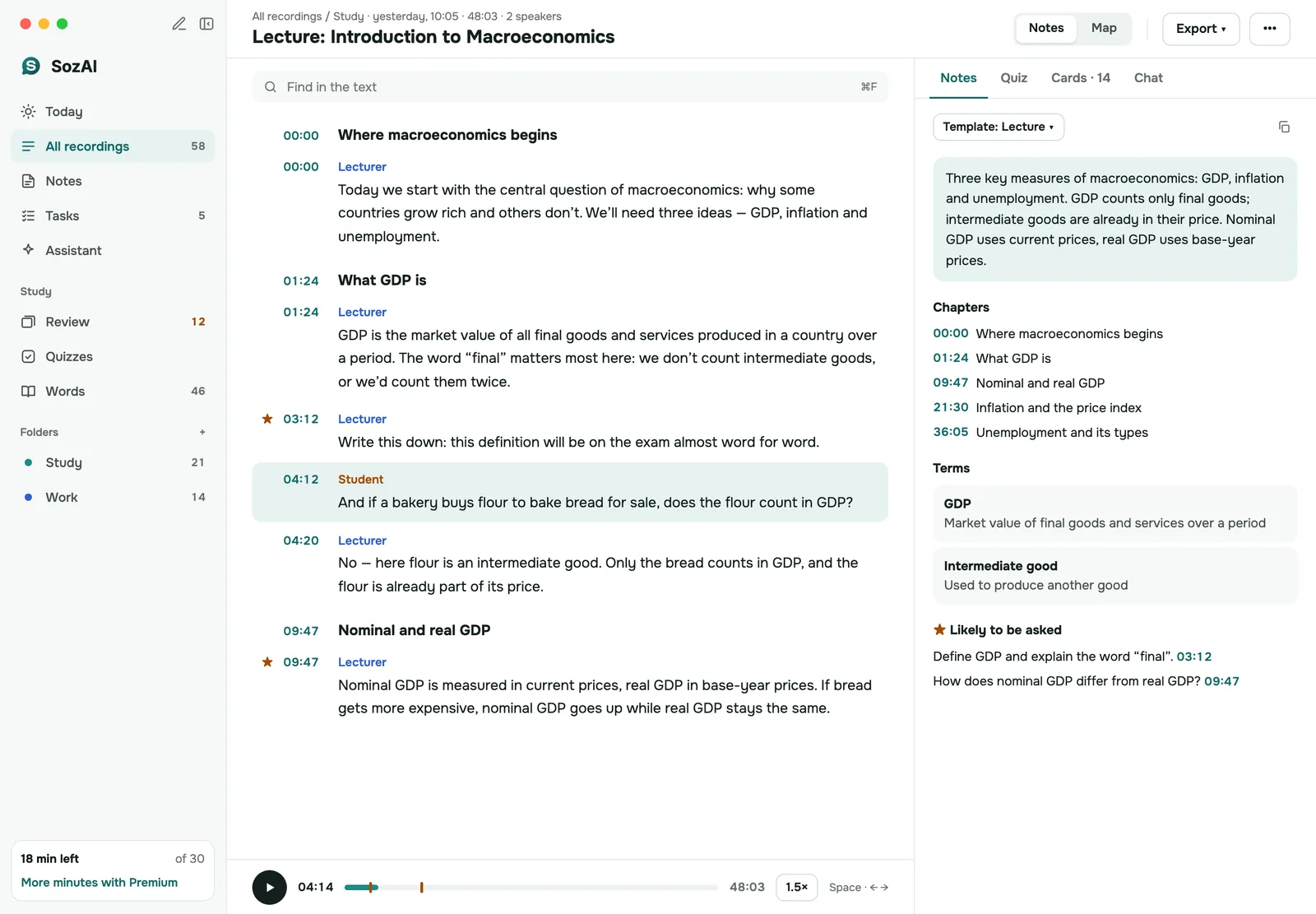
- Read the transcript. Every passage has a timestamp and a speaker label, so a question from the audience doesn't blend into the lecture. Fix misheard terms in the phone app before you build cards from them.
- Get the notes. The Lecture template writes chapters, key terms, facts and a block called Likely to be asked. If you have the slides, add the PDF to the recording and the notes are made again from both.
- Test yourself. A quiz has 5 to 15 questions with four options each. Under Why you get the explanation and a quote from the lecture, and Add mistakes to flashcards sends the questions you missed into the deck.
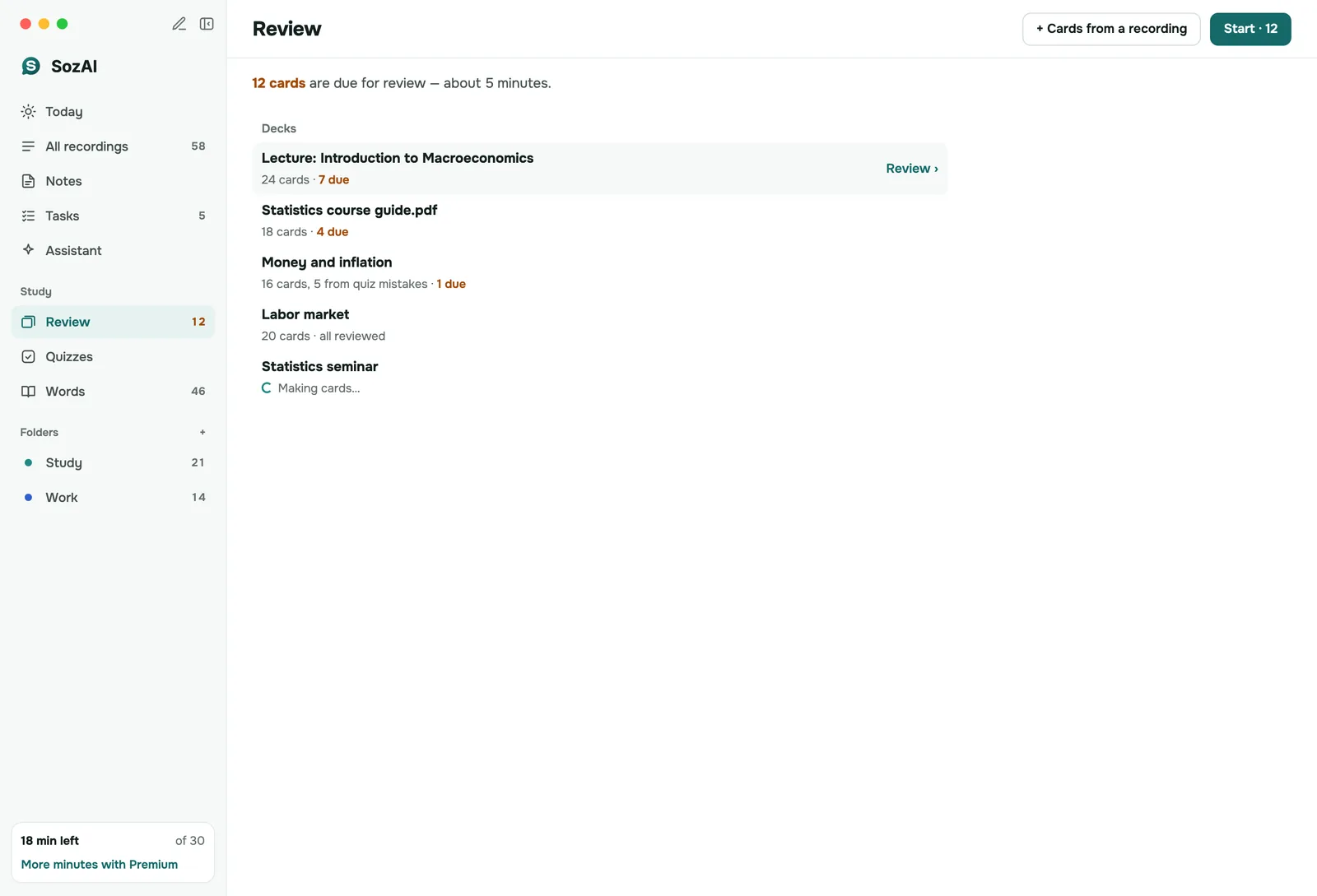
- Review on a schedule. Review shows the cards due today. Rate each card Again, Hard, Good or Easy and the app decides when you see it next. In the last days before an exam, the examiner asks you questions out loud and grades your answers.
What you need, and where SozAI does it
Most study tools are in every app. Three are missing on the web for now: the examiner, the mind map and adding slides.
| You want to | In SozAI | Works on |
|---|---|---|
| Record a lecture in the room | Record with the Lecture mode; Important marks for exam hints | iPhone, iPad, Android, Mac; web.sozai.app (microphone, up to 3 hours per recording) |
| Transcribe a lecture you already have | Upload audio or video up to 500 MB, or paste a YouTube link | All apps and the web |
| Revise from notes | Lecture template: chapters, terms, facts, Likely to be asked | All apps and the web |
| Use the slides and the board too | Add a PDF or photos to the recording; the notes are rebuilt from both | iPhone, iPad, Android, Mac |
| Follow a lecture in another language | Translate the transcript and its notes, or write the notes in your language | All apps and the web |
| Learn with flashcards | Up to 30 cards per recording, a review queue of cards due today | All apps and the web |
| Get a nudge to review | One reminder at the time you choose, only on days with cards due | Phone app (local notification) |
| Take a practice test | Quiz of 5 to 15 questions, each answer with a quote from the lecture | All apps and the web |
| Practise for an oral exam | Examiner: questions read aloud, you answer by voice or text, it grades | iPhone, iPad, Android, Mac |
| See how the topics connect | Mind map built from the chapters of the notes | iPhone, iPad, Android, Mac |
| Ask about the material | Chat on a recording; the assistant in the app looks through your recent recordings | Apps; Chat tab on the web |
| Move questions to Moodle, Anki or Quizlet | Free tools on sozai.app: quiz generator (Moodle GIFT, CSV), flashcard generator (CSV for Anki, TXT for Quizlet) | Any browser; quizzes and decks made inside the app can't be exported |
What it costs a student
There is no student price. Every account gets its first 30 minutes of transcription free, once, with every study tool included. You don't enter a card, and there is no trial that turns into a subscription.
| Plan | Price | Paid through |
|---|---|---|
| Free | 30 minutes of transcription, once per account | Nothing to pay |
| Premium in the app | From $4.99 a week or $79.99 a year (about $1.54 a week) | App Store or Google Play |
| Pro on the web | $9.99 a month or $79.99 a year | Card, through Polar, at web.sozai.app |
Both paid plans include up to 700 hours of transcription. None of the study tools use transcription minutes; only transcribing does. Generating notes and quizzes has daily limits, and the app says when you reach one. A monthly plan exists only on the web, and cancelling it keeps your access until the end of the period you paid for. Current prices for your store are on the pricing page; refunds follow the refund policy.
Pages for the situation you're in
- A lecture in a language you're still learning: translate the transcript and the notes, and keep the original next to them.
- Exam prep from a semester of recordings: quizzes per lecture, a review queue with reminders, the examiner.
- Slides plus the recording: add the PDF and photos of the board so one set of notes uses both, then open it as a mind map.
For more depth, lecture notes shows unedited output from a public lecture, and quizzes and flashcards explains the review schedule in detail. Teachers and schools have their own page: SozAI for education.
Before you record a lecture
Whether you may record is your university's decision, and often the lecturer's. Ask first. If you need recordings because of a disability, many universities arrange them through the disability or accessibility office, and at some an approved accommodation means the lecturer can't refuse. Keep the recording for your own study and don't post it. None of this is legal advice: your course handbook has the rule that applies to you.
When SozAI is not the right tool
- You need live captions in the room. SozAI works on the recording after the lecture; live captioning is a service your university arranges.
- Your lectures are in a language that recognition handles badly. In our accuracy test the word error rate was 3.6% in English and 50% in Kazakh, so check a transcript before you study from it.
- You want your SozAI decks inside Anki or Quizlet. Cards and quizzes made in the app stay in SozAI. Paste the transcript into the free flashcard generator or the quiz generator instead.
- Your study group wants one shared space. Everyone has their own account and folders; there are no shared class workspaces.
- Your course is mostly problem sets. A quiz from a recording tests what was said. It won't give you practice problems to solve.
Answers
Frequently asked questions
Is SozAI free for students?
Partly. Every account gets 30 minutes of transcription free, once, with all the study tools included, and no card is needed. After that you need Premium, from $4.99 a week or $79.99 a year in the stores, or Pro on the web at $9.99 a month.
Does SozAI have a student discount?
No. Students pay the same price as everyone else. The free 30 minutes are the way to test it on a real lecture before you pay, and the study tools never use transcription minutes.
Is there an app that records my lecture and makes flashcards from it?
Yes, SozAI does this. Record the lecture in the app or upload the file, and it writes the transcript, notes with likely exam questions, up to 30 flashcards and a quiz. The cards then come back in a review queue on the days they are due.
Does SozAI work on Android and on a Windows laptop?
Yes. There is an Android app, and on a Windows laptop you use web.sozai.app in the browser, which records the microphone and has quizzes and review. For the examiner and the mind map, or to add slides, you need one of the apps.
Can I export SozAI flashcards to Anki or Quizlet?
Not from the app. Decks and quizzes made in SozAI stay there. Copy the transcript into the free flashcard generator on sozai.app, which downloads a CSV for Anki and a TXT file Quizlet imports, or into the quiz generator, which exports Moodle GIFT and CSV.
Does SozAI join my Zoom class?
No, nothing joins the call. On a computer, web.sozai.app in Chrome or Edge can record the tab with the class and your microphone. You can also download the class recording, where your university allows it, and upload it.
Is it allowed to record lectures?
It depends on your university and often on the lecturer, so ask first. Some universities let students with an approved disability accommodation record even when a lecturer would say no. Recordings are usually for your own study only.
Turn your next recording into text
Record, upload a file or paste a link. You get the transcript, speakers and a summary back.
Free on iOS and Android. No account required for YouTube transcripts.