
Zoom recordings
Zoom transcription for any recording, even when Zoom didn’t make one
Drop the Zoom audio file below and read the first 5 minutes with speaker labels, free. Further down: what each Zoom plan transcribes on its own, checked against Zoom’s help pages.
- Free preview: first 5 minutes
- Deleted after processing
- No signup
Drop your file here
or
Supports MP3, M4A, WAV, OGG/OPUS, AAC, FLAC and WEBM
Transcript
The quick answer
Zoom can turn speech into text in three ways: live captions during the call, a meeting transcript saved as a TXT file, and an audio transcript of a cloud recording, saved as a VTT file next to the recording under Recordings & Transcripts in the Zoom web portal. Of the three, the free Basic plan gets only the first, and since May 2026 captions can no longer be saved on any plan. The other two need a paid account (Pro or above) and a host or admin who switched them on before the meeting. A recording saved to your computer is never transcribed by Zoom, so if that is the file you have, its audio-only M4A has to go to a transcription tool, such as the upload box above.
Does Zoom transcribe meetings? What you get on each plan
| Basic (free) | Pro, Business, Education, Enterprise | |
|---|---|---|
| Live captions during the call | Yes. Zoom opened automated captions to free accounts in 2021 and its pricing page lists them on Basic | Yes, on by default for paid accounts. 49 languages and dialects |
| Saving captions after the call | Not possible since May 2026 | Not possible since May 2026; captions still show when a recording plays |
| Meeting transcript (live text you can save) | Not listed for Basic | Pro, Business and Enterprise. Off by default; the host, or an admin for everyone, turns on “Meeting transcript”. Saved as a TXT file to Documents/Zoom on the computer of whoever saves it |
| Recording | Computer recording only, in the desktop app. You get an MP4 and an audio-only M4A | Computer recording, plus cloud recording started by the host or a co-host |
| Transcript of a recording | None: computer recordings don’t support audio transcription | Cloud recordings only, when “Create audio transcript” is ticked. Account or group admins can switch it on and lock it; otherwise each user can. It arrives some time after the recording, by email |
| Languages of that transcript | Not applicable | Zoom’s two help articles disagree: one says English only, the other lists 19 languages and a “Change Language” option. English is the default |
| Where it is stored | On the computer that pressed Record, in a Zoom folder under Documents | In the host’s Zoom web portal, Recordings & Transcripts → Cloud recordings |
| How long it is kept | Until someone deletes the file | Depends on the account: an admin or user can have cloud recordings deleted after a set number of days. Deleted recordings sit in the trash for 30 days |
| Download formats | MP4, M4A | MP4, M4A when the account records an audio-only file, VTT for the audio transcript, TXT for a saved meeting transcript |
| AI meeting summary | Zoom’s pricing page lists summaries for 3 hosted meetings a month; the summary help article lists only paid licences. They disagree | Licensed users on Pro and higher plans. Only the host or a co-host starts it |
Checked against Zoom help pages on 31 October 2026: using audio transcription for cloud recordings, enabling audio transcription, enabling meeting transcripts, starting a computer recording. The caption change is in Zoom’s captions and transcript update, the summary rules in using meeting summary, automatic deletion in deleting computer or cloud recordings, and the Basic plan’s contents on Zoom’s pricing page. Zoom changes these pages without dates, so check them again before you rely on a single cell.
How to get Zoom’s own transcript
The audio transcript of a cloud recording is the only built-in Zoom transcript you can fetch after the call. It has to be set up before the meeting starts, because the setting can’t be changed during one.
- In the Zoom web portal, click your profile picture, then “Settings”, then “Recording”. Check that cloud recording is on, tick “Create audio transcript” under “Advanced cloud recording settings” and click “Save”. A greyed-out box means an admin has locked it for your account or group, and the admin changes it in “Admin Center” → “Settings” → “Recording & Transcript”.
- In the meeting, the host or a co-host clicks “Record” (or “More” → “Record”) and picks “Record to the cloud”.
- After the meeting Zoom sends two emails: one when the recording is ready and one when the transcript is. The second can take longer than the meeting lasted.
- Open “Recordings & Transcripts”, then the “Cloud recordings” tab, click the meeting’s name and then the recording. The transcript runs down the right side of the player, and the VTT file is listed among the recording’s files for download.
- If the transcript came out in the wrong language, hover over the transcript file, click “Change Language”, pick the right one and save. Zoom transcribes the audio again.
For text without recording, a host on a paid plan can use the meeting transcript instead: “More” → “Transcript” during the call, then “Save transcript” at the bottom of the panel before the meeting ends. Who else may save it is the host’s setting. Zoom’s full article on audio transcripts covers editing and searching them.
When there is no transcript, and what to do
You are on the free Basic plan
Basic has no cloud recording, so Zoom has nothing to transcribe after the call, and captions vanish when it ends. Record to your computer and transcribe the M4A yourself, or record the call on your side with SozAI (below).
The meeting was recorded to a computer
Even on a paid plan, Zoom lists audio transcription among the features computer recordings don’t have. The folder holds a video and an audio-only M4A and no text. The M4A is the file to upload.
“Create audio transcript” was off
The cloud recording exists but no VTT came with it. Zoom’s help pages don’t describe making a transcript for a recording after the fact. Download the recording’s audio and transcribe it elsewhere, and tick the setting before the next meeting.
You weren’t the host
A cloud recording and its transcript live in the host’s account. You see them only once the recording is shared with you, and when sharing, the host decides whether viewers can see the transcript at all. A computer recording sits on the host’s machine. Ask for the M4A; it is a fraction of the size of the video and holds everything a transcript needs.
The meeting wasn’t in a supported language
The longest list Zoom publishes for recording transcripts has 19 languages, and its settings article still says English only. A meeting in Hindi, Hebrew, Greek, Indonesian or Kazakh is outside both. SozAI detects the language of a file by itself, out of 99.
Lines say “Unknown Speaker”
Phrases Zoom can’t attribute are filed under “Unknown Speaker”, a label you can edit in the player. SozAI separates voices by how they sound, so several people sharing one laptop can still come out as separate speakers.
The recording has been deleted
If the account deletes cloud recordings after a set number of days, the recording moves to the trash and can be restored for 30 days. After that it is gone for good. Download the files you care about soon after the meeting.
You saved captions in the past and can’t now
Zoom removed “Save captions” in May 2026. You can scroll back three minutes of captions during the call, nothing more. The replacement is the meeting transcript, which needs a paid plan and a host who turned it on.
Transcribe a Zoom recording with SozAI
- Find the files. A computer recording is in the Zoom folder in Documents on the machine that recorded, one subfolder per meeting; a cloud recording is downloaded from Recordings & Transcripts. If you can’t find either, read where Zoom recordings are saved.
- Take the audio-only M4A (in a computer recording, its name starts with “audio”). The video works too, but it is much bigger and adds nothing to the text.
- For a quick look, drop it into the box at the top of this page. That preview transcribes the first 5 minutes, with speaker labels, of files up to about 30 MB on a computer and less on a phone. An hour of Zoom audio usually fits; a full meeting video usually doesn’t. For the whole meeting, use “Upload” in web.sozai.app or the SozAI app, which take files up to 500 MB.
- Read and export. The transcript marks voices as Speaker A, Speaker B and so on; you rename them once in the phone app or on the web and the names follow through the text. A one-hour file is usually ready 1 to 2 minutes after it has uploaded. Export PDF, TXT, SRT, VTT or JSON from the app, or TXT, SRT or VTT from the web (what each file holds).
Record the next Zoom call without a bot
Nothing joins the meeting. You record on your own computer, and the way to do it depends on where Zoom runs.
Zoom in a browser tab
Open web.sozai.app in Chrome or Edge on a computer, go to Record, choose “Both” (you and the others), press “Start recording”, pick the Zoom tab and turn on “Also share tab audio”. You get a transcript with speaker labels, then meeting notes. A single recording stops at 3 hours.
The Zoom desktop app on a Mac
A browser can’t hear another program, so use the meeting mode of SozAI for Mac (macOS 14 or later) with “You and the others”. It records the Mac’s sound and transcribes on the Mac itself, so the audio isn’t uploaded and the meeting doesn’t use your minutes. The trade-off: no speaker labels and no automatic notes.
The Zoom desktop app on Windows
Join the same meeting in Zoom’s web app in Chrome or Edge and record that tab (more for Windows).
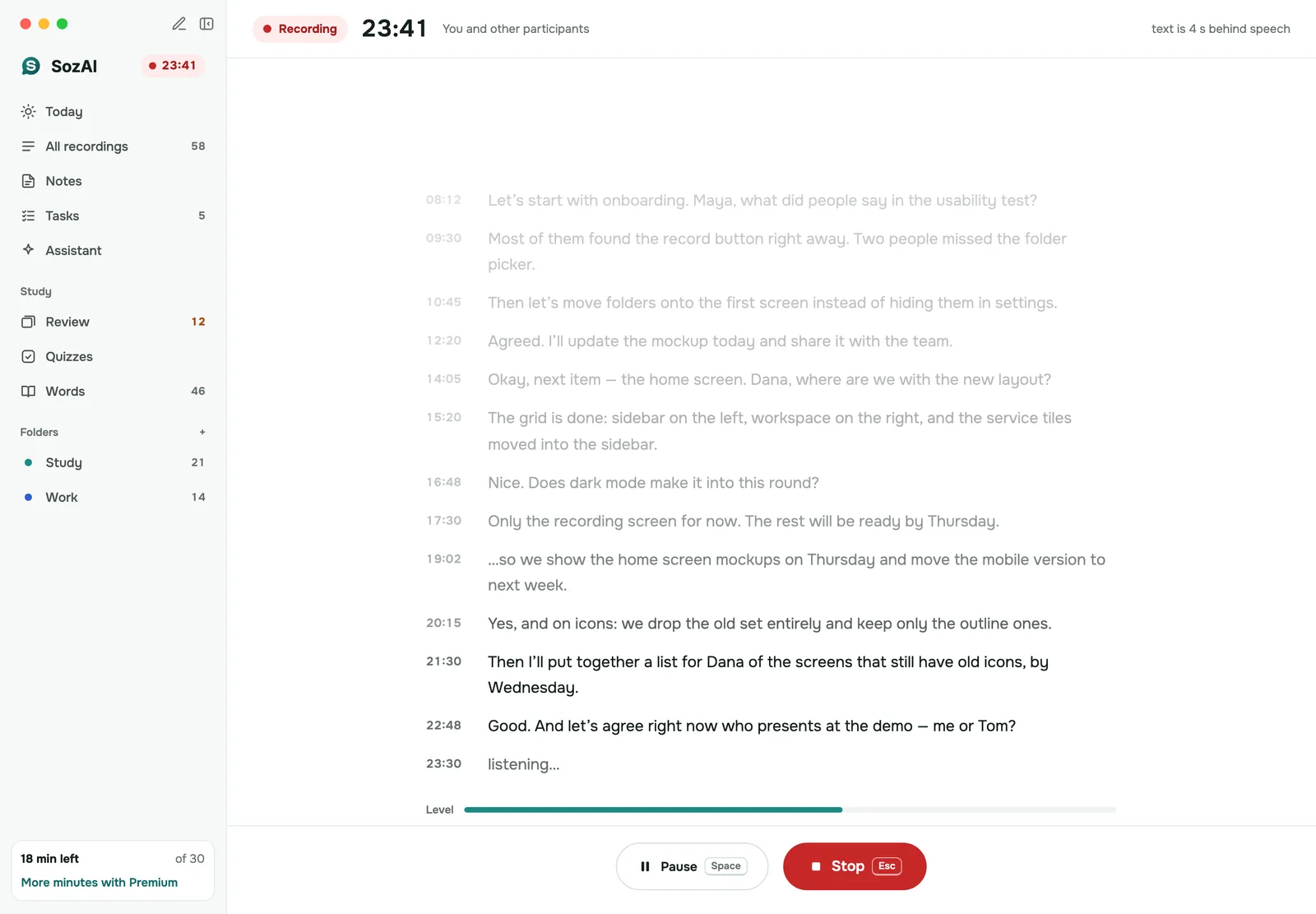
Tell the people on the call
Whatever notice Zoom gives for its own recordings, a recording made on your side shows nobody anything. Say at the start that you are recording and why, and stop if someone objects. Recording rules differ between countries and sometimes between states, and we don’t give legal advice. The whole method, with its limits, is on meeting notes without a bot.
From transcript to minutes
A transcript of an hour-long call runs to many pages, and few people read it. After a file or web recording is transcribed, SozAI writes meeting notes from it: a summary, the decisions, tasks with an owner when someone named one, open questions and a draft follow-up email. Notes need your one-time consent to AI processing. For a Mac meeting, press “Make notes” yourself. What the notes look like: the AI meeting notes page.
Zoom’s transcript or SozAI
| Zoom’s built-in transcript | SozAI | |
|---|---|---|
| Extra steps | None once set up; the transcript appears next to the recording | Download the file and upload it, or start a recording yourself |
| Plan and rights | Paid plan, cloud recording, a setting the host or admin controls | Any Zoom plan; you need only the file or a seat in the call |
| Computer recordings | Not transcribed | Transcribed like any file |
| Languages | English by default; up to 19, depending on which Zoom article is right | 99, detected automatically |
| Speakers | Names for the phrases Zoom attributes, “Unknown Speaker” for the rest | Speaker A, B and so on, which you rename |
| Formats | VTT; TXT for a meeting transcript | PDF, TXT, SRT, VTT, JSON in the app; TXT, SRT, VTT on the web |
| Summary | Zoom’s AI meeting summary (the “Start Zoom AI” button), started by the host or a co-host on an eligible plan | Meeting notes with decisions, tasks and a follow-up email, made from any file |
| Where the data goes | Stays in the Zoom account | Your SozAI account; the partners that process it are on our sub-processor list |
If your company already pays for Zoom, the meetings are in English and the host records to the cloud, Zoom’s own transcript is the easier choice and you need nothing else. SozAI earns its place when one of those three conditions fails.
Teams, Meet, prices and where recordings go
Recording on another platform? See Microsoft Teams transcription and Google Meet transcription, or go back to meeting notes. Buying for a team: SozAI for teams. The first 30 minutes of transcription are free, once, with no card. After that Premium is from $4.99 a week or $79.99 a year in the apps, with up to 700 hours of transcription (pricing).
- Recordings travel to us over HTTPS and are stored on our servers.
- Speech recognition and the AI features are run by named partners, every one listed on our sub-processor page.
- You can delete a recording or your whole account yourself, and with it the audio and everything made from it. More on the security page.
Answers
Frequently asked questions
Is there a way to transcribe an already recorded Zoom meeting?
Yes. If it was a cloud recording with “Create audio transcript” on, the VTT is already next to it under Recordings & Transcripts. If not, download the audio-only M4A, or take it from the Zoom folder in Documents for a computer recording, and upload it to a transcription tool such as SozAI.
Can you transcribe on Zoom for free?
Only as live captions. The free Basic plan shows automated captions during the call, but since May 2026 they can’t be saved, and Basic has no cloud recording to transcribe. For text you can keep, record to your computer and transcribe the M4A; SozAI’s first 30 minutes are free, once.
Can I get a Zoom transcript without recording?
On a paid plan, yes: the host turns on “Meeting transcript”, then during the call opens “More” → “Transcript” and clicks “Save transcript”, which writes a TXT file to the computer. Without it, the captions disappear when the call ends.
Can I get the transcript if I’m not the host?
Only through the host. Cloud recordings and their transcripts sit in the host’s account, and the host chooses whether viewers of a shared recording can see the transcript. Ask the host for the audio file instead, or record your side of the call with everyone’s agreement.
Where is my Zoom transcript saved, and how do I download it?
An audio transcript is in the Zoom web portal under Recordings & Transcripts → Cloud recordings, listed as a VTT file with the recording. A saved meeting transcript is a TXT file in the Zoom folder under Documents on the computer that saved it.
Why does my Zoom recording have no transcript?
Usually one of four reasons: it was recorded to a computer, the account is on the free plan, “Create audio transcript” was off before the meeting, or the transcript is still processing, which can take longer than the meeting. In the first three cases, transcribe the M4A yourself.
What languages does Zoom transcription support?
Live captions cover 49 languages and dialects. For transcripts of recordings, Zoom’s help pages disagree: the settings article says English only, while the article on using transcripts lists 19 languages with a “Change Language” option. SozAI handles 99 and detects the language itself.
Does Zoom write a meeting summary on the free plan?
Zoom’s pricing page lists meeting summaries for 3 hosted meetings a month on Basic, while its summary help article names only paid licences from Pro up. Either way, only the host or a co-host can start it, and participants who aren’t signed in don’t get the email.
Does SozAI join my Zoom meeting?
No. Nothing enters the meeting. You either upload a recording afterwards, or record on your own computer: the web version in Chrome or Edge records a Zoom browser tab, and SozAI for Mac records the Mac’s sound, so it hears the Zoom desktop app.
Turn your next recording into text
Record, upload a file or paste a link. You get the transcript, speakers and a summary back.
Free on iOS and Android. No account required for YouTube transcripts.


