
Windows
AI meeting notes on Windows, from the browser you already have
There’s no SozAI app for Windows. The web version in Chrome or Edge records your microphone and a call’s browser tab, then turns them into a transcript and notes.
The short answer
SozAI has no Windows app; on a Windows PC you use the web version at web.sozai.app in Chrome or Edge, with nothing to install. It records your microphone, the browser tab of a Google Meet, Zoom or Teams call (“Tab audio”), or both together, and it also takes recordings you already have as files of up to 500 MB. You get a transcript with speaker labels in any of 99 languages, then notes with decisions and tasks, and no bot enters the meeting. One recording stops at 3 hours or when your minutes run out, and the first 30 minutes of transcription are free, once.
What works on Windows
The browser is the whole app here, so the question is always whether the browser can hear the meeting.
| Meeting | Works | How |
|---|---|---|
| Google Meet in Chrome or Edge | Yes | Source “Both” or “Tab audio”, pick the Meet tab |
| Zoom or Teams opened in the browser | Yes | Same as Meet |
| Zoom or Teams desktop app | Not directly | Join the same meeting from the browser, or record in the meeting app and upload its file |
| Meeting in a room, laptop on the table | Yes | Source “Microphone”, in any browser |
| A recording you already have | Yes | Upload it, several files at once, up to 500 MB each |
| Any call in Firefox | Microphone only | Open the call and SozAI in Chrome or Edge |
Edge ships with Windows, so on most PCs there is nothing to download at all.
Recording a call in Chrome or Edge
- Open the call in a browser tab: Meet, the Zoom web client, or Teams on the web.
- In another tab, open web.sozai.app and sign in. A Google or Apple account works, or a one-time code by email.
- Go to Record. Under “Audio source”, choose “Both” to record you and the others. Set “Recording type” to “Meeting”.
- Press “Start recording”. In the browser’s sharing window, pick the tab with the call and turn on “Also share tab audio”. Only the sound is kept.
- If the browser can’t use the microphone, allow it for the site, and check that Windows itself allows it under Privacy → Microphone.
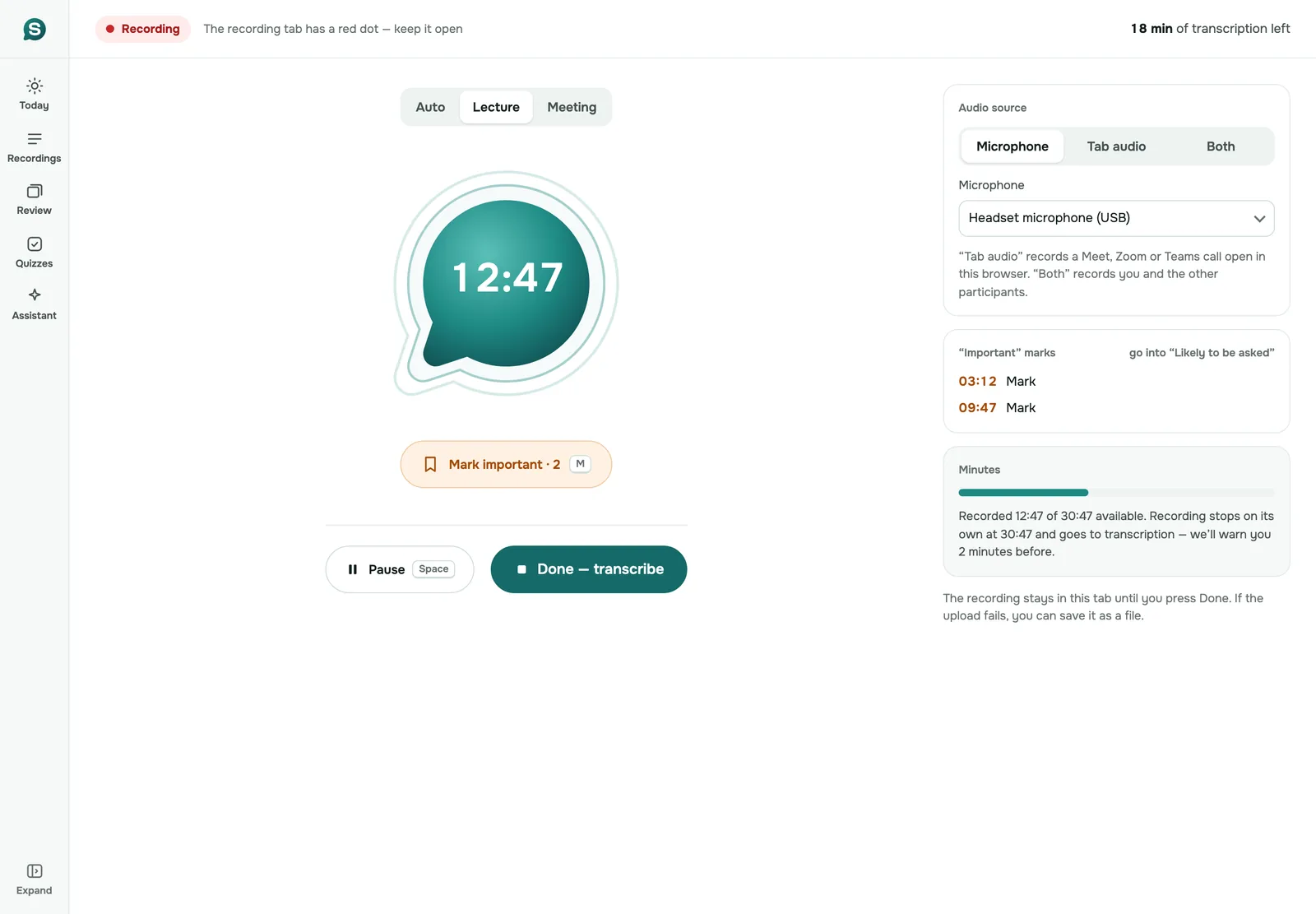
- Talk as usual. Keep the SozAI tab open; it shows a red dot while it records.
- At the end, press “Done — transcribe”.
A one-hour recording is usually transcribed 1 to 2 minutes after it has uploaded, with each voice labelled. The meeting notes follow, with the decisions and tasks at the top. Download the text as a TXT file or as SRT and VTT subtitles, or copy the notes. Tell the other participants you are recording, and follow the consent rules that apply to all of you; nothing in the call tells them.
The desktop Teams or Zoom app
This is the main gap on Windows. A browser hears its own tabs, not other programs, so a call in the Teams or Zoom desktop app is invisible to the web version. On a Mac the SozAI app solves this by recording the Mac’s sound; there is no Windows equivalent.
You have three ways around it. Open the same meeting in Chrome or Edge instead of the app; both Zoom and Teams can run in a browser tab. Or let the meeting app record, then upload the file it saved (where Zoom keeps its recordings). Or, if you can do neither and every call is in a desktop app, a bot note taker will serve you better than SozAI; meeting notes without a bot compares the two approaches.
Minutes and the 3-hour stop
Before you start, the recorder shows how many transcription minutes you have left. A recording stops by itself when they run out, or at 3 hours, whichever comes first. You get a warning 2 minutes before. What was recorded goes to transcription; for a longer meeting, start a second recording straight away.
If a finished recording needs more minutes than you have, it waits in the tab. You can buy minutes and upload it, or save it as a file. Minutes already held for recordings that are still being transcribed are shown separately, so the balance can look lower for a few minutes.
Making notes and translating a recording don’t spend transcription minutes. Only transcribing audio does.
| Plan | Price | Transcription |
|---|---|---|
| Free | No card | 30 minutes, once per account |
| Pro, bought on the web | $9.99 a month or $79.99 a year | Up to 700 hours |
| Premium, bought in a SozAI app on a phone or Mac | From $4.99 a week or $79.99 a year | Up to 700 hours |
| Team, per seat, bought on the web | $12.99 a month or $99.99 a year | Up to 700 hours per seat |
Web plans are bought in the web version under Account → Premium and charged by card through Polar, which issues the receipts. Whatever you buy works across every SozAI app with the same account. The pricing page has the details.
Keep the tab open
Until you press “Done”, the recording exists only in that browser tab. If you try to leave the page, SozAI asks whether to stop and transcribe or keep recording; closing the tab or the browser makes the browser itself ask first. If the upload fails, the recording stays safe in the tab with “Retry upload” and “Save file”. A long upload continues while the tab is open, even if you switch to other work.
When SozAI is not a fit
- Your calls all happen in the Teams or Zoom desktop app and can’t move to a browser.
- You want recording to start by itself, with no tab to keep open.
- You need meetings longer than 3 hours as a single recording.
- Someone on the call hasn’t agreed to be recorded.
Recordings travel over HTTPS and are stored on our servers in Germany (Hetzner); the companies that process them are on our sub-processor list. More about meeting notes in general is on the AI meeting notes page, and meetings that aren’t in English are covered on meetings in several languages.
Answers
Frequently asked questions
Is there an AI note taker for Windows?
SozAI works on Windows through its web version at web.sozai.app in Chrome or Edge; there is no Windows app to install. It records your microphone and a call’s browser tab. Then it writes a transcript and meeting notes.
Can I record a Teams meeting on Windows with SozAI?
Yes, if Teams runs in Chrome or Edge: choose “Both” or “Tab audio” and pick the Teams tab. The Teams desktop app can’t be recorded by a browser; join the meeting from the browser instead, or upload the recording Teams saved.
Does SozAI need a bot to take notes on Windows?
No. Nothing enters the meeting. The web version records the call’s tab on your own computer, so tell the other participants yourself.
How long can one recording be?
Up to 3 hours, or as long as your remaining minutes allow, whichever is shorter. The recording stops by itself, warns you 2 minutes before, and sends what was recorded to transcription.
Does it work in Firefox?
Only for the microphone. Recording a call’s tab audio needs Chrome or Edge on a computer; in Firefox the “Tab audio” and “Both” options are inactive.
How much does SozAI cost on Windows?
The first 30 minutes of transcription are free, once. On the web, Pro is $9.99 a month or $79.99 a year with up to 700 hours of transcription; Team seats are $12.99 a month or $99.99 a year each.
Can I upload a recording instead of recording live?
Yes. Drag one or several audio or video files into the web version, up to 500 MB each. The page shows how many minutes they will take before you start.
Turn your next recording into text
Record, upload a file or paste a link. You get the transcript, speakers and a summary back.
Free on iOS and Android. No account required for YouTube transcripts.