
In the room
Notes from a meeting in a room, recorded on the phone on the table
A bot can’t attend a meeting that isn’t online. Record it on your phone or laptop, and SozAI writes the transcript with each voice labelled. Notes and tasks follow.
The short answer
For a meeting around a table, record it with a phone or laptop microphone: the SozAI app on iPhone or Android, or the web version at web.sozai.app in any current browser. SozAI transcribes the recording in any of 99 languages, labels each voice (Speaker A, Speaker B), and then writes notes with the decisions and the tasks. AI meeting bots can’t help here, because there is no call for them to attend. The first 30 minutes are free, once; people talking over each other and whoever sits farthest from the microphone are where the transcript goes wrong.
Why a bot can’t take these notes
Bot note takers get their audio by entering a video call as a participant. A meeting in a conference room, at a client’s office or on a building site has no call to enter, so the bot hears nothing. The only way to get notes from it is a microphone in the room. That is the case SozAI was built around: you record, and everything after the recording is done for you.
It also means the other people need no account and no particular meeting service. They just need to know they are being recorded.
What to record with
All of these give you the same account and the same library afterwards. They differ in what happens to the speech.
| Device | How | Speaker labels | Notes afterwards |
|---|---|---|---|
| iPhone or Android | SozAI app, phone flat on the table | Yes | Yes, made from the transcript |
| Laptop, any browser | web.sozai.app, source “Microphone” | Yes | Yes |
| Mac, normal recording | SozAI for Mac, Record | Yes | Yes |
| Mac, meeting mode | SozAI for Mac, “Microphone only” | No | Not automatically; transcribed on the Mac, live during the meeting |
| A dictaphone or another app | Upload the file afterwards (up to 500 MB) | Yes | Yes |
For a room, our pick is the phone. It is small enough to sit in the middle of the table, and a laptop’s microphone is usually behind its owner’s typing. The Mac meeting mode is the odd one out: it shows the text while people talk and the audio never leaves the Mac, but it has no speaker labels, which is a real loss when five people share one table. The Mac page explains that mode in full.
Recording the meeting, step by step
- Before you start, say that you are recording and what the notes are for. Stop if someone objects.
- Put the phone flat in the middle of the table, closer to the quiet speakers than to the loud one. Tips on rooms and placement are on the meeting recorder page.
- Press record in the app. In the web version, choose “Microphone” as the audio source and set “Recording type” to “Meeting”.
- Leave it alone until the end. Picking the phone up adds handling noise; a notification can interrupt it, so switch on Do Not Disturb.
- Stop the recording. It uploads, and a one-hour recording is usually transcribed 1 to 2 minutes after the upload finishes.
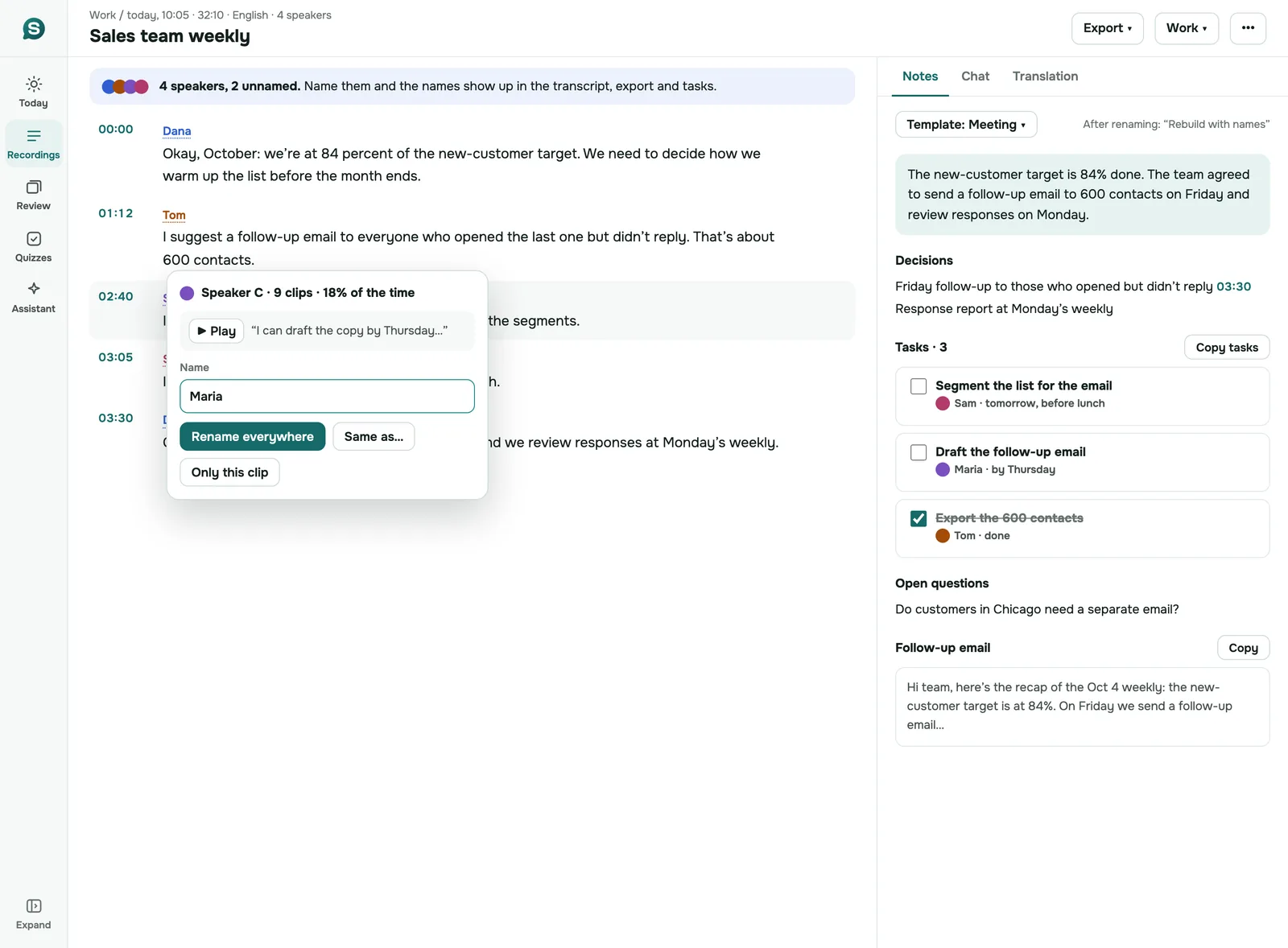
- Check the speaker labels and give them names. Renaming works in the iPhone and Android app and on the web.
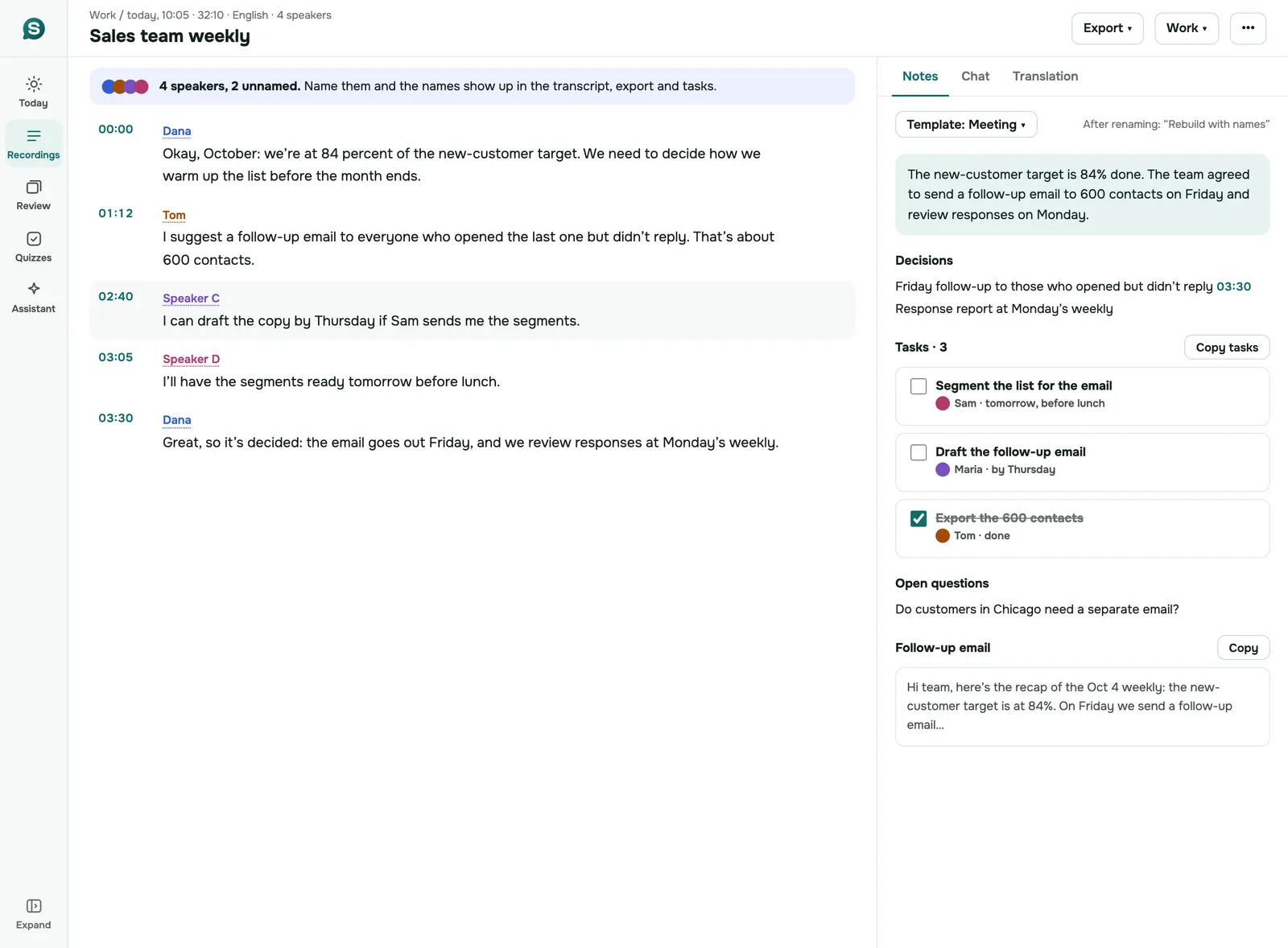
On the web, when you rename speakers after the notes were made, SozAI offers to rebuild the notes with the names, so the tasks say “Dana” instead of “Speaker B”.
A meeting with people in the room and people on a call
Hybrid meetings are where a phone on the table is weakest. The remote voices come out of a laptop speaker, and the phone hears them second-hand.
If the call runs in Chrome or Edge on a laptop in the room, record on that laptop with the web version and choose “Both”. The call’s tab gives you the remote people directly, and the laptop’s microphone picks up the room. Both end up in one recording, transcribed together, with speaker labels across the two. If the call runs in a desktop app on a Mac, the Mac meeting mode with “You and the others” does the same thing, minus the labels. Recording calls without a bot covers the details.
What you get after the meeting
The transcript comes first: every passage with a speaker label and a timestamp you can click to hear that moment. The notes are written from it. For a meeting they open with a short summary, then the decisions, tasks with an owner and a due date when somebody said one aloud, open questions and a draft follow-up email.
A full example of the output is on the AI meeting notes page. The notes can only contain what was said. A nod across the table, a decision made on a whiteboard, or the attendee who never spoke: none of that is in the audio, so it isn’t in the notes either. Read them before you send them.
To get the text out, the phone app exports PDF, TXT, SRT, VTT and JSON; the web version downloads TXT (with or without timecodes and speaker names), SRT and VTT, or copies the notes. You can correct transcript text in the iPhone and Android app; the web version and the Mac and iPad apps don’t edit text yet.
Where room recordings go wrong
Speaker separation works from the voices alone, and a room makes it harder than a call. Expect mistakes when two people talk at once, when a short “agreed” follows a long answer, and when two voices sound alike. The person at the far end of a long table is the one most likely to be misheard. A transcript in a language other than English may also be weaker; our accuracy test lists the measured error rate for ten languages, on clean speech, not meetings. If your meeting switches language, see meetings in several languages.
When SozAI is not a fit
- Someone in the room has not agreed to be recorded.
- You need a certified word-for-word record for a court or a formal board. SozAI gives you a draft that a person still checks.
- The meeting is a clinical consultation. SozAI isn’t built for patient records; our sister app notavik keeps the audio on the device.
- You want every meeting in your calendar captured without pressing anything. For video calls a bot does that; for rooms nothing does.
Where the recording goes
Recordings travel over HTTPS and are stored on our servers in Germany (Hetzner). Speech recognition and the AI notes are run by partners named on our sub-processor list. Delete a recording or your whole account yourself in the app or on the web; the audio and everything made from it go with it, and encrypted database backups are kept for up to 12 months.
Answers
Frequently asked questions
Can an AI note taker work for in-person meetings?
Yes, if it records from a microphone in the room. Bot note takers can’t, because there is no call to attend. With SozAI you record on a phone or laptop, and you get a transcript with speaker labels and then notes with decisions and tasks.
Can I record an in-person meeting with my phone?
Yes. Open the SozAI app on iPhone or Android and press record, then lay the phone flat in the middle of the table. When you stop, the recording uploads. A one-hour meeting is then usually transcribed within 1 to 2 minutes.
How does SozAI know who said what in a room?
It separates the voices it hears and labels each one, Speaker A, Speaker B and so on, without you saying how many people were there. You then give the labels names in the phone app or on the web. Overlapping speech and similar voices are where it makes mistakes.
What is the best way to take notes in a hybrid meeting?
Record on a laptop in the room with the SozAI web version in Chrome or Edge and the source “Both”. The call’s tab carries the remote people and the laptop microphone carries the room, so both are in one transcript.
Do I need to tell people I’m recording?
Yes, always say so before you start. Whether their agreement is legally required depends on where you are; we don’t give legal advice, but announcing the recording is the safe default everywhere.
Can I use a recording from a dictaphone?
Yes. Upload the audio or video file in the app or on the web, up to 500 MB per file. It is handled like a recording made in SozAI, speaker labels and notes included.
How much does it cost?
The first 30 minutes of transcription are free, once, with no card. After that, Premium in the apps is from $4.99 a week or $79.99 a year, with up to 700 hours of transcription. Making the notes doesn’t use transcription minutes.
Turn your next recording into text
Record, upload a file or paste a link. You get the transcript, speakers and a summary back.
Free on iOS and Android. No account required for YouTube transcripts.