Lecture 3.2 on password-based authentication: login process, access control, and common attacks like offline dictionary, password spraying, and guessing, plus defenses such as salting and password pol
Key Takeaways
- Password security depends on both the authentication system and user behavior.
- Hashed password files stolen offline can be cracked with dictionary attacks unless salts are used.
- Password reuse and default credentials can cascade into widespread system compromise.
- Strong password policies and salted hashing significantly reduce attack success.
What the video covers
- Introduces password-based authentication as the process of verifying a user's access to a system via a user ID and password.
- Explains the login flow: the system looks up the stored credentials, compares the user ID, then compares the password, granting or denying access.
- Describes where password authentication is used: multi-user systems, network servers, university portals, and e-commerce sites.
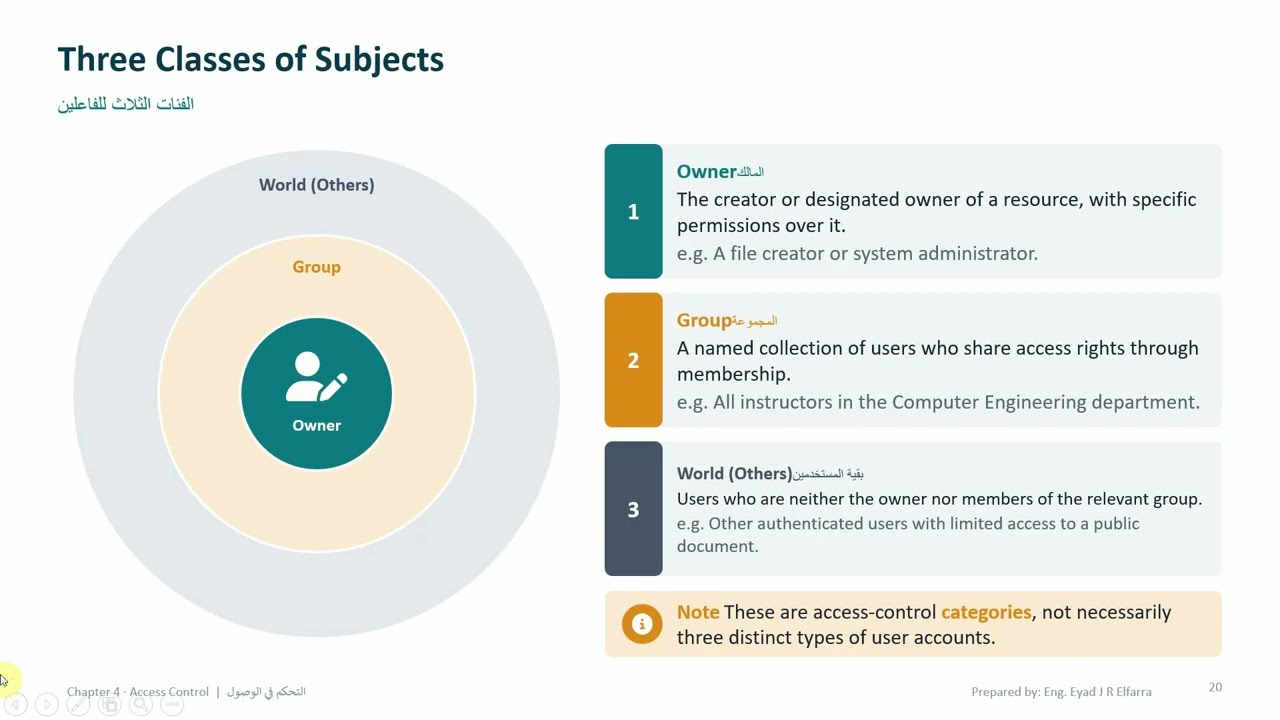
- Covers security functions including access control (determining system access and permission levels) and discretionary access control (read, write, execute permissions on owned resources).
- Presents offline dictionary attacks: stealing a hashed password file and hashing common passwords to match entries.
- Describes specific account attacks (many guesses against one account) and password spraying (one password tried across many accounts).
- Explains password guessing using personal information about a target user, and workstation hijacking via unattended logged-in devices.
- Highlights user-behavior weaknesses: writing passwords down, leaving default passwords unchanged, reusing passwords across accounts, and choosing personal-info-based passwords.
- Warns that transmitting passwords in plain text over the network enables sniffing.
- Explains the role of salts in hashing to defeat precomputed dictionary attacks, and discusses password policies and checking new passwords against forbidden lists (e.g., with Bloom filters).
Chapters
- 00:00Introduction to Password-Based Authentication
- 02:18Login Process and Security Functions
- 04:18Access Control and Discretionary Permissions
- 04:36Common Password Vulnerabilities and Attacks
- 07:00Password Guessing and Workstation Hijacking
- 10:00User Mistakes, Default Passwords, and Password Reuse
- 13:00Salts, Hashing, and Offline Dictionary Attacks
- 19:00Password Policies and Forbidden Password Checking
Full Transcript — Download SRT & Markdown
Speaker A
In the name of God, the Most Gracious, the Most Merciful. Welcome to section 3.2 of the lecture. User authentication . I will talk about password-based authentication. Which is the process of authenticating a user's access to a site using passwords. Alright. I will
Speaker A
talk about attacks, hashing, and salts. Password cracking, file protection, selection strategy, and Bloom filters.
Speaker A
Let's talk about password-based authentication. How does the login process work using a password? First, the user enters their user ID or username and password. Then the system searches in the location where I store the authentication data. Whether it's a
Speaker A
password file or, for example, a users table in my database. Once I find my data, I compare it with the stored data . I check the user ID against the user ID. If the user ID matches the user ID,
Speaker A
I check the password against the password. If the two are the same, the user has authorization to access the system. I grant them what? This means if both match, I grant access, and they enter the system. If they don't match,
Speaker A
I say denied, you are forbidden from accessing the system. It is used by multi-user systems. Meaning systems with multiple users, network servers, and web services. For example, systems like a university website, where multiple students and teachers log in
Speaker A
at the same time. E-commerce websites. Where multiple people are buying from the site, or multiple merchants are listing their goods. So you find we have a username and password. Okay, user profile. Security function.
Speaker A
Security function. First, access control. I determine whether this person, based on the username and password they provided, does......do they have permission to access the system at all? If they have access, I see what permissions I've granted them.
Speaker A
Are they an administrator? Are they a normal user? Are they a guest? Alright. Whether they are an administrator, a normal person, a normal user, or a guest on the site. The final thing is discretionary access control, which is
Speaker A
control. In discretionary access, as a user, I have a file, and I own the resource. Can I give permissions on the file I uploaded to the site to other people, or not? Of course, the permissions we have are read, write,
Speaker A
and execute. Alright. We talked about read, write, and execute permissions. So, what are the vulnerabilities or weak points that we encounter? Or the breaches that happen to passwords?
Speaker A
First, we have offline. Offline dictionary. All passwords, for example, are stored in my password file.
Speaker A
Especially in operating systems. I have a password file where passwords are stored. What do I do? They are stored in hashed form. Simply, I steal this password file. So now I have a file with all the passwords or all the
Speaker A
password hashes in my possession. I have a dictionary containing all, or most, of the popular passwords. I might have, for example, a million, two million, or three million of them. I take them. I hash every one of these
Speaker A
popular passwords. I do this offline, without being logged into the server. I hash them and check if this password exists in our file or not. If the password exists in our file, then this is the password we wanted and we
Speaker A
confirmed it. I go through all the passwords, calculating the hash for each one. I see if the hash is present or not, until I get all the passwords I want. This is the first method, then we have what's called a specific account
Speaker A
attack. What is a specific account attack? I have one account. I want to perform many guessing attempts against this account. I try the first, second, third, and tenth password with the username or user ID belonging to this account. The third type is a password
Speaker A
spraying attack, which is a popular method. I have a website with a hundred users. I try one password with the first user, another with the second, and a third with the third user. Until I can reach the password I want, to see
Speaker A
who this password is linked to. Who is this password linked to for the second person? Who is this password linked to for the third person, and so on. The fourth type is password guessing. I have an account that I know, okay. I
Speaker A
have a user that I know. I know their ID but not the password. But I know things about the user, like their date of birth, okay. I know, for example, their wedding anniversary. I know their ID number. I know the name of their
Speaker A
oldest child. I know their favorite club, okay. I know a set of data about them. From the data I know about this user, I will try to guess their password, okay. The fourth thing is called workstation hijacking. I am
Speaker A
logged into my laptop. I am logged into an account, for example, a professor's account on the Islamic University website, and I left the laptop open and walked away. Someone came, took the laptop as it is, and left. Now he has
Speaker A
performed a workstation hijacking. The device I am working on, which is the laptop, has been stolen, okay. So, users log in on an unattended PC, okay.
Speaker A
I am logged into my laptop with my own password. But I left the device and walked away, so the device was stolen from me, okay. Now he has full access to reach my data inside the site, see what he wants from it, and edit what he
Speaker A
wants, okay. The fifth or sixth thing is exploiting user mistakes. What does that mean? Some users go and do what?
Speaker A
They write the password on a piece of paper and put it in their pocket, okay.
Speaker A
Or they write it in a notebook and put the notebook in their bag. If I manage to reach the notebook or the paper, after that I have managed to know the passwords. Another thing is that most devices come with what? Default
Speaker A
passwords, okay. Default settings. For example, in a router, you will find root and admin, or admin and admin, or root and one, two, three, okay. So, we have default passwords that I didn't change, great. Consequently, I am allowing him to be able to steal my
Speaker A
file. Or he could guess it easily. Password reuse, what does that mean? I have one password used for all the accounts I have, right. If I used a password in a certain system, I can know all, I can. Access all the
Speaker A
accounts, which are your accounts. Or I have, for example, let's say the entire finance department. Or the entire administrative department has the same password. If I knew the password of one person from the administrative department. Then I was able to know all
Speaker A
the passwords of the administrative department. And I was able to enter all the accounts. So, reusing a password for more than one user in the system could cause a system leak problem.
Speaker A
Right, one leak operation opens up many systems for me. Electronic monitoring, what does it say about the network? If I were to log in, the password would be sent from my webpage in plain text.
Speaker A
Right, anyone can perform sniffing. They see the request coming out from me . They see the username and password.
Speaker A
Consequently, they can identify them. Consequently, what can they do? They can identify them. So, password security management. Right. The security process for passwords does not depend only on the authentication system we have. The authentication system I have might be strong, but what
Speaker A
? It also depends on the user's behavior. If the user uses a password used by many. Or the user who, for example, wrote down the password. Or the user did not change the default password, then we have a problem. The
Speaker A
user chose a password related to their personal information, we also have a problem. The second thing is password management. If my system allows several accounts to enter with the same password, if the password for one account in this group is revealed, it
Speaker A
means the door is open for all accounts . It opened up in front of the attacker . It says offline dictionary attack.
Speaker A
First thing, the password file is stolen. Right, we talked about that. A little while ago, that my password file is stolen, it contains the hashes of the passwords. What do they do? It says hash a dictionary. I have a dictionary
Speaker A
with all the passwords or common passwords. I hash them and compare them with whom? With the hashes I have in the password file. If I find it the same, it means I know the password. Of course, I will use here the same hash
Speaker A
function. I cannot use a hash function other than the one used for encryption. If there is a match, it means I knew the password. And if I knew the password, I became able to enter the system. Is it clear? So I steal the
Speaker A
file, I get the hash, I get the dictionary, I perform hashing for all the passwords inside it, using the same hash function my system uses for password encryption. I perform a comparison; any password in the file where I found the hash, any hash in the
Speaker A
file whose hash I found in my dictionary, means I knew its password and was able to reuse it. For example, if I have created MD5 hashes for whom?
Speaker A
For three words. And I have a stored hash that starts with "A10E" and ends with this number. I compared a password with it, but it didn't work. Then I compared "1A3AC" with the hash, and my hash "1A3A" matched this hash, which
Speaker A
means this is the password. Is that clear? So, what are our methods for protection against this? Prevent unauthorized access to password files.
Speaker A
Not just anyone who accesses my system should be able to reach the password file. Many systems, when they started, for example...Regarding the Laravel framework, specifically before Laravel 4, if you typed ".env" in the browser, it would download the file containing
Speaker A
your database login settings. And this was a serious leak. We also had routers , for instance; some types of routers, if you typed "rom-0" in the browser, what would it do? It would download the file that contains whom? The file that
Speaker A
has the admin username and password. And therefore, what should I do? Implement unauthorized access prevention for password files. In these cases, I need to prevent access. Like .env in Laravel, I need to block access to rom-0 in the router, and block
Speaker A
access to the password file in Windows, okay? So that no person unrelated to the matter can come in, take the file, and perform a search for passwords.
Speaker A
Right, detection. Spot compromise, right. For any attempt to steal the file or use the stolen words, I should use an Intrusion Detection System. So that I prevent anyone entering the system from reaching the password file, tell me. Rapidly reissue passwords if
Speaker A
the file is. Compromised, it says simply, if the file was stolen, I just need to go and change the passwords present in our system very quickly, okay. Okay, online password attacks. I have one user, as we mentioned, what
Speaker A
should I do? I have one account, and I want to try several passwords for this account, okay. So for a particular account, the attacker submits guess after guess for the account password.
Speaker A
They want to enter a first guess, a second guess, a third guess—that is, guess after guess, until they reach the password, okay. What is the defense? It tells me to lock the account after several failed login attempts. In our
Speaker A
programming languages, after three attempts, or in large software systems, what do we do? After the third password attempt, we stop the login process for you, okay, for five minutes, a minute, or a quarter of an hour, depending on
Speaker A
the system and its security level. Okay , the fourth type, which is who? Or the third popular password attack. No, I have a password like "123", these are famous passwords. I go and try it on whom? On a group of accounts. It worked
Speaker A
with one or two of the accounts. And that is how I knew their passwords later. Then I use a second password.
Speaker A
And I attack it as a third. And so on, until I know most of the passwords used . Back to our account here. As we said.
Speaker A
The way is, first, passwords like 1 to 6 are forbidden from my system. Second, monitor login request patterns. What does this mean? If I find a certain source IP. Trying to access 10 accounts at the same time. Or 20 accounts at the
Speaker A
same time. Then this one must be blocked. I can also, during your login process, store data about you. In the browser cookies, if I find you have logged into an account, for example.
Speaker A
Then attempted another account, then a third account. I will also prevent you from logging into the site. Our website . Password guessing, as we said. I want to use my knowledge of the account owner to guess their password, and so
Speaker A
on. I want to choose passwords as a defense mechanism. Choose a password unrelated to personal details. It should have nothing to do with personal data. Not a name, ID number, birth date , son's name, or favorite club name.
Speaker A
Choose data that has nothing to do with your personal information for your workstation. We said that I logged in with a password, okay. Logged into my account on the device, and the device is left alone. It simply tells me to
Speaker A
perform an automatic logout after inactivity. Meaning, if I left the device for five minutes without activity on the site, I should immediately log the user out. User mistake, as we said, simply. The user wrote the password on a piece of paper.
Speaker A
Someone tricked them and managed to get the password from them, right, correct. They called them and said, "We are the telecom company checking your internet.
Speaker A
""Give me the username or the password for your router." Many people provide the password. Therefore, I need to provide user training, okay. I need to train users so they aren't easily deceived. And they know how to write correct passwords. Also, I must force
Speaker A
them as soon as they start. The system for the first time to change the default password and set a new, strong one. Another type is password reuse.
Speaker A
Okay, meaning one password or a group of similar passwords is used on several systems, as we mentioned. For example, in my organization, I say all users.
Speaker A
Your username is your employee number. And the password, for example, is 1 to 6 for all employees, or. Your employee number is the username and password. In this case, I want to prevent users from reusing the same or similar passwords
Speaker A
so that the system's security is higher . Electronic monitoring. We said that I simply come and try to do what? I perform sniffing on the network. Or I monitor the network. I see what packet is coming from you. I will find the
Speaker A
password written in plaintext. Okay, not encrypted. I will know the username and password you sent. I will perform an attack. Okay. Why are passwords still used? Okay, despite all these problems, why do we keep using passwords? I say it's because of the
Speaker A
methods, I say most of our hardware and software require a client-server usage model. In the current situation, I, as a mobile user, access my mobile. I want to be logged into Google services. I want to log into iOS. I want to be in
Speaker A
Apple services. I want to log into Facebook. I want to go and be on Facebook and WhatsApp. Alright. So most of them rely on a username and password . Another thing: cost and inconvenience . I'm talking about physical tokens. If
Speaker A
I were to give you this flash drive, or take this smart card to log into the system. First, it will be costly for us . I have to give everyone a card. I have to give everyone a flash drive. It
Speaker A
will be a costly process. Second, carrying it around is a bit difficult or bothersome; for example, if I have to always wear the card or keep it in my pocket, I might forget it, which creates problems. The third thing is
Speaker A
the single point of risk; simply put, if I lose my password, I only lose access to my account. But if...In other systems, maybe that won't happen.
Speaker A
Password managers, as they say, password managers have their own security problems. Alright. They have expiration dates. Reuse or redistribution of passwords. And synchronizing them. And the problems associated with them are known to us.
Speaker A
For whom? For passwords. Alright. Conclusion: despite all the weaknesses they have. Passwords remain very widely used. Therefore, we must protect them with strong mechanisms, like hashing and salting. Alright. Let's talk about salt. What is salt? I have a user ID
Speaker A
and a password. I want to hash the password. Alright. Normally, For the user ID, I want to hash what? Their password. In a normal situation, what do I do? I hash the password. Alright.
Speaker A
I hash only their password. Alright. And store it in the database. They say anyone with database access can see it, they might reach it. But no, I want to add a random number of my own, or a random text of my own, to the user's
Speaker A
password before I hash and store it. So I have the user ID, a salt, and a hash code. Now, who arrived with the user ID ? Their password arrived, and the user ID arrived. I check the table for the
Speaker A
user ID to see what their salt is. For example, I found HKL, let's assume. So I merge it with their password. Now I have the password plus HKL. I hash this entire string. If an attacker now gains access to the user's data, they
Speaker A
actually don't know the salt I used in the hashing process, because I don't give the salt to the user. Consequently , their hash code will always turn out wrong. Therefore, I can provide protection for the user. Alright. I can
Speaker A
provide what? Protection for the user. Alright. How does the method work? First, for the salt. Alright. A random salt is created for the password.
Speaker A
Alright. Slow hash password function. I want to put the password, let it go through a slow hash function. It does not produce the result quickly, and therefore. It limits the attacker's attempts at attacking the system. I mean, if the system had a fast hash
Speaker A
function, it could perform, for example , 1,000 attempts per minute. Of course, all I will give you is 10 attempts or 5 attempts per minute. Consequently, as an attacker, your authorization or access capabilities to the password or guessing will be limited. Thus, I
Speaker A
provide better protection. The third point says, load the file. Hash code file with, not just user ID and hash code, but user. ID, salt, and hash code to protect my user. Alright, it says the plain password, fine. The password,
Speaker A
which is plain text, in its clear format, for example "123", is never stored inside the password file.
Speaker A
Therefore, it will create a costly task for the attacker. This will make every password guessing attempt expensive for the attacker. So, how do I perform verification now? Who is this? This first part was about me wanting to store a new password. Well, since the
Speaker A
password is stored, how do I do it? Verification. I will ask the user to enter their ID and password. We entered the user ID. So, what did I do? I took their salt. Good. And I took the password they gave me. I fed them into
Speaker A
the slow hash function. It output the hash for me. I will take the new hash that resulted. And compare it with the user's hash stored in my password file.
Speaker A
If the two are the same, it means I was able to perform verification for them.
Speaker A
And therefore, it's correct. If I couldn't, or the compare gave me that they are not the same, it means reject, this is not the user. Trying to enter our system. Alright. Why do I use salt?
Speaker A
It says, assume Alice and Bob are my users. Alice's password: "sunshine". And Bob's password: "sunshine". Alice's salt is "3f7a". And what about the password and salt for Bob? Alright. Now it says, if we want to hash them, how
Speaker A
do we do it? We take "sunshine" plus this, and we hash them. And to get the result, we take "sunshine" plus this salt. We hash them to get the stored result. Which is the password for, for Bob. Therefore, two passwords, the same
Speaker A
password for two users, but different hashes. Alright. And so, I managed to provide another layer of protection. So , what is the benefit? It says here, duplicate passwords. In my system, it is impossible for me to know that I
Speaker A
have duplicate passwords. Because the hashes are always different. Why? Because the salt is always different.
Speaker A
Because they are, okay. Slows offline dictionary attacks. If someone performs an offline dictionary attack, they have the stored hashes and usernames.
Speaker A
Alright. How would they know that this hash is actually Alice's? It’s actually sunshine, not sunshine tied to something else. How would I know if Alice and Bob don't have the same password? That they have the same password? Consequently, it makes the
Speaker A
process difficult for this system user. If I am a user who has reused a password in more than one place, it hides it for me. Why? Because every time in every place in the system, it will give me a different hash,
Speaker A
different from whom? From. Okay. The traditional versus model, which is who? Traditional password cracking. We have, we have a dictionary. Dictionary attack , I will have a large list of passwords . Right. Known, if the password is QWERTY, one to six, one to eight, ABC,
Speaker A
ASD. Right. These are famous passwords. Right. I will have a list stored in them, "Dragon,""The King." Anyway, the passwords. Famous, I will have a list stored in them, for example, I have a million passwords, two million passwords. Right. So I have a
Speaker A
dictionary, and this dictionary, every entry in the dictionary is a guess, an attempt to guess. I take the attempt, I hash it, and I compare. Right. If the compare works for me, that means I was able to get the password. If the
Speaker A
compare doesn't work for me. Right. I wasn't able to get the password. Therefore, what is this first type? I call it dictionary attack. You must use passwords with numbers, symbols, and capitalization. How? I can vary, and if I vary, I won't use words that are
Speaker A
known. Right. From the dictionary, and try to add numbers and symbols to whom, to your password. Use different capitalization, capital and small letters, and thus, what? It makes the process difficult for him. When in your name, for example, the letter A, make
Speaker A
it the letter 0, the O, make it zero. And thus, the process becomes very difficult for him. The second thing they call a rainbow table. What is the rainbow? Tables, a rainbow table, they call it precomputed tables of password
Speaker A
hashes. What does that mean? I have these passwords and this is their hash. This is the hash password, this is the hash tag. For example, we have MD5, one of the types of hashing. Right. I have this first password, this is the hash,
Speaker A
and the second is the hash, and the third is the hash. I have a whole table I call a rainbow table, a precomputed table of password hashes. I want to take this dictionary and do a precomputed one for it. And thus, I
Speaker A
have, for example, a million, two million, three million hashes. Nice. I come to you to the storage space, and I see what hashes you have. If I found this hash, it means its password; I found this hash. It means this is its
Speaker A
password, right. This is what I call a rainbow table. So, how do we want to prevent the rainbow table? He told us the simplest way for a rainbow table is the salt. The salt, right. Use a large salt instead of two or three letters.
Speaker A
For example, make them five letters, five different characters, add them to the password. And thus, the rainbow table fails us completely in this case, right. Modern attack, what does it tell me? Computing power is, based on numbers, right. The story is no longer
Speaker A
about me wanting to ask the user to, what. Gone are the days where I have to try one attempt after another. Now I have a GPU; what does a GPU do for me?
Speaker A
It performs massive comparison operations at the same time, okay? It can perform smart guesses using artificial intelligence. I can also use leaked databases. For example, I have a leaked database of Facebook passwords, Google passwords, or passwords from any
Speaker A
site. I use this leaked database I have and I can check my data against it.
Speaker A
This is also a feature we have in what? In modern cracking, okay? It reuses the most common passwords rather than random ones, okay? Therefore, it says that highly used passwords are checked first. I am not talking about random
Speaker A
checking like we have in a dictionary attack. Is the difference between a dictionary attack, rainbow tables, and modern cracking clear? For a dictionary attack, I take a dictionary with all the famous, globally known passwords. I take them and try them out. Rainbow
Speaker A
tables are different; I have a table of password hashes based on the hash function used, and I check against that . To avoid rainbow tables, simply put, if you add salts to the password before hashing, the whole rainbow table fails.
Speaker A
Why? Because salts are always random. Modern cracking relies on the GPU, which provides very high computational power, like GPUs and TPUs. It performs a smart guess operation. I don't just take any password. Based on your name and your data, I can say that these
Speaker A
passwords are the most likely ones you would use, and I add them first. It also relies on databases leaked from sites, and database leaks happen often.
Speaker A
Thus, I have real passwords that I can try, okay? Okay. Why do users use weak passwords? Most users try to come up with short, common passwords to remember them. Okay. They keep them linked across all their accounts. They
Speaker A
are predictable, often linking them to their names or personal information. Okay. And they rely on common knowledge . Why do people do these things? Okay.
Speaker A
Well, it says length alone is not enough. Okay. Meaning, the length of the password alone is not sufficient.
Speaker A
You might type your name, birthdate, and ID number in one long password. Okay. But what? It is predictable, okay , and thus this is a weakness. I see, so what is the solution? It tells me, of course, it tells me the number of
Speaker A
guesses. Do you see what it says here about the number of guesses? It tells me the number of attempts and the number of successful attempts. It says with 10 to the power of 8 attempts, for example, you can get approximately only
Speaker A
2%of passwords. With 10 to the power of 10, how much can you get? About 12%, and with 10 to the power of 13, the percentage can reach close to 40%. Why?
Speaker A
Because as the number of attempts increases, more commonly used passwords will be tested, and attackers always try to use the most common passwords in their initial attacks. How do I protect the password file? We said that one of
Speaker A
the attack methods is performing an offline attack. What happens to them? They take the password file and move it to their offline device. Then they start trying to crack it. How can I protect it? They say an account file
Speaker A
has account information readable by any user. This is a problem. The solution is to create a shadow password file. I should obscure it, for example, not just a plain password file. The passwords inside should be hashed, alright. And I should keep them in a
Speaker A
separate, secure place. Only authorized personnel should be able to access and read the data. Exactly. And what matters is the password file offline.
Speaker A
If an attacker steals the file, I, as the site owner, won't know it was stolen. Why? Because they will be working offline on their device, trying to guess the passwords. Consequently, in the next attempt on my site, they
Speaker A
will log in with the username and password on the first try. Without multiple attempts for me to detect them . Therefore, no lockout. Exactly, I won't be able to lock them out, and I won't be able to detect it. So, what
Speaker A
other reasons are there? Operating systems. If someone gains access to my operating system, they can reach the password file. System database weaknesses: If the password database is weak or stored in a weak location, it means anyone could potentially access
Speaker A
it. Password across systems: If I use the same password in more than one place in the system. Also, weak physical security: if someone can physically access my machine and take the hard disk. Backup files: Same thing , if someone can physically access the
Speaker A
backup files. Or network sniffing: If someone can sniff the network, they can potentially discover the password. All of these are considered threats to passwords. Okay, password selection strategy: to choose a strong password, what strategies do I have? First, I
Speaker A
should teach the user how to choose a password. A strong one, exactly. And what things they should avoid. But it says, what about many users? Even when I tell them. That to create a strong password, for example, it must be 8 to
Speaker A
16 characters long and include letters, numbers, capital, and small letters. You find them ignoring this advice. So, the second solution is computer-generated. I let the computer generate the password for the user randomly. And force you to use it. It
Speaker A
will be strong, but what about it? Since it was. Chosen randomly. It will be difficult for you to use or remember . The third thing, it says, or the third strategy is reactive checking. I let the user enter a password they can
Speaker A
remember. But I will check it, alright. How is that? After you enter the password, I will periodically scan the system. I will examine the passwords we have. Any password I find weak, I will alert the person using that password.
Speaker A
You call it proactive checking, and that is the best; I want to do. A pre-check. Every password, as soon as you create it, I want to check it. If it is weak and does not meet the standards, because it requires eight or
Speaker A
sixteen characters, including capital, small, and special characters, I will block you from entering this password.
Speaker A
Most systems currently rely on proactive measures. They rely on what we call...Okay. This is after the proactive part, okay. Well, or the proactive check, you know. Okay. We receive the password, and check it against the standards. If it is okay,
Speaker A
it passes; if not, I reject it and ask the user for the password again. What are our standards? Basic standard says that your password must be at least 16 characters long; that is a standard.
Speaker A
Another standard says it should be comprehensive, meaning eight characters or more, containing upper and lower case letters, symbols, digits, and most importantly, not be a dictionary word, okay. The currently used standard is the minimum number of characters, that
Speaker A
your password should be more than eight , but at least...At least eight characters. Okay. So, why did we choose eight? To strike a balance between security and usability. If I asked for 16, 20, or 30, it would be a very large
Speaker A
size. Consequently, usability would be somewhat difficult. True, I achieved security. But usability would be difficult. I want the user to follow my rules. So I will strike a balance between security and usability. By setting strict rules. And at the same
Speaker A
time, allow the user to use the site easily, okay. We have the second type of checking or password checkers. Which is what? Bloom filter password checkers . This Bloom...Filter password checkers won't check against rules. It will check against stored passwords. I have
Speaker A
a dictionary of one million. Two million. Ten million. If I want to search in the bad list. The bad password list, which has 10 million passwords. The storage for it would be very large. And searching through it is
Speaker A
expensive. And the repetitions or alternatives create complexity, so... What is the solution? The solution is to use the Bloom filter. It gives us compact storage and very fast rejection of known bad passwords. But how? The Bloom filter works by first creating
Speaker A
the Bloom filter architecture, and then I start checking; simply put, I will use different hashing functions. I will take the bad passwords we have here. I will say the first password. This is bad: H1 for the password. H2 function
Speaker A
for the password. A third hash function for the password. Each of them will give me a number, okay. For example, 8 and 1. I will say okay. Let it be one and eight. Let it be 13, let it be one,
Speaker A
something for the password. And the one after it, and the one after it, and so on. Okay. What happens here? We have created what you might call a template.
Speaker A
It contains what? The hashes of the passwords that are weak. Now, in order to compare, do I go to the main list that has a million records? No. I now have one ready. Built and ready. It is one, zero, one. Zero, one, okay.
Speaker A
Depending on the number of bits. I take the password I want to check. Here, the user has entered a new password. Is it among the forbidden passwords or not? I take the password. I input it into the first hash function. And the second
Speaker A
hash function. And the third hash function. Now, each one of them will give me a bit number. I will check the bits that were returned. Assume that " dragons" returned the first bit and the bit. The second and the third bit. It
Speaker A
says if I find all three are correct. If I find all three are ones, this means the password is weak, so I reject it. Now, if I find one of the three is a zero. This means your password is
Speaker A
strong. You can use it. However, it says that Bloom filter passwords suffer from something called false positives.
Speaker A
What does that mean? A strong password might come in, not in the dictionary, and it returns all of them as positive.
Speaker A
Why? Because it intersected with two weak passwords, and thus we have a false positive; this will cause a problem where strong words might be rejected. Strong and clear, right. So the key. If all bits are one. It means
Speaker A
our password is bad. The probability of it being in the bad list might be very high, so I reject it; if I see a zero, it means for sure it is not in the bad list. And thus I accept it. Okay. We
Speaker A
talked about threats. We talked about. Storage, we talked about policies. We talked about what they are. How can they be attacked? We talked about the main types: guessing, dictionary, reuse , hijacking, and monitoring. In storage , we talked about how to store
Speaker A
passwords in a way that protects them. It says I don't store the password in plain text. I store it as a hash, and not just the hash alone. Who can I store it with? With a salt. In addition
Speaker A
to that, I use a slow hash function, so that I make the cost of guessing high for the user, and I provide great protection for whom? For the storage of the password file. Policies balance between security and usability. I don't
Speaker A
want to make a very long and complex password. Such that the user finds it difficult to use. Keep it usable. But it meets the minimum security standards . The process is done through proactive checking. Proactive checking rejects any weak password before it is used.
Speaker A
While we talked about Bloom filters. Also the same proactive checking. But the idea is that instead of searching in huge amounts of passwords. I keep the amount compressed. And through what is a map. Which is like we saw earlier
Speaker A
in the checking process. That every password in the bad password list, I input it into whom? I input it into three different hash functions. Each one of them gives me a bit number. I set the value of this bit to one. I get
Speaker A
a large file with the rejected bits. Or with these zeros and ones. I go to this file and start checking the password.
Speaker A
The user enters the password. Instead of checking a million. checking, for example, 1000 or 2000, and thus our checking process becomes very fast and highly efficient. Alright, that's it for password authentication. Thank you all, yeah.
Topics:password authenticationoffline dictionary attackpassword sprayingsalt hashingaccess controlworkstation hijackingpassword policyBloom filterdiscretionary access controluser authentication