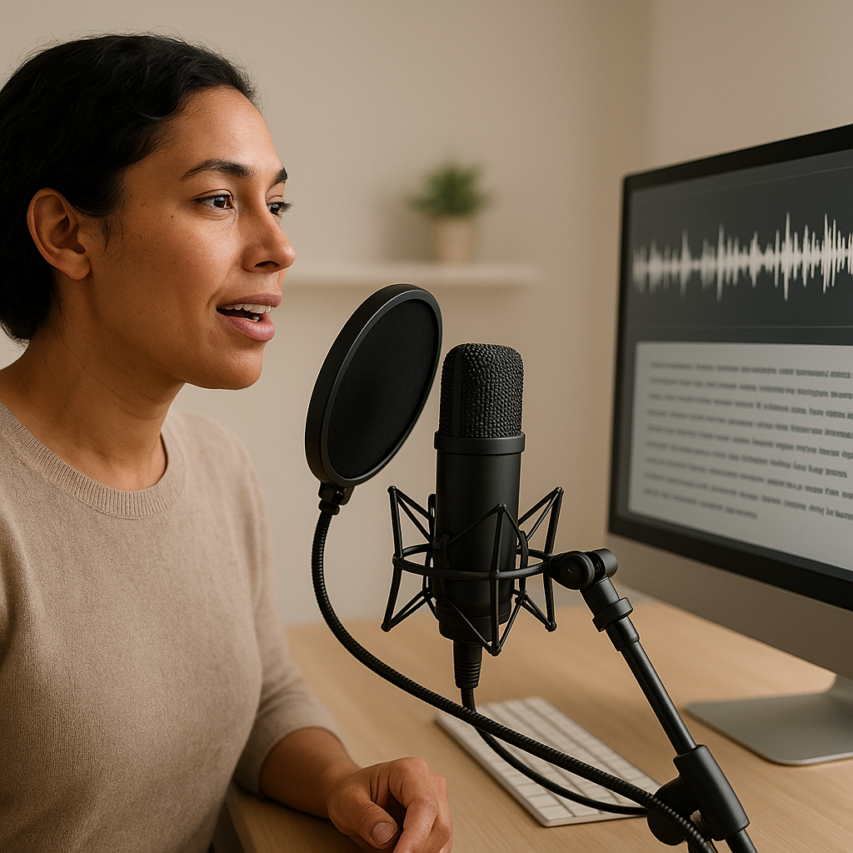
Speech to text technology has fundamentally transformed how we capture, process, and share information in our digital age. What once required hours of manual typing can now be accomplished in minutes through advanced speech recognition systems that convert spoken words into accurate written text. From busy professionals dictating meeting notes during their commute to students transcribing lectures for better study materials, voice to text solutions have become indispensable tools for maximizing productivity and accessibility across countless industries and personal workflows.
The evolution of dictation software has reached remarkable sophistication, with modern speech converter tools achieving accuracy rates that rival human transcriptionists while offering real-time processing capabilities. Whether you’re a content creator looking to streamline your writing process, a business professional managing multiple meetings, or someone seeking better accessibility options, understanding the landscape of available speech to text solutions can dramatically improve your efficiency and communication effectiveness.
This comprehensive guide will walk you through everything you need to know about speech recognition technology, from selecting the right tools for your specific needs to optimizing accuracy and integrating these powerful systems into your existing workflows. You’ll discover practical strategies for different use cases, learn how to convert recorded audio into text, and explore the exciting future developments that will continue to reshape how we interact with our devices and information.
Understanding Speech to Text Technology
Speech to text technology has evolved from simple pattern matching systems to sophisticated neural networks that can understand human speech with remarkable accuracy. This transformation represents one of the most significant advances in computational linguistics, enabling seamless voice to text conversion across countless applications.
How Speech Recognition Works
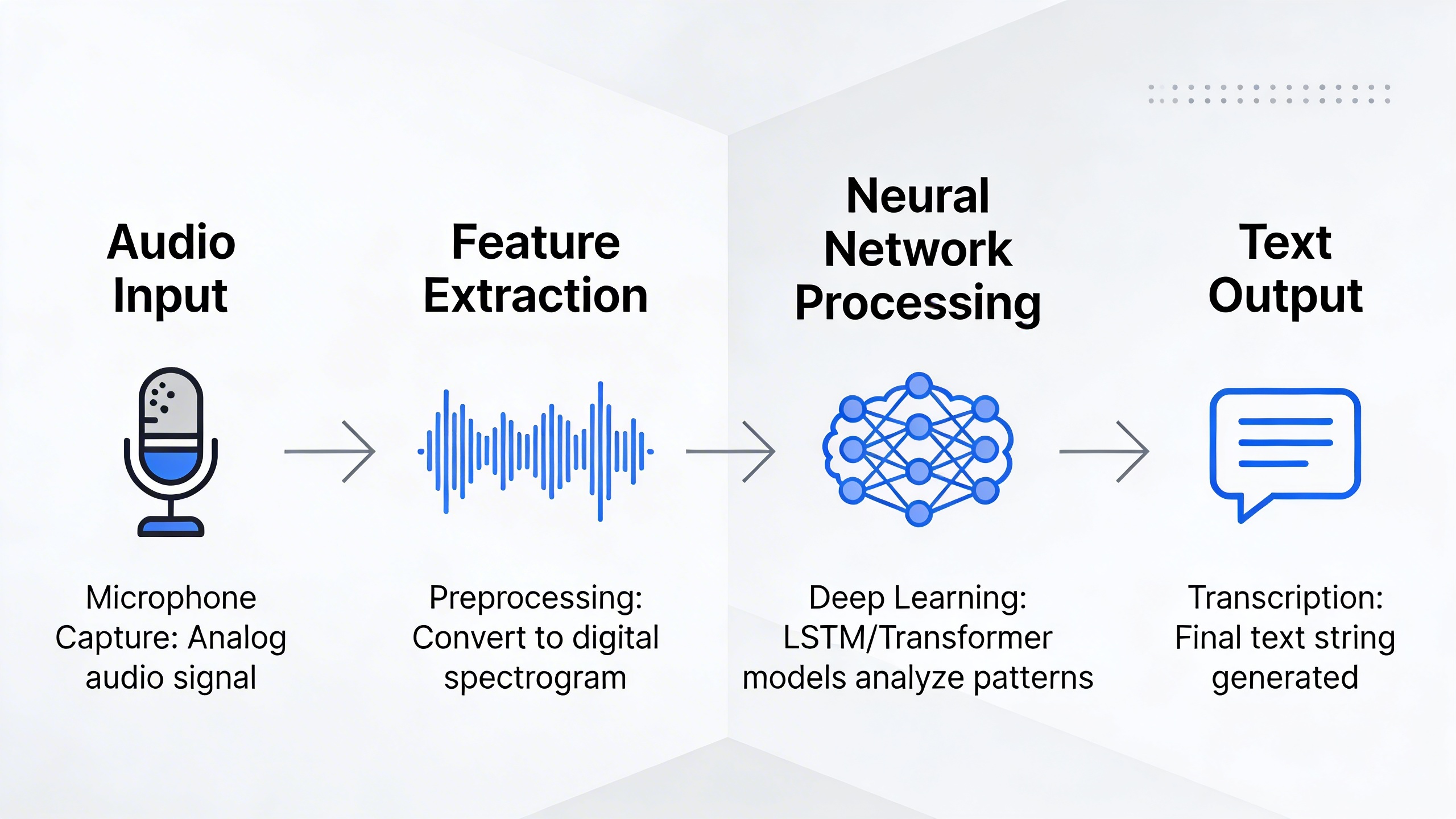
Modern speech recognition systems operate through a complex pipeline that transforms acoustic signals into readable text. The process begins when your microphone captures sound waves and converts them into digital audio signals. These signals undergo preprocessing to remove background noise and normalize volume levels.
The core of any speech converter relies on acoustic models that analyze the frequency patterns and phonetic characteristics of speech. These models work alongside language models that predict the most likely word sequences based on context and grammar rules. Advanced systems employ deep neural networks with multiple layers that can identify subtle variations in pronunciation, accent, and speaking style.
Machine learning algorithms continuously refine their understanding by processing vast datasets of human speech paired with corresponding text transcriptions. This training enables the system to recognize not just individual words, but the natural flow and context that makes human communication meaningful.
Types of Speech to Text Systems
Speech to text systems fall into two primary categories based on where the processing occurs. Cloud-based systems leverage powerful remote servers to perform the heavy computational work required for accurate transcription. These systems typically offer superior accuracy because they can access larger language models and benefit from continuous updates and improvements.
On-device processing systems handle all computation locally on your smartphone, computer, or dedicated hardware. While these systems may have slightly lower accuracy due to hardware limitations, they offer significant advantages in privacy and offline functionality. Your voice data never leaves your device, making them ideal for sensitive conversations or environments with limited internet connectivity.
Real-time dictation software processes speech as you speak, providing immediate text output with minimal delay. This approach works well for live note-taking, voice commands, and interactive applications. Batch processing systems, conversely, analyze entire audio files after recording completion, often achieving higher accuracy by considering the full context of the conversation.
Accuracy Factors and Limitations
Several factors significantly impact the performance of voice to text conversion systems. Audio quality represents the most critical element – clear recordings with minimal background noise produce dramatically better results than noisy or distorted audio. Speaker characteristics such as accent, speaking pace, and pronunciation clarity also influence transcription accuracy.
Environmental conditions play a crucial role in system performance. Ambient noise, multiple speakers, and poor microphone positioning can substantially reduce accuracy rates. Professional-grade applications often require controlled recording environments or specialized hardware to achieve optimal results.
Language complexity presents ongoing challenges for speech recognition technology. Homophones (words that sound identical but have different meanings), technical jargon, and proper nouns frequently cause transcription errors. Context-aware systems have improved significantly in recent years, but human review remains essential for critical applications.
Current limitations include difficulty processing overlapping speech in group conversations, challenges with heavily accented speech, and reduced accuracy for specialized vocabulary in technical fields. However, modern systems like Sozai incorporate advanced neural networks that continuously learn and adapt, significantly reducing these limitations for everyday use cases.
Understanding these technological foundations helps users select appropriate tools and optimize their setup for maximum transcription accuracy. The rapid advancement in artificial intelligence continues to push the boundaries of what’s possible in speech to text conversion, making this technology increasingly accessible and reliable for both personal and professional applications.
Best Speech to Text Conversion Tools and Software
Choosing the right speech to text solution depends on your specific workflow, budget, and accuracy requirements. Modern speech recognition technology has evolved to offer diverse options across desktop, web, and mobile platforms, each with distinct advantages for different use cases.
Professional Desktop Applications
Desktop dictation software typically provides the most robust feature sets and highest accuracy rates for professional users. These applications excel in specialized vocabularies and offer extensive customization options.
Dragon Professional Individual stands as the industry standard for desktop speech recognition, delivering accuracy rates exceeding 99% with proper training. The software adapts to individual speaking patterns and integrates seamlessly with Microsoft Office applications, making it ideal for legal professionals, medical practitioners, and writers who require precise voice to text conversion.
Windows Speech Recognition, built into Windows 10 and 11, offers a capable free alternative for basic dictation needs. While lacking the advanced features of premium solutions, it handles everyday document creation and email composition effectively. Mac users benefit from enhanced dictation capabilities that work system-wide across applications.
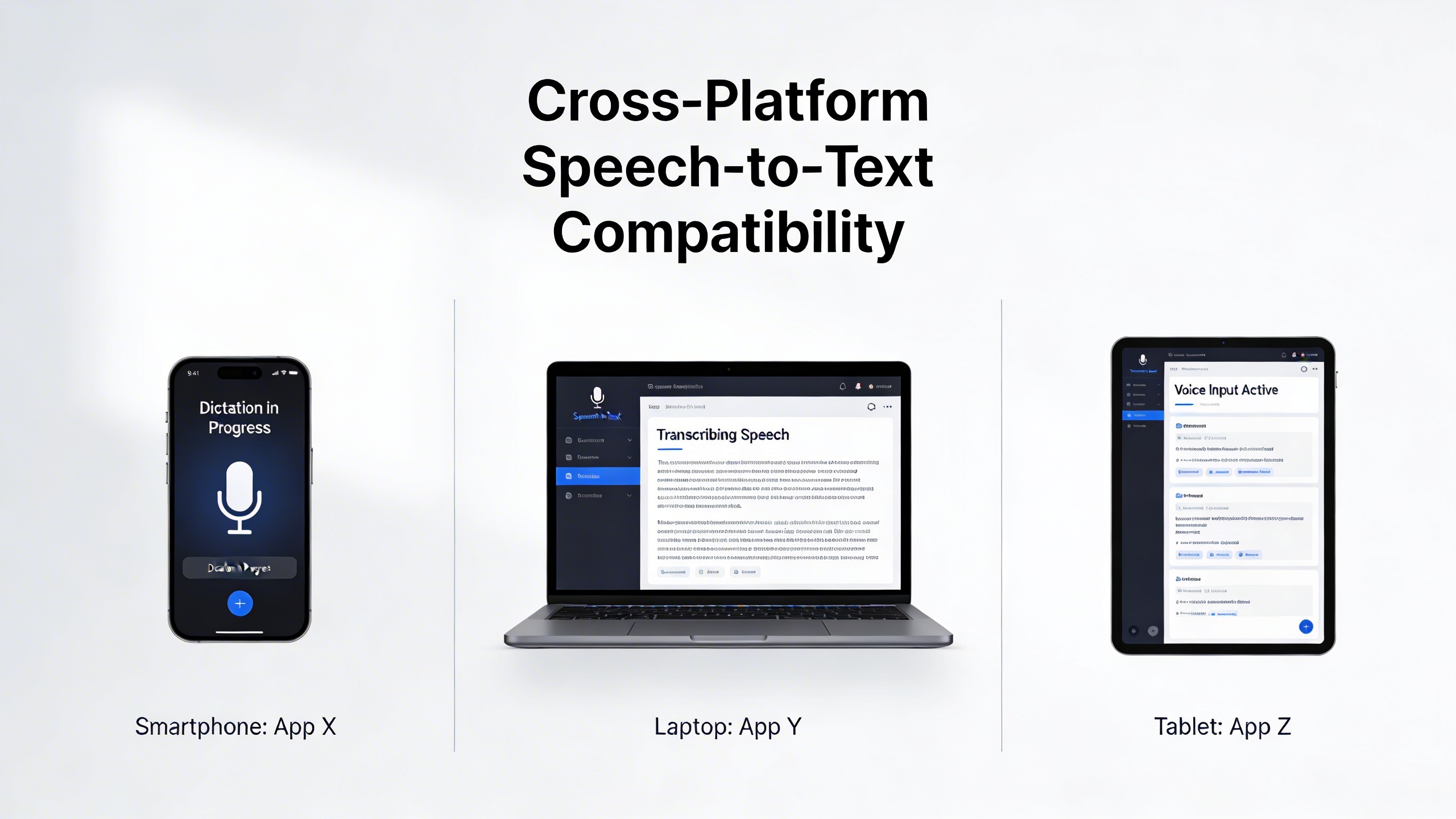
For users seeking powerful transcription capabilities across multiple platforms, Sozai provides AI-powered speech recognition with support for iOS, Android, and macOS. The application excels at converting voice recordings into accurate text, making it particularly valuable for meeting notes, interviews, and content creation workflows.
Web-Based Conversion Platforms
Cloud-based speech converter platforms offer the advantage of accessing cutting-edge AI models without requiring powerful local hardware. These solutions typically provide real-time transcription and collaborative features.
Google Docs Voice Typing leverages Google’s advanced speech recognition algorithms to provide accurate real-time transcription directly within documents. The service supports over 100 languages and dialects, making it accessible to global users. Integration with Google Workspace creates seamless workflows for teams collaborating on documents.
Otter.ai specializes in meeting transcription and conversation analysis, offering features like speaker identification and keyword highlighting. The platform excels in business environments where multiple participants need searchable meeting records.
Rev.com combines automated transcription with human review options, providing flexibility between speed and accuracy. Their hybrid approach works well for content creators who need quick drafts with the option for professional polish.
| Platform | Accuracy Rate | Real-time Processing | Offline Capability | Starting Price |
|---|---|---|---|---|
| Dragon Professional | 99%+ | Yes | Yes | $300 |
| Google Docs Voice Typing | 95% | Yes | No | Free |
| Otter.ai | 90-95% | Yes | No | $10/month |
| Windows Speech Recognition | 85-90% | Yes | Yes | Free |
Mobile Apps for Voice-to-Text
Mobile speech to text applications prioritize convenience and quick capture, making them essential tools for on-the-go professionals and students. These apps typically focus on ease of use and rapid voice note creation.
Apple’s built-in dictation feature works across all iOS applications, providing consistent voice to text functionality whether composing emails, text messages, or notes. The system learns from usage patterns to improve accuracy over time, particularly with proper names and technical terminology.
Google Assistant and Gboard offer powerful voice input capabilities on Android devices, leveraging Google’s cloud-based speech recognition for high accuracy rates. The integration with Android’s operating system ensures voice input availability across virtually all text input fields.
Specialized mobile apps like Just Press Record focus on audio recording with automatic transcription, creating searchable text from voice memos and interviews. These applications bridge the gap between simple note-taking and professional transcription needs.
When evaluating mobile speech recognition options, consider battery impact, offline functionality, and sync capabilities with desktop workflows. The most effective mobile solutions integrate seamlessly with existing productivity systems while providing reliable accuracy in various acoustic environments.
Integration capabilities often determine the practical value of any speech converter solution. Look for platforms that connect with your existing tools through APIs, plugins, or direct integrations. Professional workflows benefit most from solutions that can automatically route transcribed text to appropriate destinations, whether that’s customer relationship management systems, content management platforms, or collaborative workspaces.
Speech to Text for Different Use Cases
The versatility of speech to text technology extends far beyond simple dictation, offering transformative solutions across industries and personal workflows. Understanding how different sectors leverage voice to text capabilities can help you identify the most effective applications for your specific needs.
Business and Professional Applications
Modern businesses rely heavily on speech recognition technology to streamline operations and enhance productivity. Meeting transcription workflows have become essential for remote and hybrid work environments, where accurate documentation ensures nothing falls through the cracks. Professional teams use dictation software to capture client calls, brainstorming sessions, and strategic planning meetings, creating searchable archives that improve decision-making processes.
Content creation and journalism represent another powerful application area. Reporters conducting interviews can focus entirely on the conversation while their speech converter handles documentation. This approach not only improves interview quality but also accelerates the writing process, as journalists can quickly search through transcribed content for specific quotes or themes.
Sales teams leverage voice to text technology for customer relationship management, converting sales calls into detailed notes that integrate seamlessly with CRM systems. The ability to automatically transcribe and categorize customer interactions provides valuable insights into buying patterns and service requirements.
Academic and Research Purposes
Educational institutions have embraced speech to text solutions to support both teaching and learning objectives. Students with effective note-taking strategies can capture lectures in real-time, ensuring they never miss critical information while maintaining engagement with the material. Research interviews, focus groups, and qualitative data collection benefit enormously from automated transcription, allowing researchers to analyze patterns and themes more efficiently.
Language learning applications represent another significant academic use case. Students practicing pronunciation can use speech recognition systems to receive immediate feedback on their speaking accuracy. This real-time assessment helps accelerate language acquisition by identifying specific areas that need improvement.
Thesis and dissertation writing processes become more manageable when researchers can dictate their thoughts and ideas, particularly during the initial brainstorming phases. The ability to speak naturally while organizing complex academic arguments often leads to more coherent and well-structured written work.
Accessibility and Assistive Technology
Perhaps the most impactful application of speech to text technology lies in accessibility support. Individuals with mobility limitations, repetitive strain injuries, or conditions affecting manual dexterity can maintain productivity through voice-controlled computing. Dictation software becomes an essential tool for creating documents, sending emails, and navigating digital interfaces without relying on traditional keyboard input.
The deaf and hard-of-hearing community benefits from real-time transcription services that convert spoken conversations into readable text. These applications prove invaluable in educational settings, workplace meetings, and social interactions, breaking down communication barriers that might otherwise limit participation.
Cognitive accessibility represents another crucial area where speech recognition technology makes a difference. Individuals with dyslexia, dysgraphia, or other learning differences often find speaking more natural than writing. Voice to text solutions enable these users to express complex ideas without the frustration of traditional text input methods.
Healthcare applications extend beyond simple documentation to include patient interaction support. Medical professionals can dictate patient notes during examinations, ensuring comprehensive records while maintaining eye contact and personal connection with patients. This approach improves both clinical efficiency and patient experience.
Legal documentation workflows have been revolutionized by professional-grade speech converters that understand legal terminology and formatting requirements. Court reporters, paralegals, and attorneys can create accurate transcripts of depositions, hearings, and client consultations with minimal post-processing required.
The integration of artificial intelligence has enhanced these use cases significantly, with modern systems learning user-specific vocabulary, accent patterns, and professional terminology. This personalization ensures that speech to text accuracy improves over time, making these tools increasingly valuable for specialized applications across different industries and personal needs.
Optimizing Speech to Text Accuracy
Achieving high accuracy with speech to text technology requires a strategic approach that combines proper hardware setup, optimal speaking techniques, and effective post-processing methods. Even the most advanced speech recognition systems can struggle with poor audio input or unclear pronunciation, making optimization crucial for reliable voice to text conversion.
Audio Quality Best Practices
The foundation of accurate speech to text conversion lies in capturing clean, high-quality audio. Your microphone selection directly impacts recognition accuracy, with dedicated USB microphones typically outperforming built-in laptop microphones by 15-20% in transcription quality.
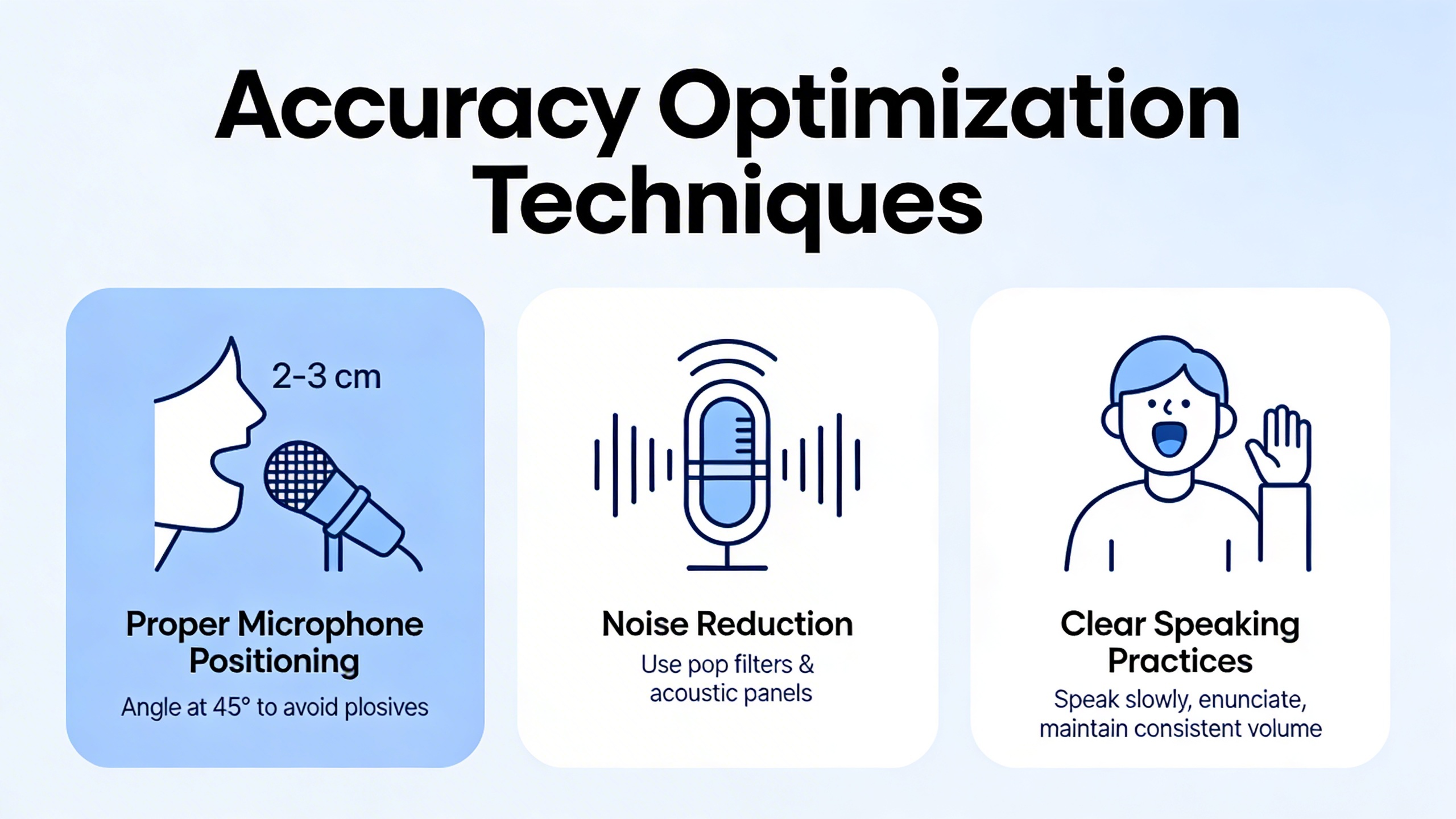
Position your microphone 6-8 inches from your mouth at a slight angle to avoid breathing directly into it. Headset microphones offer consistent positioning and excellent noise isolation, making them ideal for dictation software applications. For desktop setups, cardioid microphones reduce background noise pickup while maintaining voice clarity.
Environmental factors significantly affect speech recognition performance. Choose quiet spaces with minimal echo and background noise. Hard surfaces like glass and concrete create sound reflections that confuse speech converters, while soft furnishings and carpeting improve audio quality. If working in noisy environments, consider using noise-canceling microphones or acoustic panels to minimize interference.
Speaking Techniques for Better Recognition
Consistent speaking patterns dramatically improve voice to text accuracy across all platforms. Maintain a steady pace of 140-160 words per minute, which allows speech recognition algorithms sufficient processing time while maintaining natural flow. Speaking too quickly overwhelms the system, while speaking too slowly can cause word boundary confusion.
Articulate consonants clearly and avoid mumbling or trailing off at sentence endings. Proper pronunciation is essential—even native speakers can improve accuracy by emphasizing word endings and consonant clusters. Practice speaking with slightly exaggerated enunciation during initial setup sessions to establish optimal recognition patterns.
Master voice commands for punctuation and formatting to reduce manual editing time. Most dictation software recognizes commands like “comma,” “period,” “new paragraph,” and “question mark.” Learning these commands transforms speech to text from a transcription tool into a complete writing solution.
Post-Processing and Editing Strategies
Even with optimal setup, speech recognition systems require systematic editing approaches. Develop a consistent review process that checks for common error patterns specific to your speaking style and vocabulary. Technical terms, proper nouns, and industry jargon often need manual correction or custom dictionary additions.
Create personalized word lists and abbreviation expansions within your speech converter settings. This proactive approach reduces repetitive corrections and improves long-term accuracy. Many platforms allow custom vocabulary training, where repeated corrections teach the system your specific pronunciation patterns.
Implement a two-pass editing strategy: first, correct obvious errors and missing words, then review for context and flow. This systematic approach ensures both accuracy and readability in your final text. For professionals requiring high accuracy, tools like Sozai offer advanced editing features and customizable recognition settings that adapt to individual speaking patterns.
Consider using confidence scoring features available in advanced speech recognition platforms. These tools highlight uncertain transcriptions, allowing you to focus editing efforts on sections most likely to contain errors. This targeted approach significantly reduces overall editing time while maintaining document quality.
Converting Recorded Speech to Text
Converting pre-recorded audio files to text opens up powerful possibilities for content creators, researchers, and professionals who need to transform existing speech recordings into searchable, editable documents. Modern speech to text technology has evolved to handle diverse recording conditions and formats, making it easier than ever to extract valuable insights from your audio archives.
File Format Compatibility
Professional speech recognition systems support a wide range of audio formats to accommodate different recording scenarios. Common supported formats include MP3, WAV, FLAC, M4A, and OGG, each offering distinct advantages for specific use cases. WAV files provide uncompressed audio quality ideal for precise transcription, while MP3 offers compressed convenience for large file collections.
When selecting a voice to text solution for recorded content, consider the original recording format and quality. Lossless formats like FLAC preserve audio fidelity better than compressed alternatives, resulting in more accurate transcription output. Many modern dictation software platforms automatically detect and process multiple formats, eliminating the need for manual conversion before transcription begins.
Batch Processing Techniques
Efficient batch processing transforms how organizations handle large volumes of recorded content. Advanced speech converter tools enable simultaneous processing of multiple files, dramatically reducing the time investment required for extensive audio libraries. This approach proves particularly valuable for podcast archives, interview collections, and meeting recordings accumulated over time.
Implementing automated transcription workflows involves organizing files into logical groups, establishing naming conventions, and setting quality parameters for consistent results. Many platforms offer scheduling features that process files during off-peak hours, maximizing system resources while maintaining productivity during business operations.
For professionals managing substantial audio collections, tools like Sozai provide streamlined batch processing capabilities that handle multiple recordings efficiently while maintaining high accuracy standards across different speakers and recording conditions.
Quality Enhancement for Old Recordings
Older recordings often present unique challenges including background noise, poor microphone quality, and audio degradation that can significantly impact transcription accuracy. Effective audio preprocessing methods address these limitations through noise reduction algorithms, volume normalization, and frequency filtering techniques.
Before applying speech to text conversion to vintage recordings, consider implementing audio enhancement steps. Noise reduction software can eliminate consistent background sounds like air conditioning or traffic, while equalization adjustments improve vocal clarity. Some advanced platforms automatically apply these enhancements during the transcription process, saving valuable preparation time.
Handling multiple speakers in older recordings requires particular attention to speaker separation and identification. Modern speech recognition technology can distinguish between different voices and assign speaker labels, but this process benefits from clear audio separation and distinct speaking patterns. When dealing with overlapping conversations or poor audio quality, manual review and editing may be necessary to achieve optimal results.
The key to successful conversion lies in understanding your specific audio characteristics and selecting appropriate preprocessing techniques. Whether working with crystal-clear studio recordings or challenging field recordings, the right combination of enhancement tools and transcription technology can unlock the textual content within virtually any speech recording.
Integration and Workflow Automation
Modern speech to text technology reaches its full potential when integrated into existing workflows and automated systems. Whether you’re developing custom applications or connecting voice recognition capabilities to your favorite productivity tools, the right integration approach can transform how you handle voice data across your entire digital ecosystem.
API Integration for Developers
REST API implementation forms the backbone of most speech recognition integrations. Leading platforms offer comprehensive APIs that accept audio files in multiple formats, return accurate transcriptions with confidence scores, and provide real-time streaming capabilities. Developers can implement these APIs using standard HTTP requests, making integration straightforward across programming languages like Python, JavaScript, and Java.
When building custom applications, consider implementing error handling for audio quality issues, timeout management for longer recordings, and batch processing capabilities for multiple files. Many APIs also support speaker identification, custom vocabulary training, and language detection features that enhance the accuracy of your speech converter implementation.
Connecting with Productivity Tools
Third-party app integrations expand the utility of voice to text technology beyond standalone applications. Popular integrations include connecting dictation software to document management systems like Google Drive or Microsoft 365, automatically transcribing meeting recordings in Slack or Microsoft Teams, and creating voice-activated task entries in project management platforms.
Cloud storage integrations enable automatic processing of uploaded audio files, while CRM systems can benefit from transcribed sales calls and customer interactions. Email platforms often support voice-to-text for composing messages, and note-taking applications can synchronize transcribed content across devices for seamless access.
Creating Custom Voice-to-Text Workflows
Automation platforms like Zapier, Microsoft Power Automate, and IFTTT enable sophisticated workflow creation without extensive coding knowledge. These platforms can trigger speech to text conversion based on specific events, such as new voicemail recordings, uploaded audio files, or scheduled meeting recordings.
Custom workflows might include automatically transcribing podcast episodes and posting summaries to social media, converting voice memos into calendar events with extracted dates and times, or processing customer service calls for sentiment analysis and keyword extraction. Advanced implementations can incorporate natural language processing to categorize transcribed content, extract action items, or generate automated responses.
For professionals seeking comprehensive transcription capabilities with seamless workflow integration, Sozai offers robust automation features that connect with popular productivity platforms while maintaining high accuracy across multiple languages and audio formats.
The key to successful workflow automation lies in identifying repetitive voice-related tasks and designing systems that reduce manual intervention while maintaining quality control over the transcribed output.
Future of Speech to Text Technology
The landscape of speech to text technology is evolving at an unprecedented pace, driven by breakthrough advances in artificial intelligence and machine learning algorithms. Modern speech recognition systems are becoming increasingly sophisticated, moving beyond simple voice to text conversion to offer contextual understanding and semantic analysis that rivals human comprehension.
Emerging Trends and Innovations
Artificial intelligence advancement is fundamentally transforming how speech converter technology operates. Neural networks now process voice patterns with remarkable accuracy, enabling dictation software to understand context, emotions, and speaker intent. These systems can distinguish between homophones based on conversational context and adapt to individual speaking patterns over time.
Real-time translation capabilities represent another revolutionary development. Modern platforms can simultaneously convert speech to text while translating content across multiple languages, breaking down communication barriers in global business environments. This technology enables instant cross-language meeting transcriptions and facilitates international collaboration without traditional language constraints.
Edge computing developments are shifting processing power from cloud servers to local devices, reducing latency and improving response times. This advancement means speech recognition can function effectively in environments with limited internet connectivity while maintaining high accuracy levels.
Multi-language and Dialect Support
Contemporary voice to text systems are expanding their linguistic capabilities to accommodate diverse global populations. Advanced algorithms now recognize regional accents, colloquialisms, and dialectical variations with increasing precision. This evolution enables more inclusive technology that serves users regardless of their linguistic background or speaking patterns.
Code-switching recognition allows systems to process conversations that naturally blend multiple languages, particularly valuable in multicultural business settings and educational environments where speakers frequently alternate between languages within single conversations.
Privacy and Security Considerations
Data protection standards are becoming increasingly stringent as speech to text adoption grows across sensitive industries. Modern platforms implement end-to-end encryption, ensuring voice data remains secure throughout the conversion process. Local processing capabilities reduce privacy concerns by minimizing data transmission to external servers.
Compliance frameworks like GDPR and HIPAA are driving innovation in privacy-preserving speech recognition technologies. Organizations now demand solutions that provide robust transcription capabilities while maintaining strict data governance standards, particularly in healthcare, legal, and financial sectors where confidentiality is paramount.

